
A First Principles Deep Dive into Claude Agent Skills
# Claude Agent Skills: A First Principles Deep Dive
## Introduction
Claude's **Agent Skills** system is a sophisticated, **prompt-based meta-tool architecture**.
Rather than executing code, these skills **inject specialized instructions** to extend Claude’s capabilities via **prompt expansion** and **context modification**.
This article explains **from first principles** how Claude’s Agent Skills work — including:
- How skills are stored, discovered, and invoked
- The differences between **Skills** and traditional tools
- Examples with `skill-creator` and `internal-comms`
- Lifecycle stages for skill execution
- Best practices for designing SKILL.md files
---
## Core Concepts
### Definition
Skills are **folders containing instructions, scripts, and resources** that Claude can load dynamically to enhance its performance for specific tasks.
### Key Properties
- **Declarative & prompt-driven** — discovered/activated from descriptions
- Decisions to invoke are **LLM-based**, with no hardcoded or algorithmic selector
- **Not executable code** — no Python/JS runtime, no backend servers
- Modify Claude’s **conversation context and execution context**, not actions directly
---
## How Skills Operate
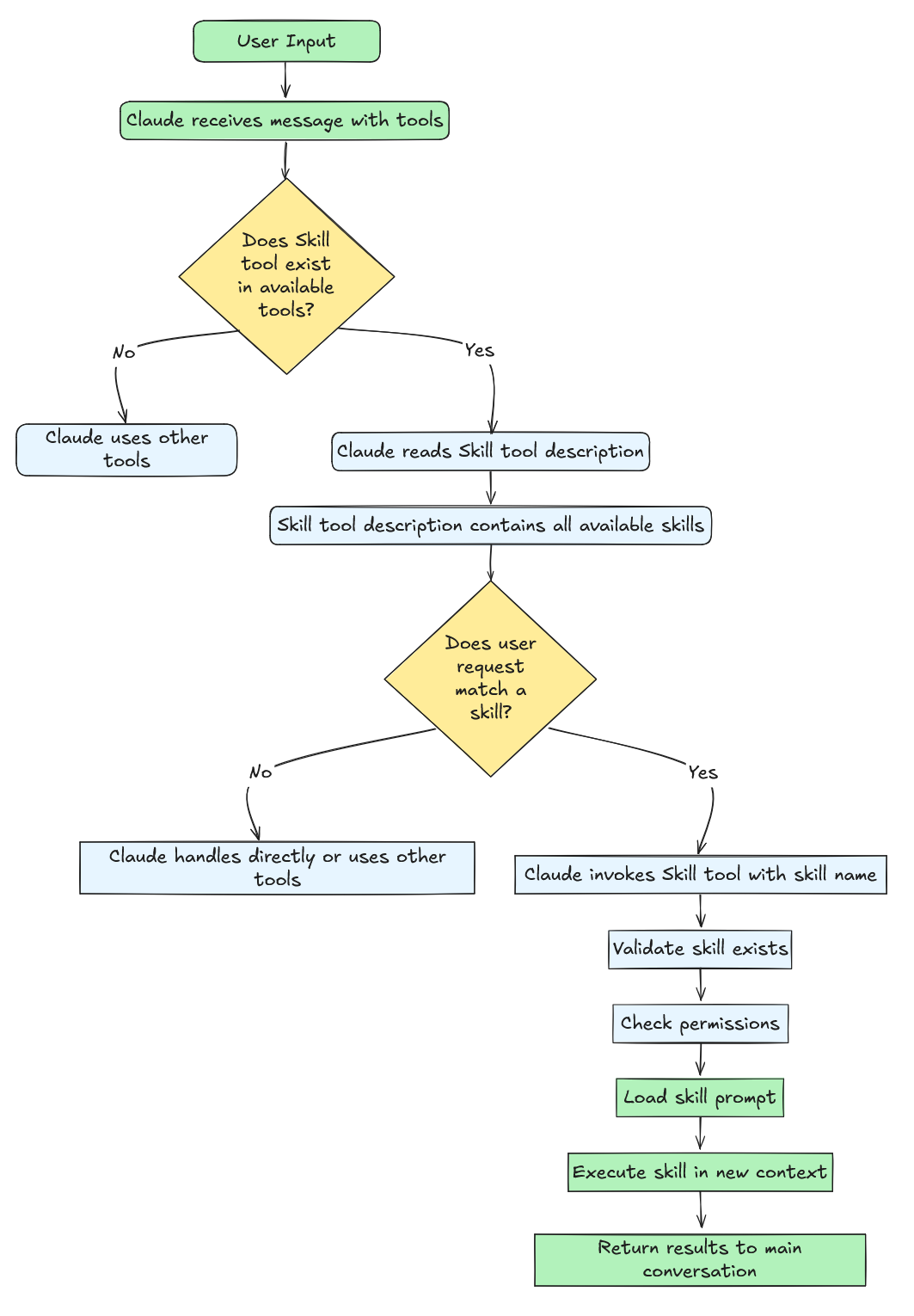
When a request reaches Claude:
1. **Input Provided:**
- User message
- Available tools (`Read`, `Write`, `Bash`, etc.)
- **Skill tool** (meta-tool listing all available skills)
2. **Skill tool description**:
- Contains skill **name** and **description** from frontmatter
- Claude uses **natural language reasoning** to select the most relevant skill
3. **Invocation**:
- Claude calls the Skill tool with:
`command: ""`
> **Terminology:**
> - **Skill tool** (capital S): The meta-tool that manages skills.
> - **skills** (lower case): The individual skill prompts (e.g. `skill-creator`, `internal-comms`).
---
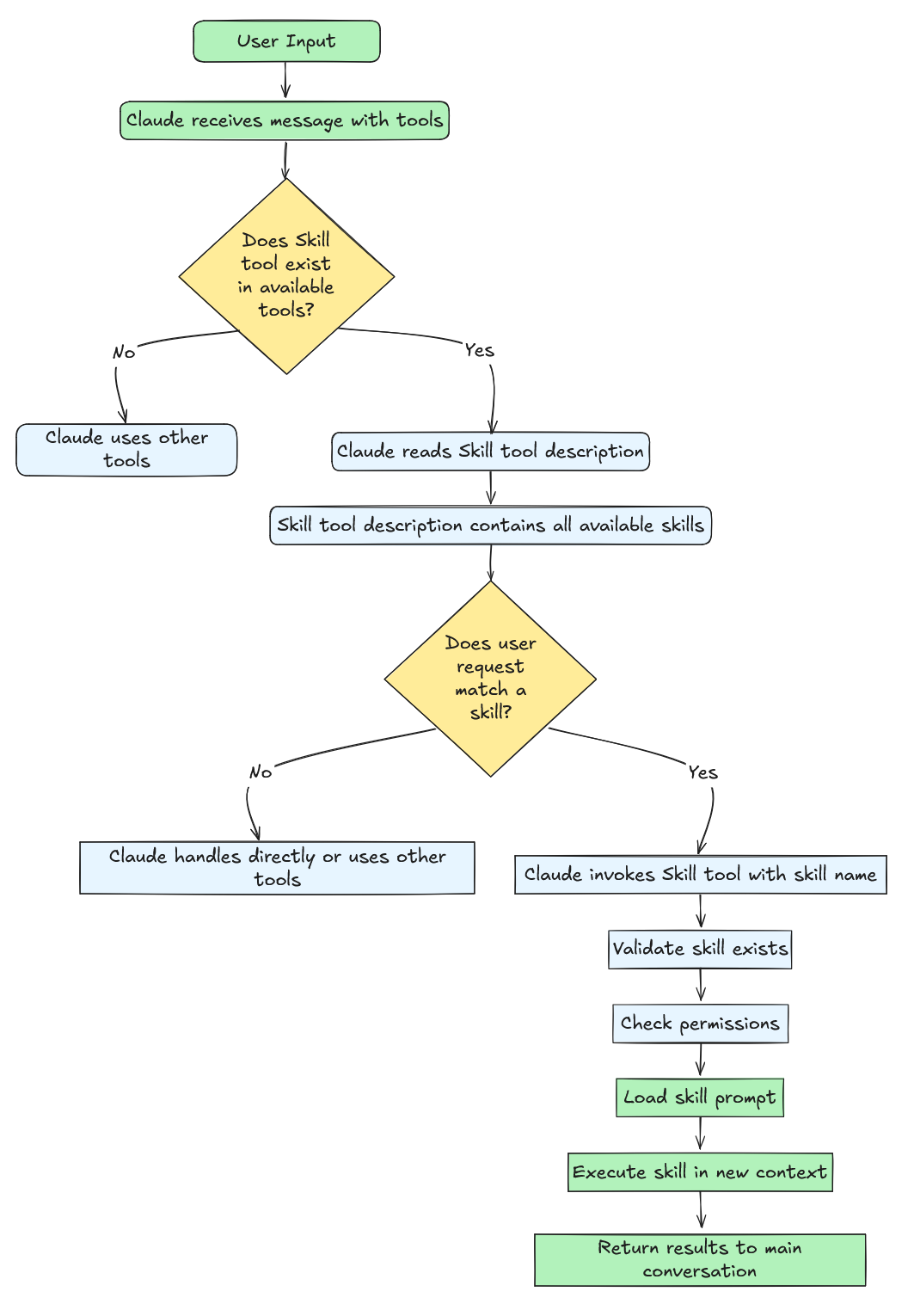
Skill selection is **purely LLM reasoning** — no embeddings, regex matching, or classifiers.
Decisions happen during the **Transformer forward pass**.
---
### Traditional Tools vs Skills
| Dimension | Traditional Tools | Skills |
|------------------------|-----------------------------|---------------------------------------|
| **Mode** | Direct synchronous execution| Prompt expansion |
| **Purpose** | Perform a specific action | Drive complex workflows |
| **Return Value** | Immediate results | Context and permissions modifications |
| **Example** | `Read`, `Write`, `Bash` | `skill-creator`, `internal-comms` |
| **Concurrency** | Generally safe | Not concurrency-safe |
| **Type** | Varies | Always `"prompt"` |
---
## Building an Agent Skill
We'll use the [`skill-creator`](https://github.com/anthropics/skills/tree/main/skill-creator) example.
**Definition:**
> Skill = Prompt template + Context injection + Execution context modification + Optional scripts/assets
**Structure:**my-skill/
├── SKILL.md # Core prompt
├── scripts/ # Automation scripts
├── references/ # Readable resources
└── assets/ # Templates/binaries
Claude scans:
- `~/.config/claude/skills/`
- `.claude/skills/`
- Plugin-provided skills
- Built-in skills

---

### Progressive Disclosure
Limit initial metadata to **name, description, license**.
Load full SKILL.md only *after* selection, then supporting resources on demand.

---

## Writing `SKILL.md`

### Format
---
name: skill-name
description: Brief summary
allowed-tools: "Bash, Read"
version: 1.0.0
---
Purpose
Detailed instructions & workflows...
**Frontmatter Fields**:

- **name** *(required)* — Used as `command` value
- **description** *(required)* — Main signal for skill selection
- **allowed-tools** *(optional)* — Tool permissions for skill execution
- **model** *(optional)* — Model override
- **version**, **disable-model-invocation**, **mode** *(optional)* — For versioning, visibility, and classification

---

### `allowed-tools` Examples
Multiple tools
allowed-tools: "Read,Write,Bash,Glob,Grep,Edit"
Limit to specific git commands
allowed-tools: "Bash(git status:),Bash(git diff:),Read"
File operations only
allowed-tools: "Read,Write,Edit,Glob,Grep"
❌ Overly broad & unsafe
allowed-tools: "Bash,Read,Write,WebSearch,Task,Agent"
---

## Prompt Content Best Practices
- ≤ 5,000 words (≈ 800 lines)
- Imperative tone (“Analyze the code”)
- Use `{baseDir}` for paths
- Offload bulk detail to `references/` or `assets/`

---

## Binding Resources

### `scripts/`
Automation or deterministic logic (Python, Bash).

Example:
python {baseDir}/scripts/init_skill.py
### `references/`
Text docs loaded into Claude’s context when referenced.

### `assets/`
Templates/binaries referenced by path, not loaded into context.

---

## Common Skill Patterns

**Script Automation**
allowed-tools: "Bash(python {baseDir}/scripts/:), Read"
**Read – Process – Write**allowed-tools: "Read, Write"
**Search – Analyze – Report**allowed-tools: "Grep, Read"
**Command Chain Execution**allowed-tools: "Bash(npm run:*), Read"
**Wizard-Style Multi-Step**
Wait for user confirmation before each stage.

---

## Internal Architecture

**Skill Tool** = Meta-tool listing all skills.

Two injected messages:
1. **Metadata (visible)** — Status & skill name
2. **Full skill prompt (hidden)** — Detailed instructions from SKILL.md (`isMeta: true`)

**Execution Flow**:
- Validate input
- Permission checks
- Load SKILL.md
- Inject messages
- Modify context (permissions, model)
- Claude continues execution with new context

---

## Example: PDF Skill Execution

1. **User:** “Extract text from report.pdf”
2. **Skill tool:** Lists available skills
3. **Claude:** Chooses `"pdf"` skill
4. **Metadata message:** Visible to user
5. **Skill prompt:** Hidden from user, sent to API
6. **Allowed tools injected:** `Bash(pdftotext:*)`, `Read`, `Write`
7. **Claude executes workflow:**
   - `pdftotext` bash command
   - Reads extracted text
   - Presents result

---

## Key Takeaways
- Skills are **prompt templates**, not code
- Skill selection is **LLM reasoning**
- Two-message injection design provides **transparency + clarity**
- Scoped tool permissions & model overrides keep execution safe and specialized
- Progressive context loading avoids token bloat

---

## References
- [Introducing Agent Skills](https://www.anthropic.com/news/skills)
- [Equipping Agents for the Real World](https://www.anthropic.com/engineering/equipping-agents-for-the-real-world-with-agent-skills)
- [Claude Code Documentation](https://docs.claude.com/en/docs/claude-code/overview)
- [Anthropic API Reference](https://docs.anthropic.com/en/api/messages)

---

