
A New Paradigm for Agent Development: Efficient Agent & Workflow Practices with the Blades Architecture
🎉 Blades v0.3.0 Release
Blades v0.3.0 is now available — feel free to try it!
---
Understanding Agents (Intelligent Entities)
An Agent in AI and software development does not have a single, strict definition. Vendors, open-source communities, and academia may describe it differently, but typically, an Agent is an:
> Intelligent system capable of autonomous, long-term operation, decision-making, and invoking multiple tools as needed.
Agents can be:
- Dynamic LLM-based systems that understand goals, assess situations, and act accordingly.
- Rule-based bots with fixed processes.
In Blades, all forms are considered Agentic Systems, but it’s important to distinguish between two foundational concepts:
- Workflow — process controls the model
- Agent — model controls the process
---
Workflow
Workflow is a pre-defined set of execution steps dictating how LLMs and tools are invoked. The logic is fixed in diagrams or code.
Key Characteristics:
- Fixed execution paths — predictable behavior.
- Developer-defined inputs, outputs, and branching conditions.
- Ideal for standardized, stable processes.
- Easier to control, test, and audit.
Summary: Model follows the process.
---
Agent
An Agent is defined by autonomy and adaptability. It makes real-time decisions based on objectives and state — like a brain directing actions dynamically.
Capabilities:
- Autonomous execution decisions.
- Independent selection and invocation of external tools.
- Maintains memory and context across tasks.
- Strategic adjustments based on feedback.
- Continuous operation in service-like mode.
Summary: Model directs the process.
---
Building Agents in Blades
Blades leverages Go’s concise syntax and concurrency to provide:
- Unified interfaces
- Pluggable components
- High performance with extensibility
Architecture
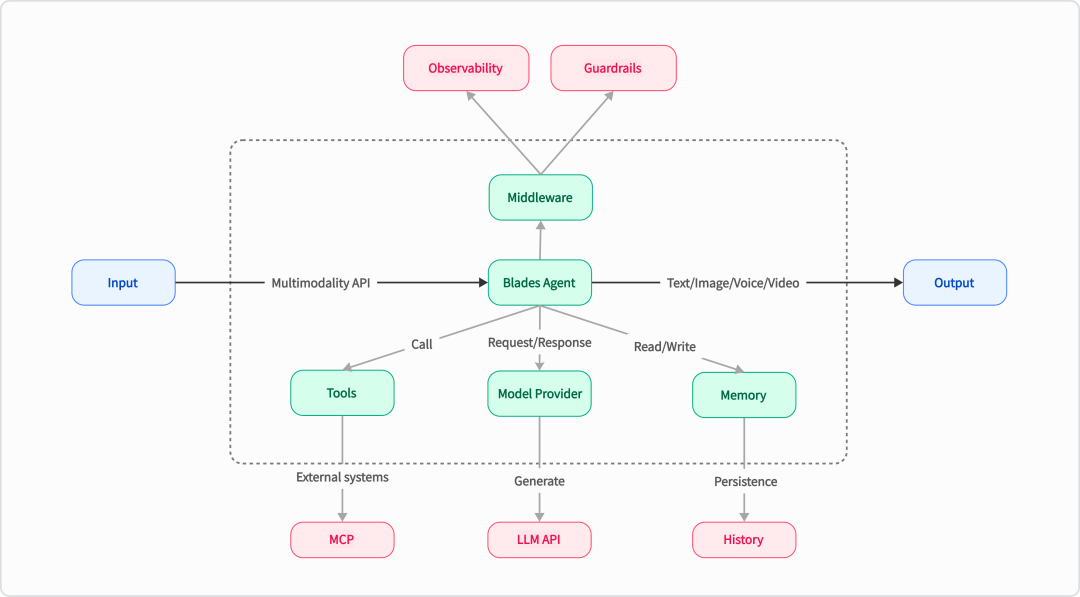
Blades architecture
You can build an Agent via:
agent, err := blades.NewAgent(...)Agent Responsibilities:
- Invoking LLM models
- Managing tools
- Executing prompts
- Controlling task flow
Example: Custom Weather Tool
func weatherHandle(ctx context.Context, req WeatherReq) (WeatherRes, error) {
    return WeatherRes{Forecast: "Sunny, 25°C"}, nil
}

func createWeatherTool() (tools.Tool, error) {
    return tools.NewFunc(
        "get_weather",
        "Get the current weather for a given city",
        weatherHandle,
    )
}
Creating a Weather Agent
model := openai.NewModel("deepseek-chat", openai.Config{
    BaseURL: "https://api.deepseek.com",
    APIKey:  os.Getenv("YOUR_API_KEY"),
})

agent, err := blades.NewAgent(
    "Weather Agent",
    blades.WithModel(model),
    blades.WithInstruction("You are a helpful assistant that provides weather information."),
    blades.WithTools(createWeatherTool()),
)
---
Workflow Patterns in Blades
Blades supports various workflow patterns, from predictable step-based sequences to highly autonomous designs.
---
Pattern 1: Chain Workflow
> Break complex tasks into simple sequential steps.
When to Use:
- Clear, ordered tasks.
- Acceptable latency.
- Step dependencies.
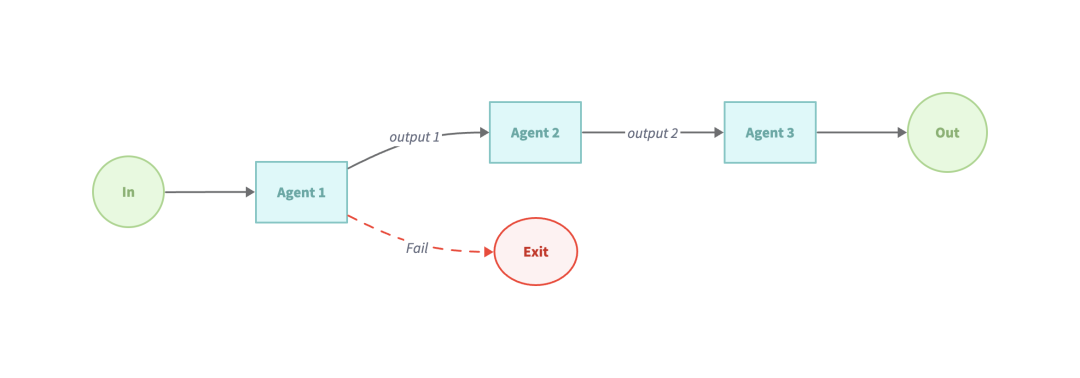
Example: `examples/workflow-sequential`
sequentialAgent := flow.NewSequentialAgent(flow.SequentialConfig{
    Name: "WritingReviewFlow",
    SubAgents: []blades.Agent{
        writerAgent,
        reviewerAgent,
    },
})
---
Pattern 2: Parallelization Workflow
> Run multiple sub-tasks concurrently, then combine results.
When to Use:
- Many independent, similar items.
- Need multiple perspectives.
- Time-sensitive tasks.
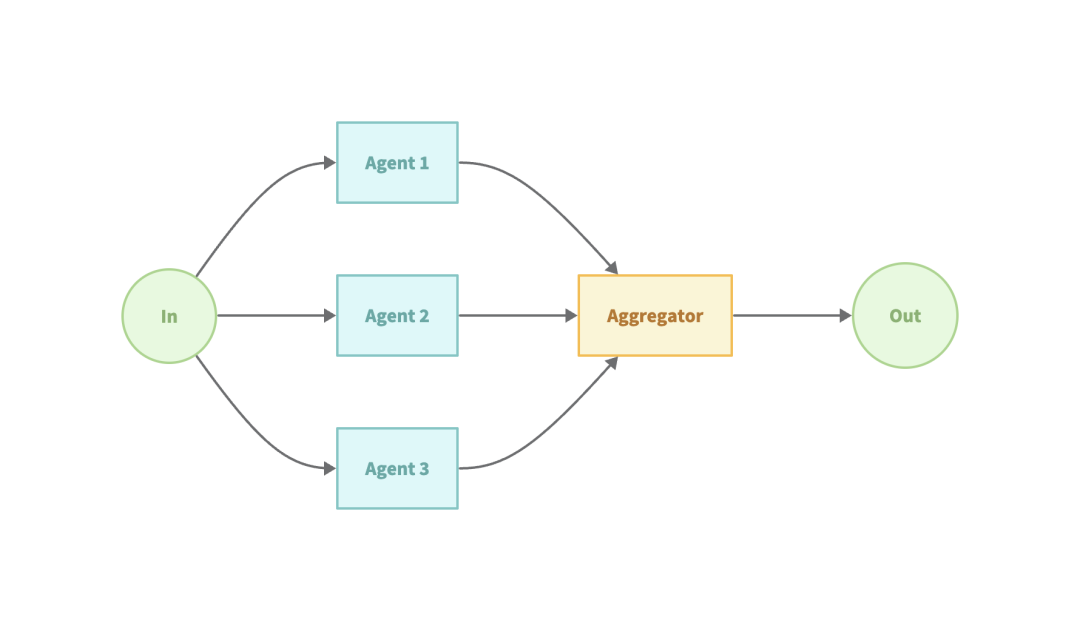
Example: `examples/workflow-parallel`
parallelAgent := flow.NewParallelAgent(flow.ParallelConfig{
    Name:        "EditorParallelAgent",
    Description: "Edits text in parallel for grammar and style.",
    SubAgents: []blades.Agent{
        editorAgent1,
        editorAgent2,
    },
})
---
Pattern 3: Routing Workflow
> Dispatch inputs to specialized flows based on type analysis.
When to Use:
- Diverse input categories.
- Specialized handling per category.
- High classification accuracy.
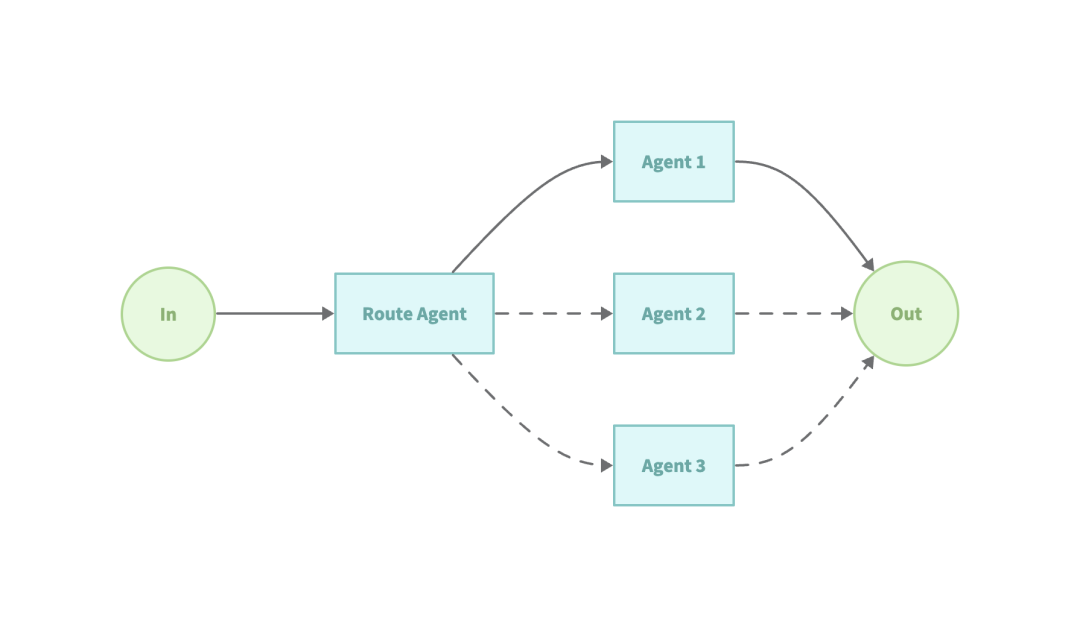
Example: `examples/workflow-routing`
agent, err := flow.NewRoutingAgent(flow.RoutingConfig{
    Name:        "TriageAgent",
    Description: "Choose appropriate agent per homework question.",
    Model:       model,
    SubAgents: []blades.Agent{
        mathTutorAgent,
        historyTutorAgent,
    },
})
---
Pattern 4: Orchestrator–Workers
> Central Agent decomposes tasks, Workers execute sub-tasks.
When to Use:
- Unknown sub-tasks.
- Need multiple perspectives/methods.
- Adaptable, complex systems.
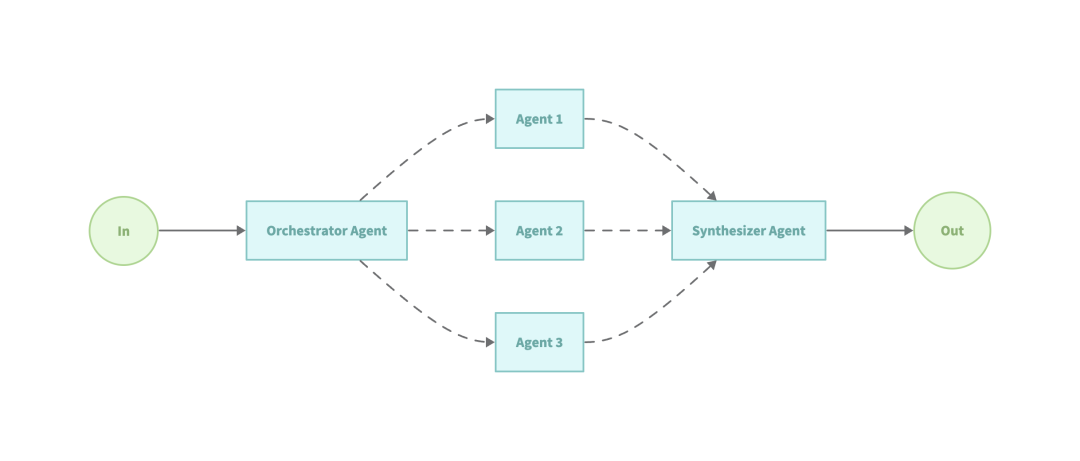
Example: `examples/workflow-orchestrator`
// Orchestrator selects tools to execute
orchestratorAgent, err := blades.NewAgent(
    "orchestrator_agent",
    blades.WithInstruction("Use provided tools for translation."),
    blades.WithModel(model),
    blades.WithTools(translatorWorkers...),
)
---
Pattern 5: Evaluator–Optimizer
> Generate → Evaluate → Refine loop.
When to Use:
- Clear evaluation metrics.
- Quality improves with iteration.
- Repeatable tasks.
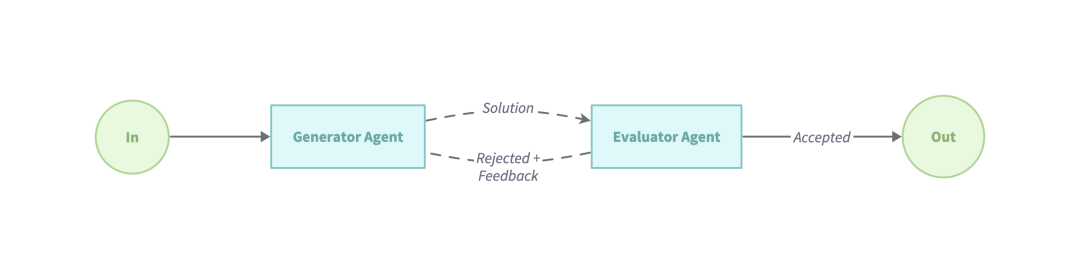
Example: `examples/workflow-loop`
loopAgent := flow.NewLoopAgent(flow.LoopConfig{
    Name:          "WritingReviewFlow",
    MaxIterations: 3,
    Condition: func(ctx context.Context, output *blades.Message) (bool, error) {
        return !strings.Contains(output.Text(), "The draft is good"), nil
    },
    SubAgents: []blades.Agent{
        writerAgent,
        reviewerAgent,
    },
})
---
Best Practices
1. Start Simple
- Begin with the simplest functional workflow.
- Incrementally add complexity.
2. Design for Reliability
- Implement robust error handling.
- Prefer type-safe responses.
- Validate outputs at each step.
3. Make Trade-offs
- Balance speed vs accuracy.
- Evaluate parallelization needs.
---
References:
---
📌 Tip for Scaling Multi-Agent Workflows
If your agents generate and distribute content, consider platforms like AiToEarn官网, which:
- Generates AI content.
- Publishes simultaneously on Douyin, Kwai, WeChat, Bilibili, Rednote, Facebook, Instagram, LinkedIn, Threads, YouTube, Pinterest, X.
- Integrates analytics and model ranking (AI模型排名).
This can complement Blades by connecting creation, workflow automation, and monetization across platforms.
---
Would you like me to create a visual comparison table for all five workflow patterns so readers can quickly grasp their differences? That could make the document even more actionable.


