Best Practices for Full-Chain Observability in the Agentic Application Era with Dify
# Alibaba Insights: Enhancing Observability for Dify Agentic Applications
This guide explores **observability challenges** faced by the Dify platform in Agentic application development — analyzing **current capabilities**, **limitations**, and **improvement strategies** from both **developer** and **operations** perspectives.
---
## Introduction
**Dify** is a **low-code LLM application development platform** supporting model orchestration, RAG retrieval, Workflow/Agent frameworks, and plugins — easing the creation of **Agentic applications**.
Production-grade Agentic apps deal with dynamic elements such as:
- Historical conversations and memory
- Tool invocation and knowledge base retrieval
- Model output generation
- Script execution and process control
These introduce **uncertainty** into application outcomes. Observability acts across the full lifecycle:
- **Development**
- **Debugging**
- **Operations**
- **Iteration**
It links execution to upstream/downstream **tools, models, and users** — and is crucial for successful production deployment.
---
## Observability Perspectives: Developer vs. Ops
### Developers
- Focus: Building workflows in Dify SaaS or self-hosted environments
- Monitor:
- Workflow execution steps (RAG, Tool, LLM, etc.)
- **AI generation quality**
- **User conversation experience**
- Needs: Pre- and post-launch optimization
### Operations
- Focus: Overall **Dify cluster** performance, load, and anomalies
- Monitor:
- All cluster components — execution engine, plugin engine, queues, sandboxes, storage
- Upstream/downstream systems — model providers, tools, KBs
- Needs: **Full request chain observability**
---
## Current State & Pain Points
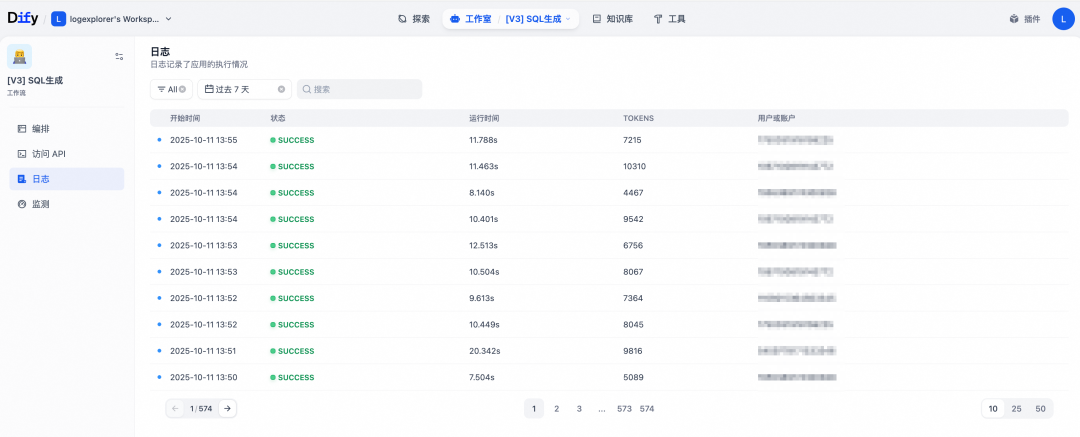
### 1. Native Dify Application Monitoring
- Integrated within the execution engine
- Convenient for development & debugging
**Limitations**:
- **Analysis:** Cannot filter by flexible criteria (keywords, time range, error type)
- **Performance:** Logs stored in DB cause scalability problems
- Requires **manual log cleanup** via Celery jobs
---
**Tip:**
For extended observability with content monetization, platforms like [AiToEarn官网](https://aitoearn.ai/) can connect monitoring outputs to multi-platform publishing workflows, enabling revenue generation from AI content.
---
### 2. Official Third-Party Tracking Integrations
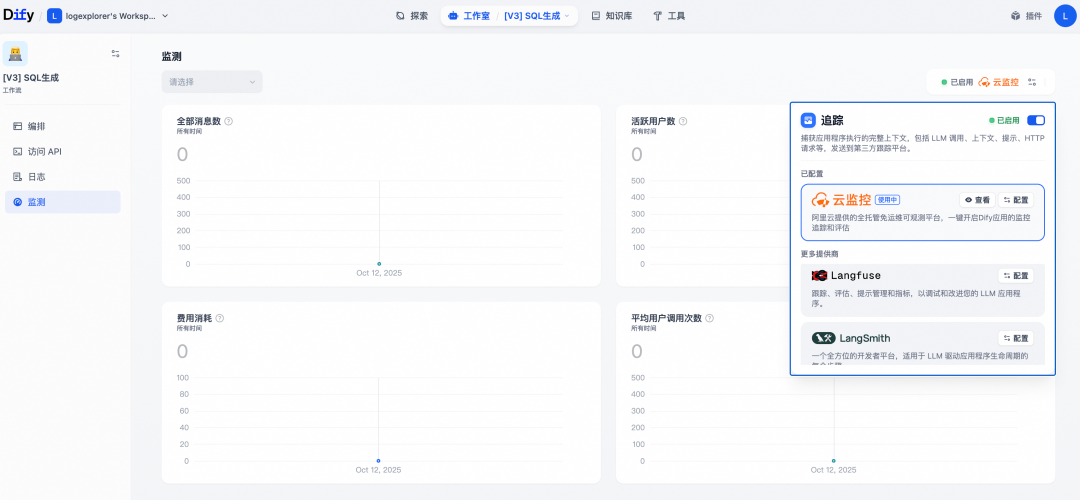
- Services: **Cloud Monitoring**, **Langfuse**, **LangSmith**
- Source: OpsTrace event mechanism
- Level: Workflow/Agent usage and node actions
- From **v1.6.0**: Alibaba Cloud Monitoring offers managed observability
**Limitation:**
**No full-chain tracking** — scope is **developer-focused**, misses cluster health and detailed data.
---
### 3. Cluster Component Observability
- Supports **Sentry** and **OpenTelemetry (OTel)**
- Framework coverage only (Flask, HTTP, DB, Redis, Celery)
- No internal execution logic instrumentation
**Limitations:**
- Minimal upstream/downstream linkage
- Partial component coverage
- Complex architecture & custom protocols hinder full-chain linking
---
## Panoramic Observability: Cloud Monitoring Approach
**Goal:** Cover **all components** + official app tracking to serve **developers & ops**.
### Challenges
1. **Many components, complex execution chains**
- Gateway → Execution Engine → Plugin Engine → Sandbox → Plugin Runtime → Celery
- Solution: Multi-language probes (Python, Go, OTel), **non-intrusive injection** via env vars/startup scripts
2. **Rapid iteration pace**
- Solution: Collaborate with Dify community, minimize internal dependencies
---
## Version Requirements
**Python Probe**: Works with all v1.x; Trace Link supported from v1.8.0
**Go Probe**: Works with all v1.x; monitors Plugin-Daemon lifecycle
**Native Monitoring**: Integrated from v1.6.x
| Version | Feature | Reference |
|---------|---------|-----------|
| v1.6.0 | Initial integration | [PR #21471](https://github.com/langgenius/dify/pull/21471) |
| v1.7.0 | Span bugfix | [Issue #22467](https://github.com/langgenius/dify/issues/22467) |
| v1.8.0 | Trace Link support | [Issue #23917](https://github.com/langgenius/dify/issues/23917) |
---
## Workflow Application Monitoring
### Prerequisites
- Dify ≥ v1.6.0
---
### Step 1: Obtain Endpoint & License Key
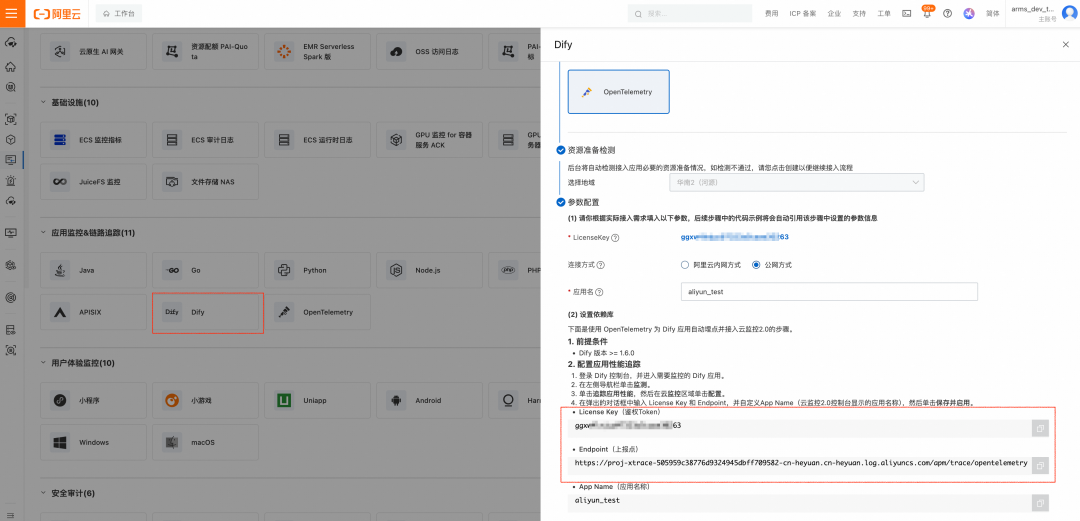
**Cloud Monitoring 2.0 (v1.9.1+)**
1. Log in → Access Center → Dify card
2. Choose region, click **Get LicenseKey**
3. Record **LicenseKey** & **Endpoint**
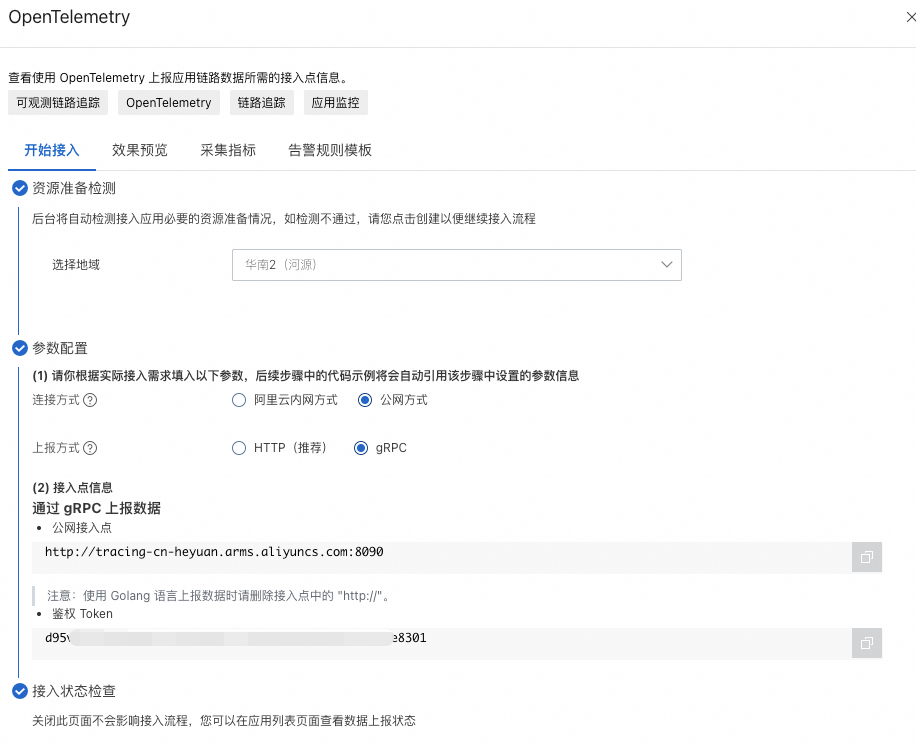
**ARMS (v1.6.0–1.9.0)**
1. Log in → Access Center → OpenTelemetry card
2. Select gRPC + region
3. Record **LicenseKey** & **Endpoint**
---
### Step 2: Configure in Dify
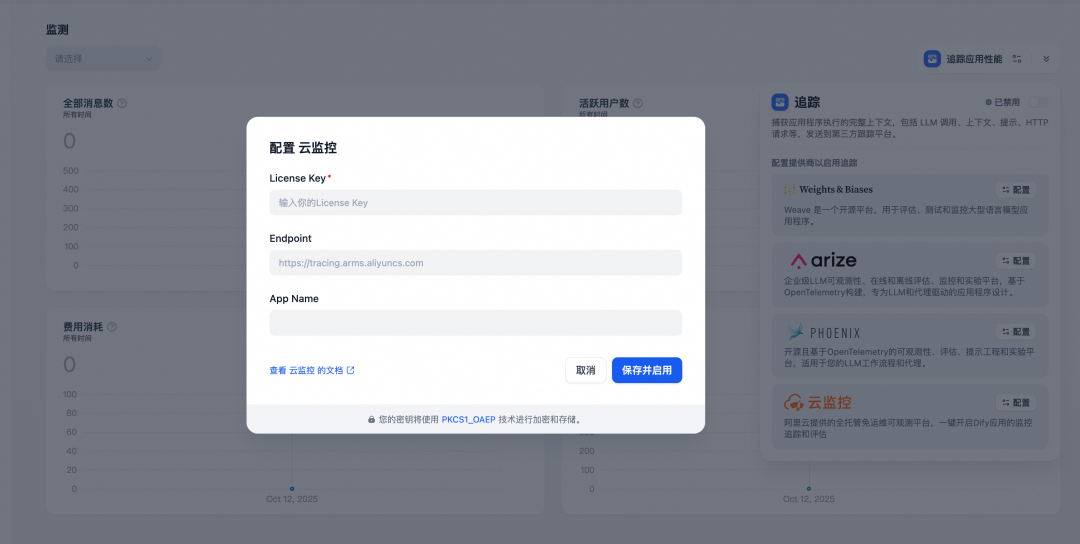
1. Dify console → App → **Monitoring**
2. **Trace Application Performance** → **Configure**
3. Enter LicenseKey, Endpoint, AppName → **Save & Enable**
---
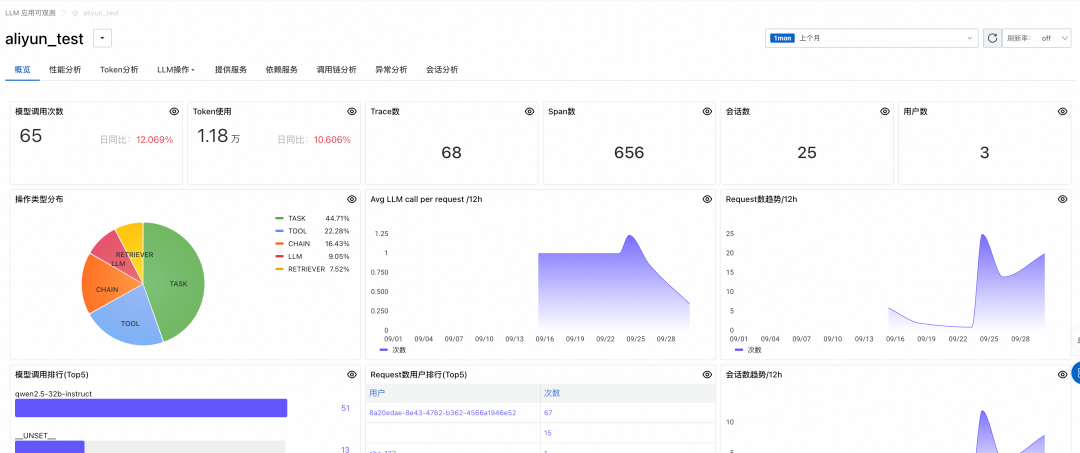
### Step 3: View Data
Trigger requests → wait 1–2 mins → view in:
- **CM2**: Application Center → AI Application Observability
- **ARMS**: LLM Application Monitoring
---
## API Execution Engine Monitoring
### Step 1: Install Python Probe
Remove conflicting OTel plugins:
python -m ensurepip --upgrade
pip3 uninstall -y opentelemetry-instrumentation-celery \
opentelemetry-instrumentation-flask \
... # more plugins
pip3 install aliyun-bootstrap && aliyun-bootstrap -a install
**Tip:** Replace startup script via Docker volume or rebuild image.

---

### Step 2: Modify Startup Command
Launch with `aliyun-instrument`:
exec aliyun-instrument gunicorn \
--bind "${DIFY_BIND_ADDRESS:-0.0.0.0}:${DIFY_PORT:-5001}" \
--workers ${SERVER_WORKER_AMOUNT:-1} \
--worker-class ${SERVER_WORKER_CLASS:-gevent} \
...
---
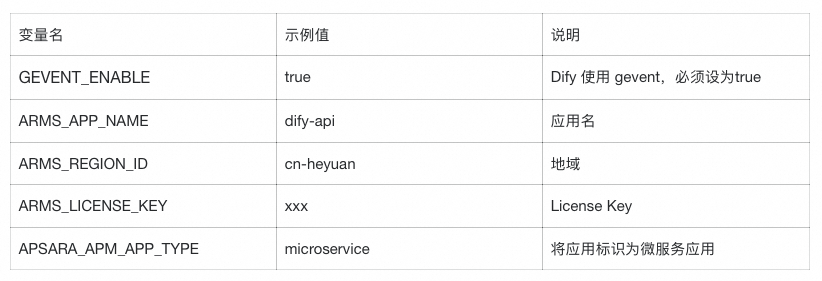
### Step 3: Set Environment Variables
---
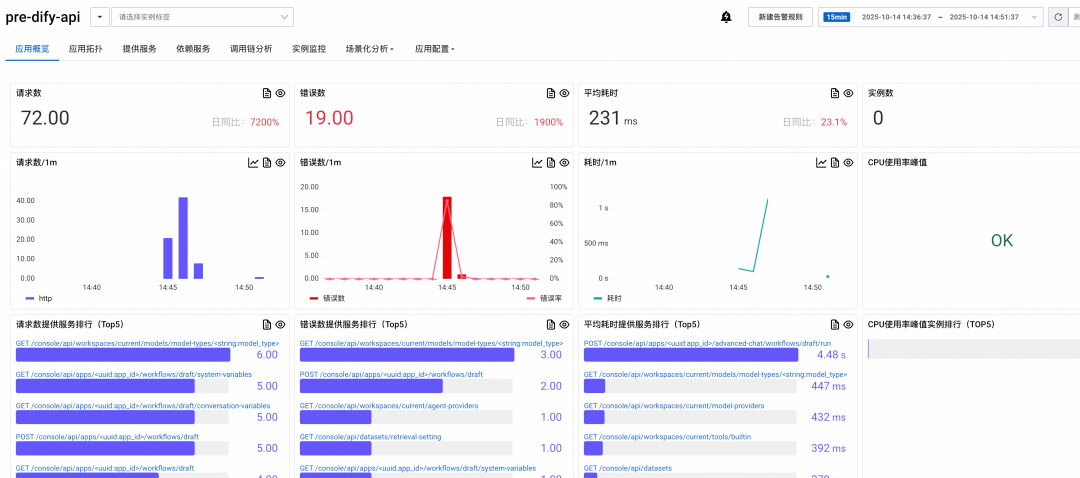
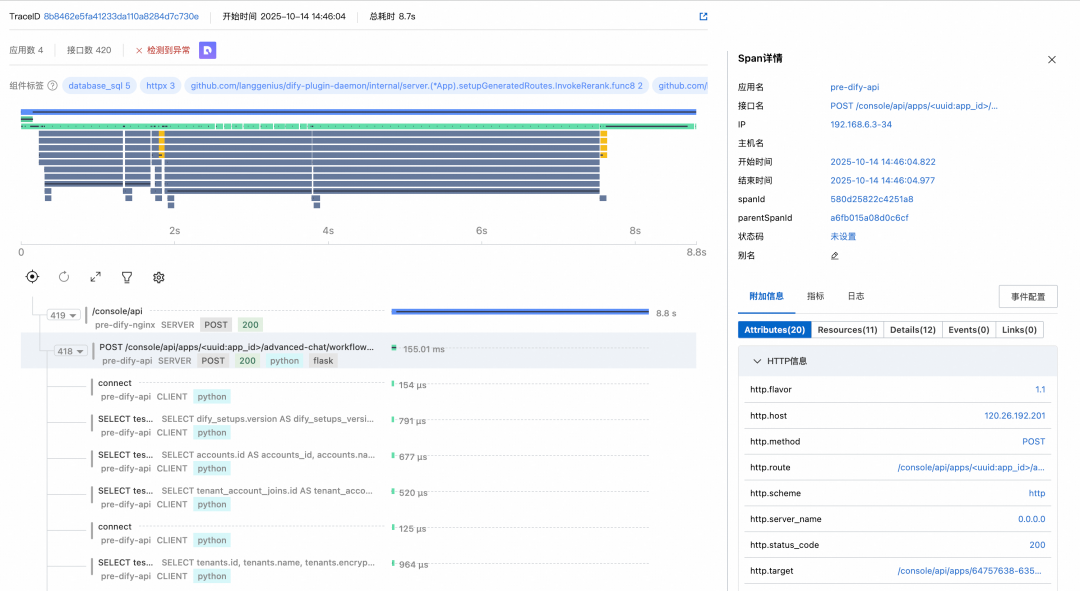
### Step 4: Deploy & View
Check Application Monitoring → `dify-api` details and linked call chains.
---
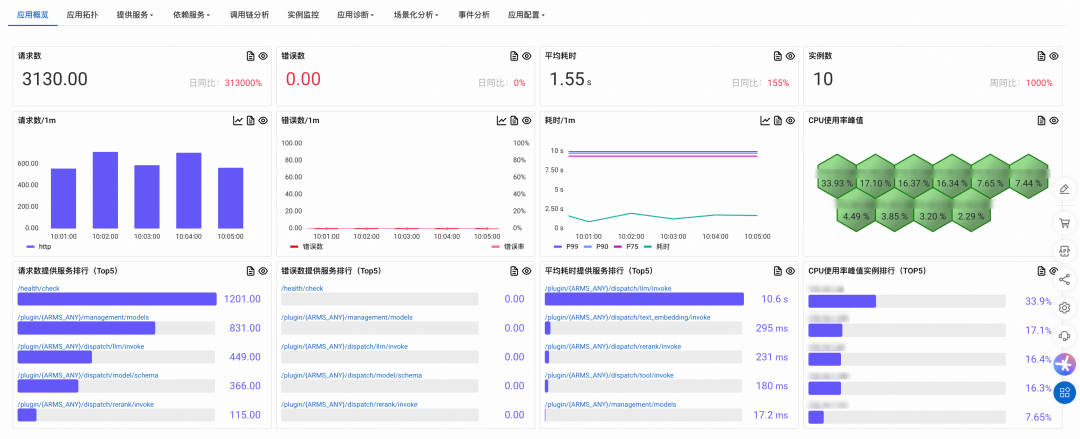
## Plugin Engine Monitoring
### Step 1: Modify Dockerfile & Rebuild
Use Go probe via `instgo` tool:
RUN INSTGO_EXTRA_RULES="dify_python" ./instgo go build ...
Full example included above.

---

### Step 2: Set Environment Variables
labels:
aliyun.com/app-language: golang
armsPilotAutoEnable: 'on'
armsPilotCreateAppName: "dify-daemon-plugin"
---
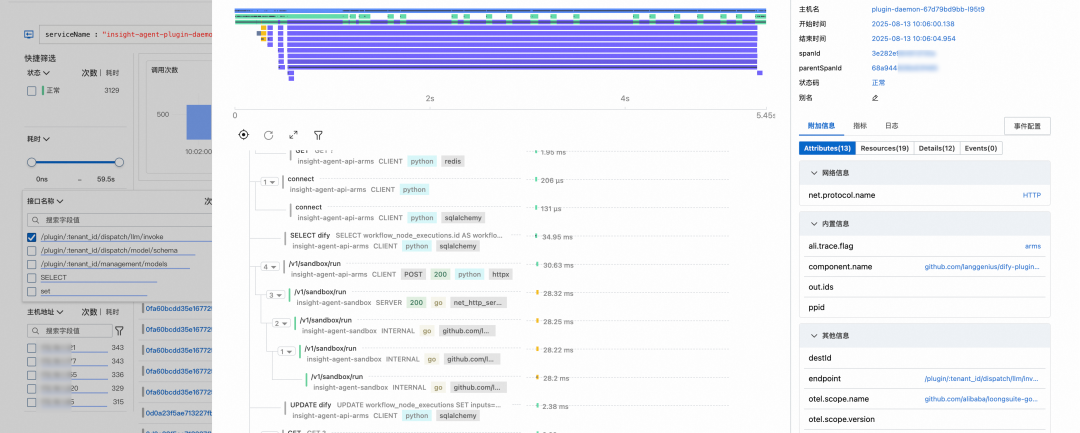
### Step 3: Deploy & View Plugin-Daemon Data
---
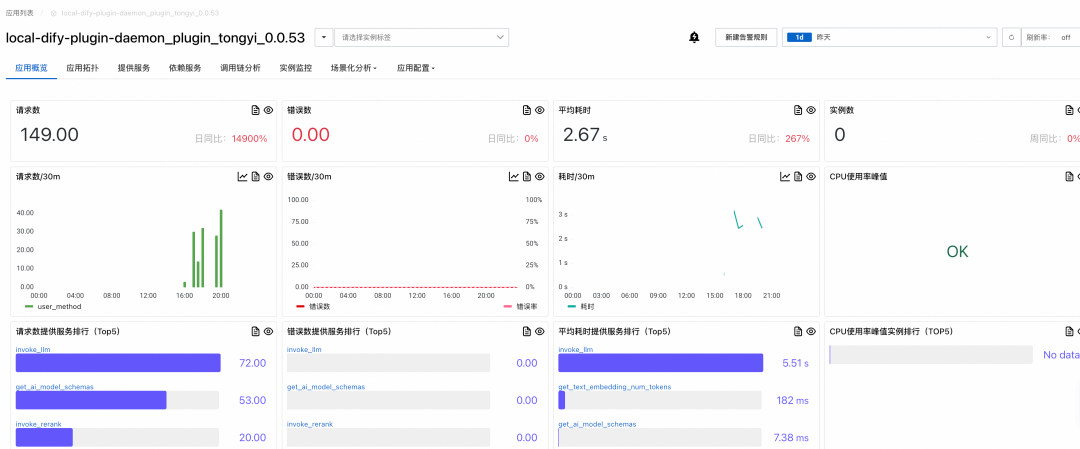
### Step 4: Plugin Runtime Monitoring
Auto-generated application name:
{daemon}_plugin_{plugin_name}_{plugin_version}
---
## Optional Components
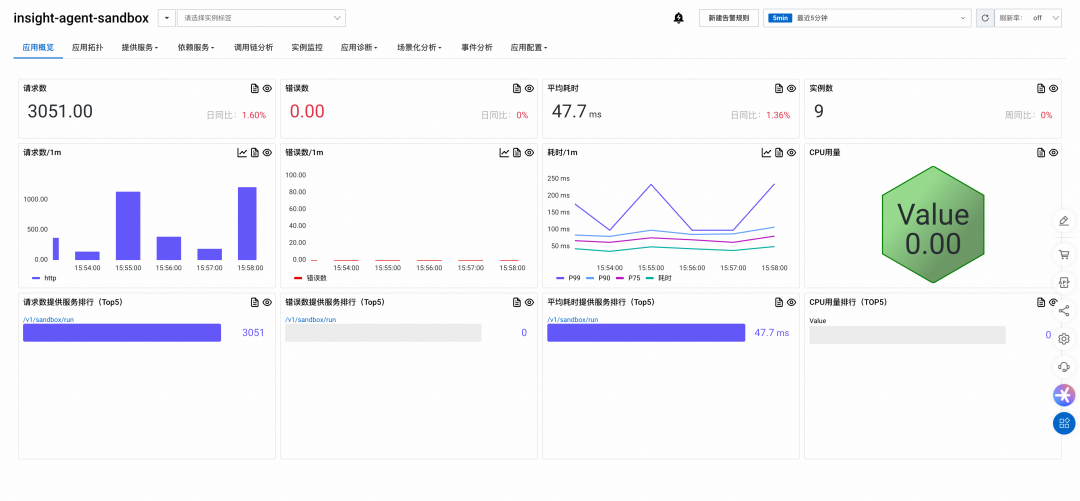
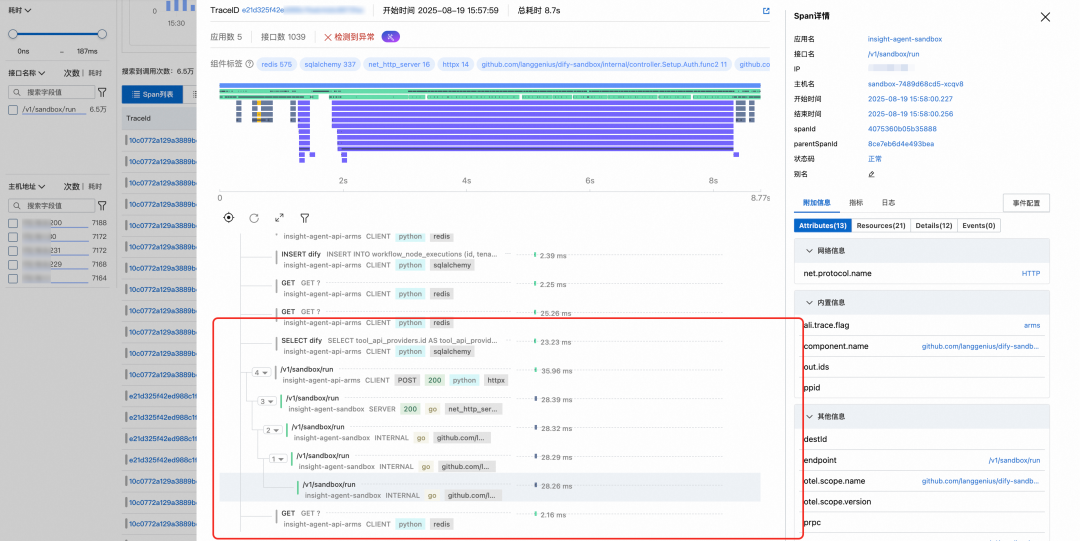
### Sandbox (Code Execution Engine)
- Modify build scripts to inject Go probe
- Deploy & monitor in `dify-sandbox` app
---
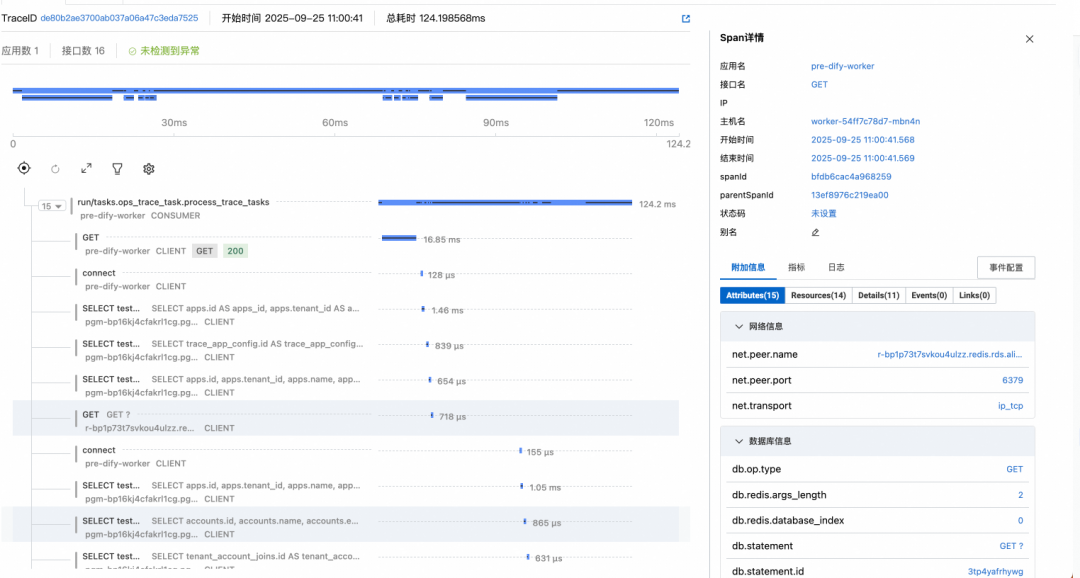
### Worker (Task Queue)
Use built-in OTel plugin (v1.7.0+):
| Param | Example | Notes |
|------------------------|---------|-------|
| ENABLE_OTEL | true | Enable |
| OTLP_TRACE_ENDPOINT | ... | From ARMS |
| APPLICATION_NAME | dify-worker | Separate from API name |
---
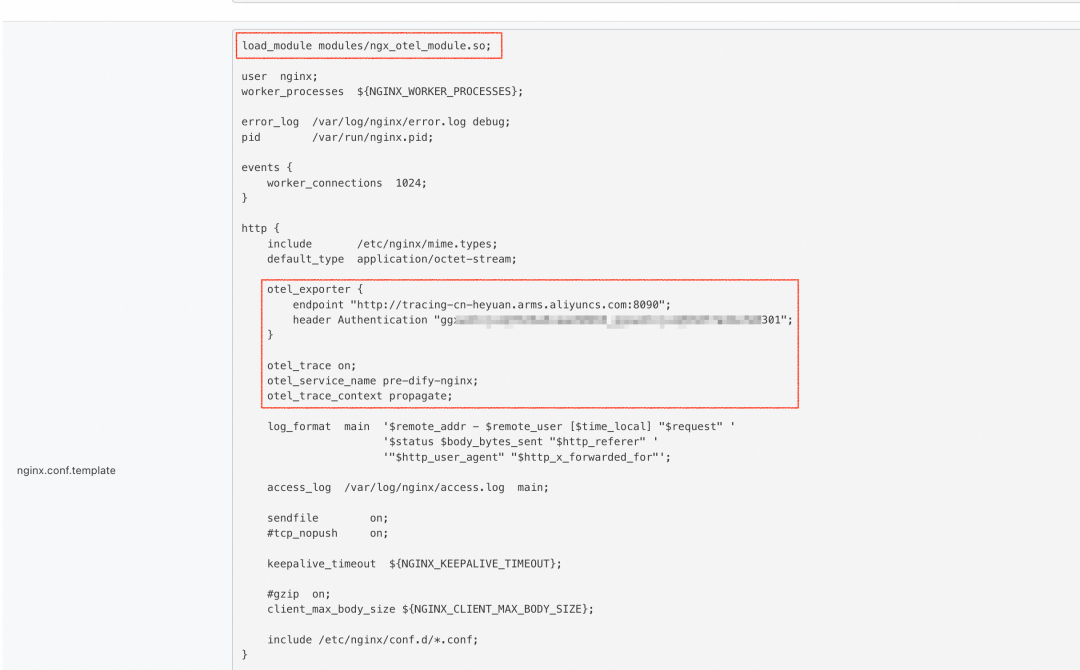
### Nginx Gateway
Use OTel-enabled Nginx image, configure in `nginx.conf`:
load_module modules/ngx_otel_module.so;
otel_exporter {
endpoint "${GRPC_ENDPOINT}";
header Authentication "${GRPC_TOKEN}";
}
otel_trace on;
otel_service_name ${SERVICE_NAME};
...
---
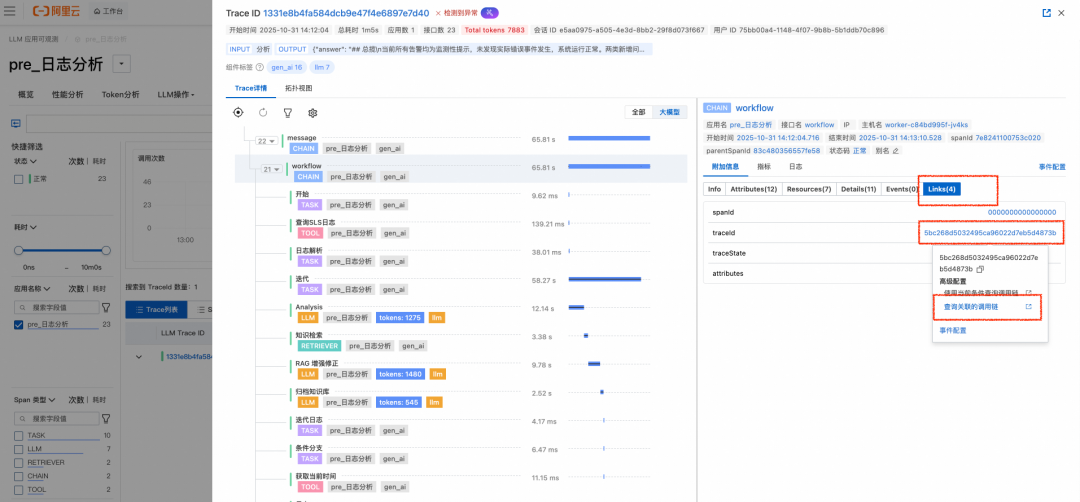
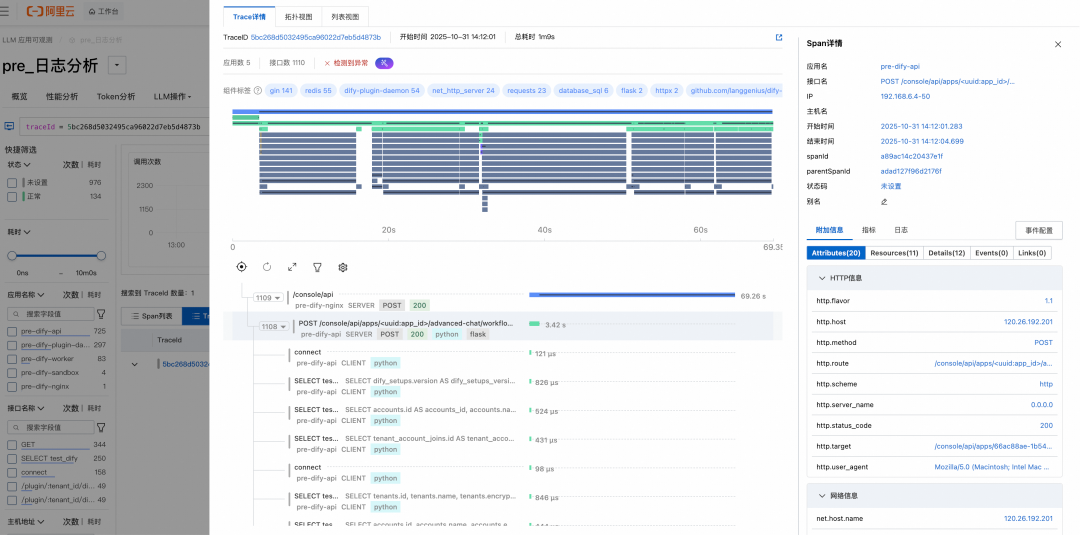
## Practical Use: Linking LLM & Microservice Traces
Use **Trace Link** in CM2 to jump between Workflow-level and infra-level traces:
---
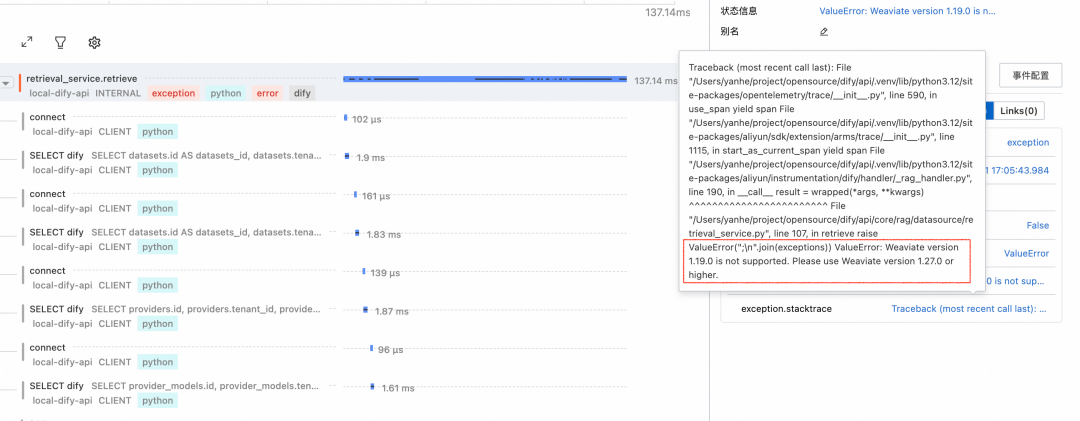
### Example: Root Cause Analysis
- LLM Trace shows empty KB output
- **Link → Infra Trace** reveals Weaviate config error via stack trace
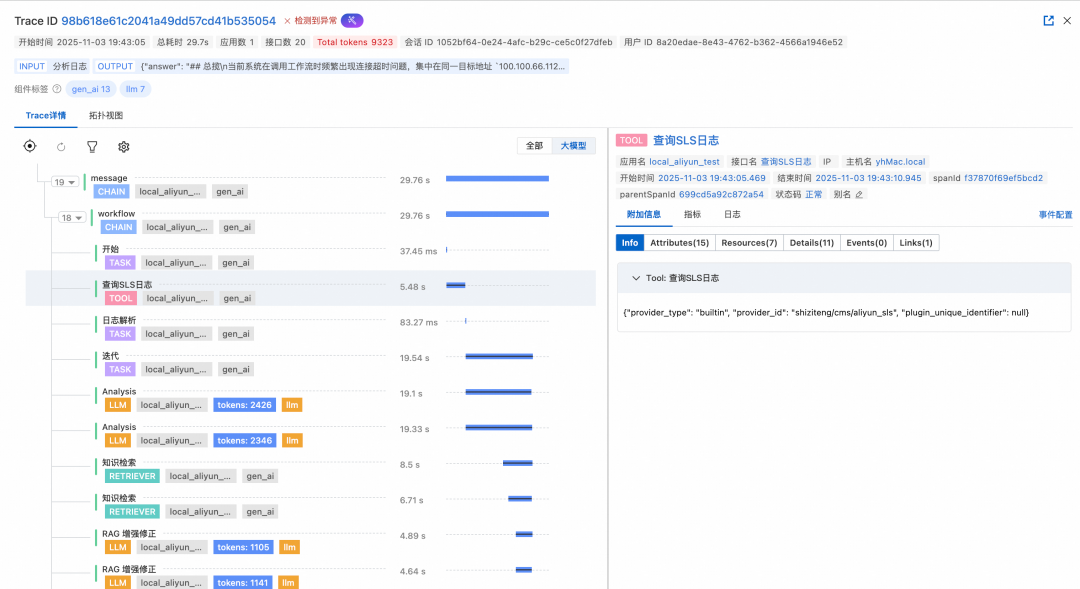
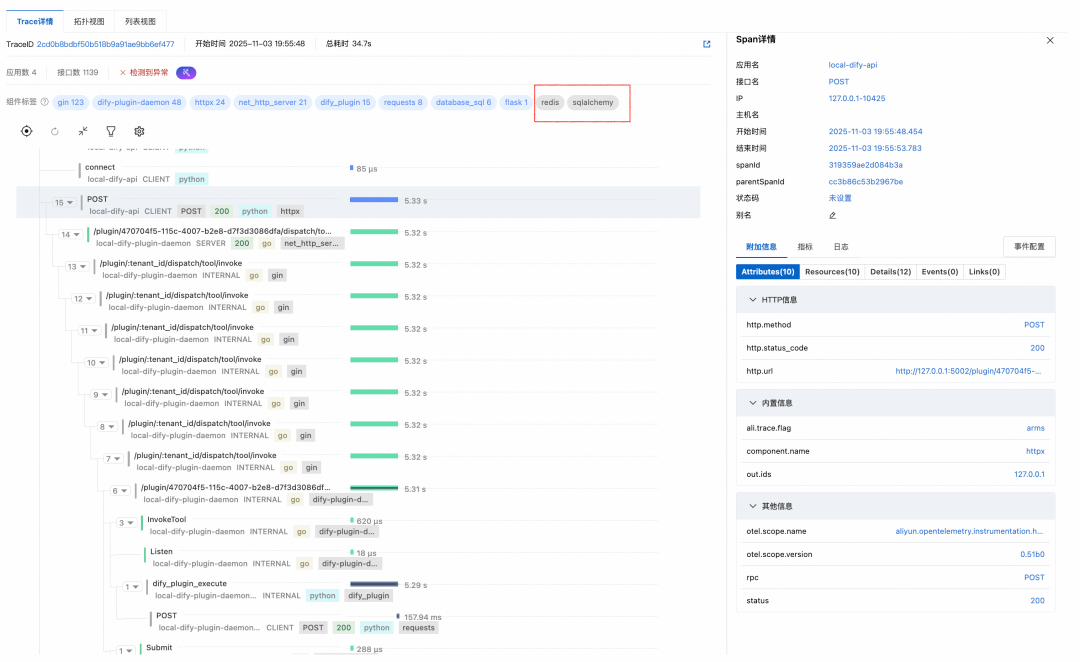
---
### Example: Slow Plugin Detection
- Identify cause (Plugin Runtime slow execution) via linked full-chain trace
---
**References**
1. [LicenseKey API](https://help.aliyun.com/zh/arms/application-monitoring/developer-reference/api-arms-2019-08-08-describetracelicensekey-apps)
2. [Go Components List](https://help.aliyun.com/zh/arms/application-monitoring/developer-reference/go-components-and-frameworks-supported-by-arms-application-monitoring)
3. [Dify Monitoring Guide](https://help.aliyun.com/zh/arms/tracing-analysis/untitled-document-1750672984680)
4. [Alibaba Cloud Integrate Dify](https://docs.dify.ai/zh-hans/guides/monitoring/integrate-external-ops-tools/integrate-aliyun)
5. [Python Probe Guide](https://help.aliyun.com/zh/cms/cloudmonitor-2-0/user-guide/monitor-dify-applications)
6. [Nginx OTel Tracing](https://help.aliyun.com/zh/opentelemetry/user-guide/use-opentelemetry-to-perform-tracing-analysis-on-nginx)
---
## Final Note
Beyond observability, tools such as **[AiToEarn官网](https://aitoearn.ai/)** can **monetize AI workflows** — linking generation, multi-platform publishing, and analytics.
This complements operational monitoring with content performance tracking across **Douyin, Kwai, WeChat, Bilibili, Xiaohongshu, Facebook, Instagram, LinkedIn, Threads, YouTube, Pinterest, and X**.
See:
- [AiToEarn Blog](https://blog.aitoearn.ai)
- [GitHub Open Source](https://github.com/yikart/AiToEarn)
- [Model Ranking](https://rank.aitoearn.ai)