
Build Your First AI Agent with Eino ADK: Starting with an Excel Agent Tutorial

Introduction

This article explains how to use Eino ADK (Agent Development Kit) to build a robust multi-agent system.
Previous article: Eino ADK: One-Stop Guide to AI Agent Core Design Patterns, Building an Agent System from 0 to 1
We illustrate this with a real-world business case — the Excel Agent:
> An intelligent assistant that can “understand what you say, interpret your spreadsheets, and write/execute code.”
By breaking down complex Excel tasks into clear steps, this agent leverages automated planning, tool invocation, and result verification to reliably complete diverse Excel data workflows.
You will learn about the complete architecture and capabilities of the Excel Agent, step-by-step, how it is built using Eino ADK, and how these principles help you design your custom agents and AI application systems.
---
What is Excel Agent?
Excel Agent is an “Excel-smart assistant” that:
- Breaks down problems step-by-step,
- Executes and verifies each result,
- Understands both your questions and file contents,
- Chooses the right tools (system commands, Python, web search, etc.).
Multi-Agent Architecture:
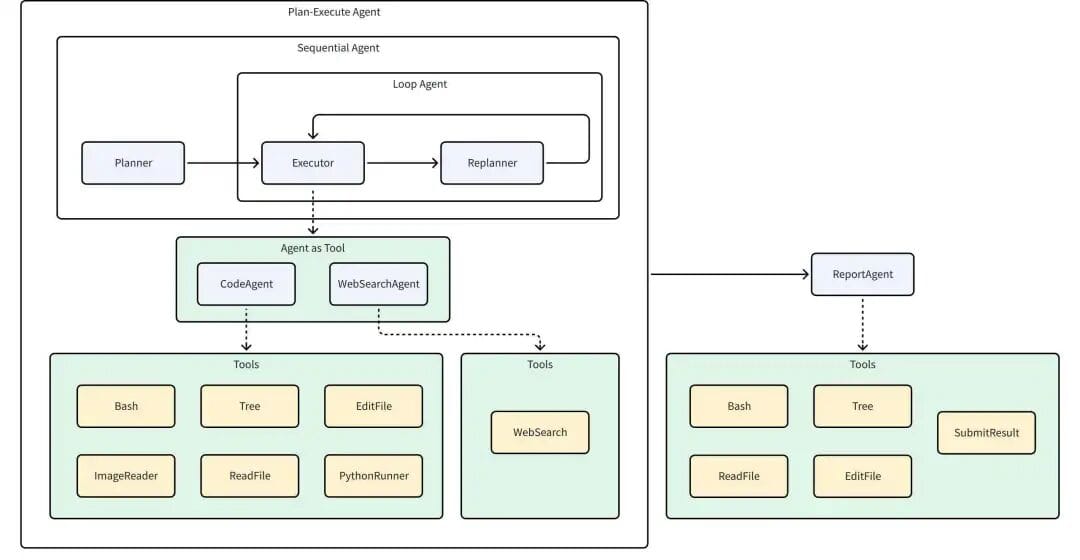
Components:
- Planner – Analyzes input, creates execution plan.
- Executor – Runs the first step in the plan.
- CodeAgent – Handles file I/O, runs Python, etc.
- WebSearchAgent – Performs online searches.
- Replanner – Adjusts/continues plan based on results.
- ReportAgent – Produces summary reports.
---
Typical Use Cases
The Excel Agent works like an "Excel specialist + automation engineer". Examples:
- Data Cleaning & Formatting – Remove duplicates, handle nulls, standardize dates.
- Data Analysis & Reporting – Aggregate monthly sales, create pivot charts.
- Automated Budgeting – Calculate departmental budget totals.
- Data Matching & Merging – Consolidate customer data from multiple sources.
---
Workflow Overview
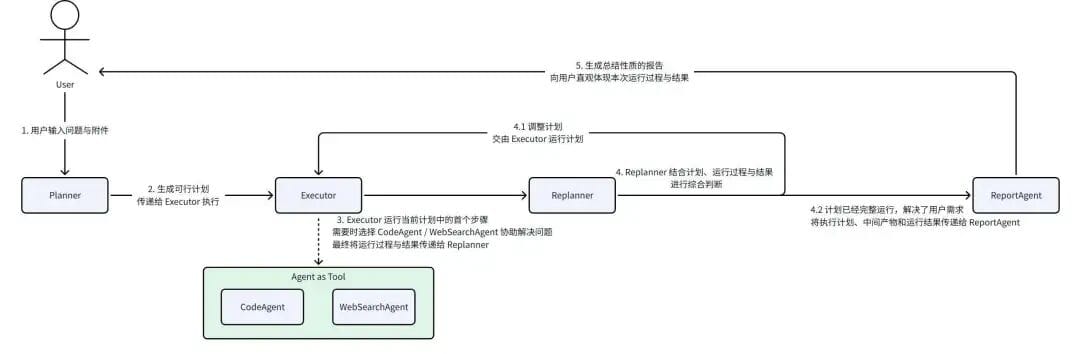
Benefits:
- Minimal manual work
- Consistent output via “Plan → Execute → Reflect”
- Scalable design with low coupling between agents
Can be used stand-alone or as a sub-agent in composite systems.
---
ChatModelAgent – Foundation for LLM Interaction
ChatModelAgent is a core prebuilt agent in Eino ADK implementing the ReAct pattern (“Think → Act → Observe”):
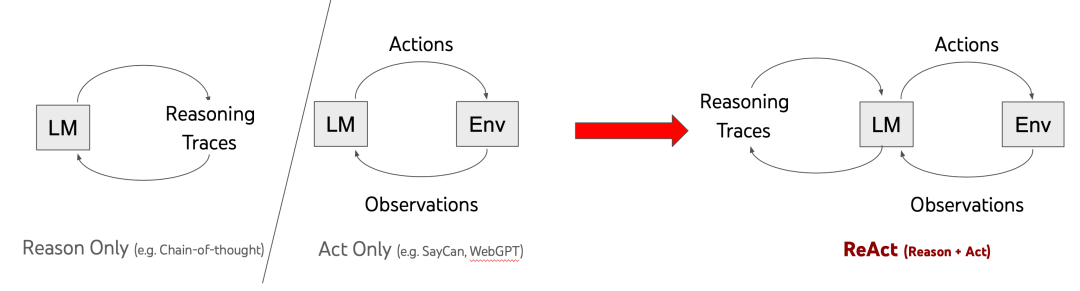
Workflow:
- Reason – Model thinks step-by-step.
- Action – LLM requests tool invocation.
- Act – ChatModelAgent executes tool.
- Observe – Tool results returned to LLM for continued reasoning.
Example in Excel Agent:
Executor instructs CodeAgent to read spreadsheet header.
- CodeAgent thinks about needed files → acts (`ls`) → thinks about reading first row → executes Python code → observes output → completes task.
---
Plan-Execute Agent – Collaboration Framework
Framework implements Plan–Execute–Reflect via:
- Planner – Creates plan and steps.
- Executor – Executes steps with tools.
- Replanner – Decides next step or adjustment.
func NewPlanner(...)
func NewExecutor(...)
func NewReplanner(...)
func New(...)
Plan Interface:
type Plan interface {
    FirstStep() string
    json.Marshaler
    json.Unmarshaler
}
---
Sample Task Plan
- Read `'模拟出题.csv'` into pandas.
- Classify question types.
- Format data for non-short questions.
- Merge answers into explanations for short-answer items.
- Verify consistency.
- Produce cleaned report.
---
Workflow Agents – Controlled Execution
Execution orders:
- SequentialAgent – Agents run in fixed order.
- LoopAgent – Iterates agent sequence until done/limit reached.
- ParallelAgent – Agents run concurrently.
Sequential Example
sequential := adk.NewSequentialAgent(ctx, &adk.SequentialAgentConfig{
    Name: "research_pipeline",
    SubAgents: []adk.Agent{
        planAgent,
        searchAgent,
        writeAgent,
    },
})
Loop Example
loop := adk.NewLoopAgent(ctx, &adk.LoopAgentConfig{
    Name: "iterative_optimization",
    SubAgents: []adk.Agent{
        analyzeAgent,
        improveAgent,
        validateAgent,
    },
    MaxIterations: 5,
})
Parallel Example
parallel := adk.NewParallelAgent(ctx, &adk.ParallelAgentConfig{
    Name: "multi_analysis",
    SubAgents: []adk.Agent{
        sentimentAgent,
        keywordAgent,
        summaryAgent,
    },
})
---
Agent Abstraction – Unified Interface
type Agent interface {
    Name(ctx context.Context) string
    Description(ctx context.Context) string
    Run(ctx context.Context, input *AgentInput, ...) *AsyncIterator[*AgentEvent]
}
AgentEvent includes outputs, actions, errors; enables asynchronous streaming of results.
---
Agent Collaboration – Data Transfer
Two main mechanisms:
1. History
Stores past `AgentEvent`s and appends to `AgentInput` for next agent; transforms role for context clarity.
2. Shared Session
Persistent key-value store for cross-agent state:
func GetSessionValues(...)
func AddSessionValue(...)
---
Collaboration Models
- Preset Workflow – Fixed code-defined order.
- Transfer Execution – Passes context to sub-agent.
- ToolCall – Agent used as tool with explicit parameters.
---
Excel Agent Example – Environment & Execution
Input: Description + files from configured path.
Sample files: `questions.csv`, `推荐小说.txt`, `模拟出题.csv`.
Example run: extract first column from `questions.csv`:
- Generates plan (`plan.md`).
- CodeAgent writes Python script, handles errors via ReAct pattern.
- Saves result as `extracted_first_column.csv`.
- ReportAgent outputs `final_report.json`.
---
Execution Highlights
- Planner: Creates steps in JSON.
- Executor → CodeAgent: Runs tools (`Bash`, `PythonRunner`).
- Error correction: ReAct fixes `NameError` by loading DataFrame before extraction.
- Replanner: Confirms completion.
- ReportAgent: Summarizes result.
---
Summary
Excel Agent demonstrates a full engineering approach for multi-agent systems with Eino ADK:
- Use ChatModelAgent + ReAct for reasoning and tool use.
- Orchestrate order via WorkflowAgents.
- Implement Planner–Executor–Replanner loop.
- Share data via History and Shared Session.
---
Recommended Resources
- Source Code: integration-excel-agent
- Docs: Eino ADK Documentation
- Examples: Eino ADK Examples
- Community: Join and exchange best practices.
---
Eino ADK — Making Agent Development Simple and Powerful!
---
References:
[1] ReAct
[2] Sample Code
[4] Eino ADK source
[5] Eino Examples


