
Building an AI Gateway for Amazon Bedrock with Amazon API Gateway | AWS
# Building a Scalable AI Gateway for Amazon Bedrock
Enterprises building **generative AI applications** must implement **governance controls** for foundation model usage—covering **authorization**, **quota management**, **tenant isolation**, and **cost control**.
To address these needs, [Dynatrace](https://www.dynatrace.com/) developed a **robust AI gateway architecture** that serves as a reusable **reference pattern** for organizations needing controlled access to [Amazon Bedrock](https://aws.amazon.com/bedrock/) at scale.
---
## Why Use an AI Gateway?
Placing [Amazon API Gateway](https://aws.amazon.com/api-gateway/) in front of Amazon Bedrock unlocks:
- **[Request Authorization](https://docs.aws.amazon.com/apigateway/latest/developerguide/apigateway-control-access-to-api.html)**
Integrates with existing identity systems (JWT validation, Cognito, etc.)
- **[Usage Quotas & Throttling](https://docs.aws.amazon.com/apigateway/latest/developerguide/api-gateway-request-throttling.html)**
Manage traffic and prevent abuse
- **[Lifecycle Management](https://docs.aws.amazon.com/apigateway/latest/developerguide/how-to-deploy-api.html)** & **[Canary Releases](https://docs.aws.amazon.com/apigateway/latest/developerguide/canary-release.html)**
Safe, incremental deployment
- **[AWS WAF](https://docs.aws.amazon.com/apigateway/latest/developerguide/apigateway-control-access-aws-waf.html)** Integration
Protects against common exploits
- **[Response Streaming](https://docs.aws.amazon.com/apigateway/latest/developerguide/response-transfer-mode.html)**
Streams model outputs in real-time directly to users
Full source code: [GitHub — Sample AI Gateway for Amazon Bedrock](https://github.com/aws-samples/sample-ai-gateway-for-amazon-bedrock).
---
## Architecture Overview
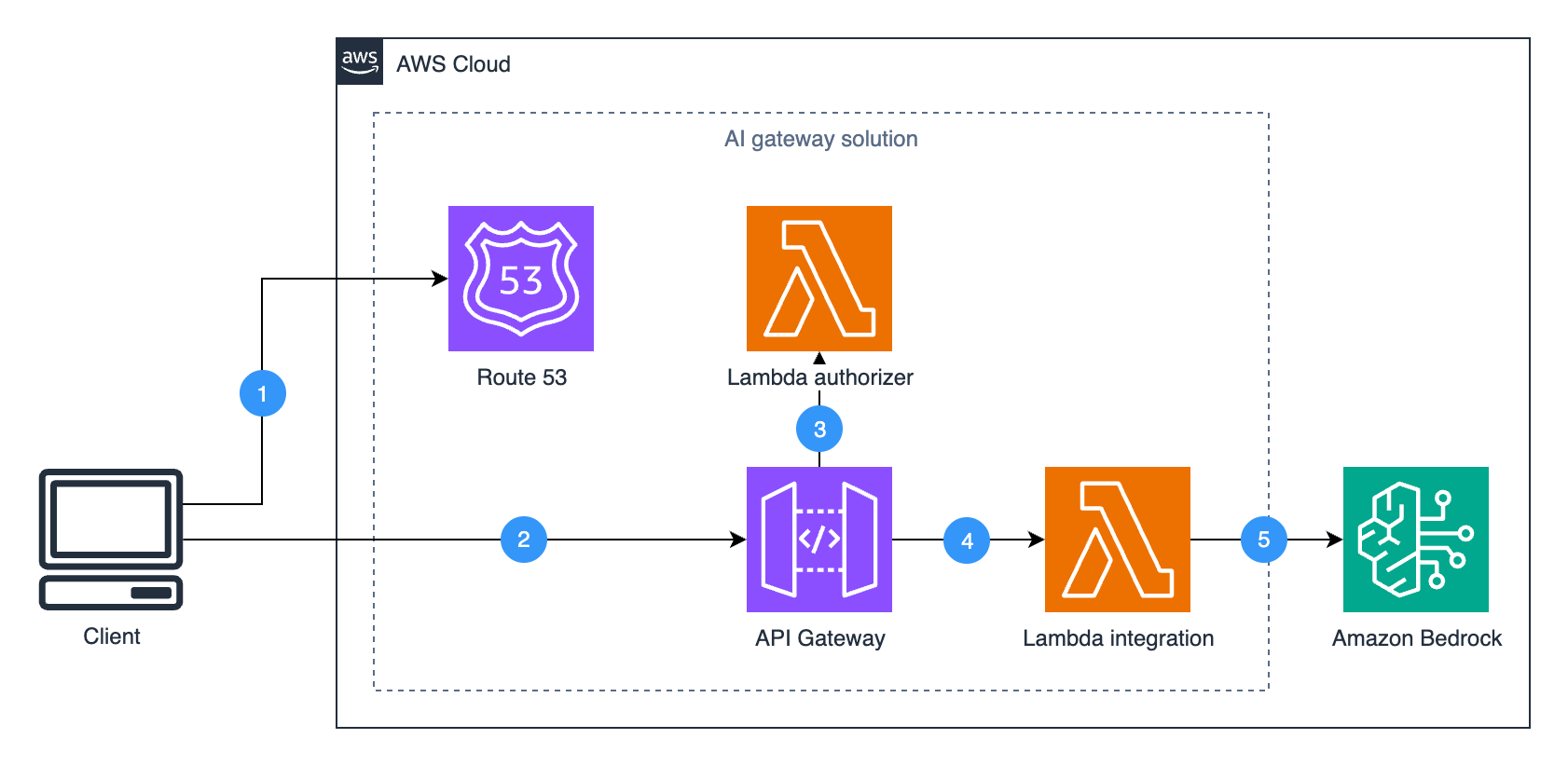
This **reference architecture** offers granular LLM access control via **fully managed AWS services**, transparent to client applications.
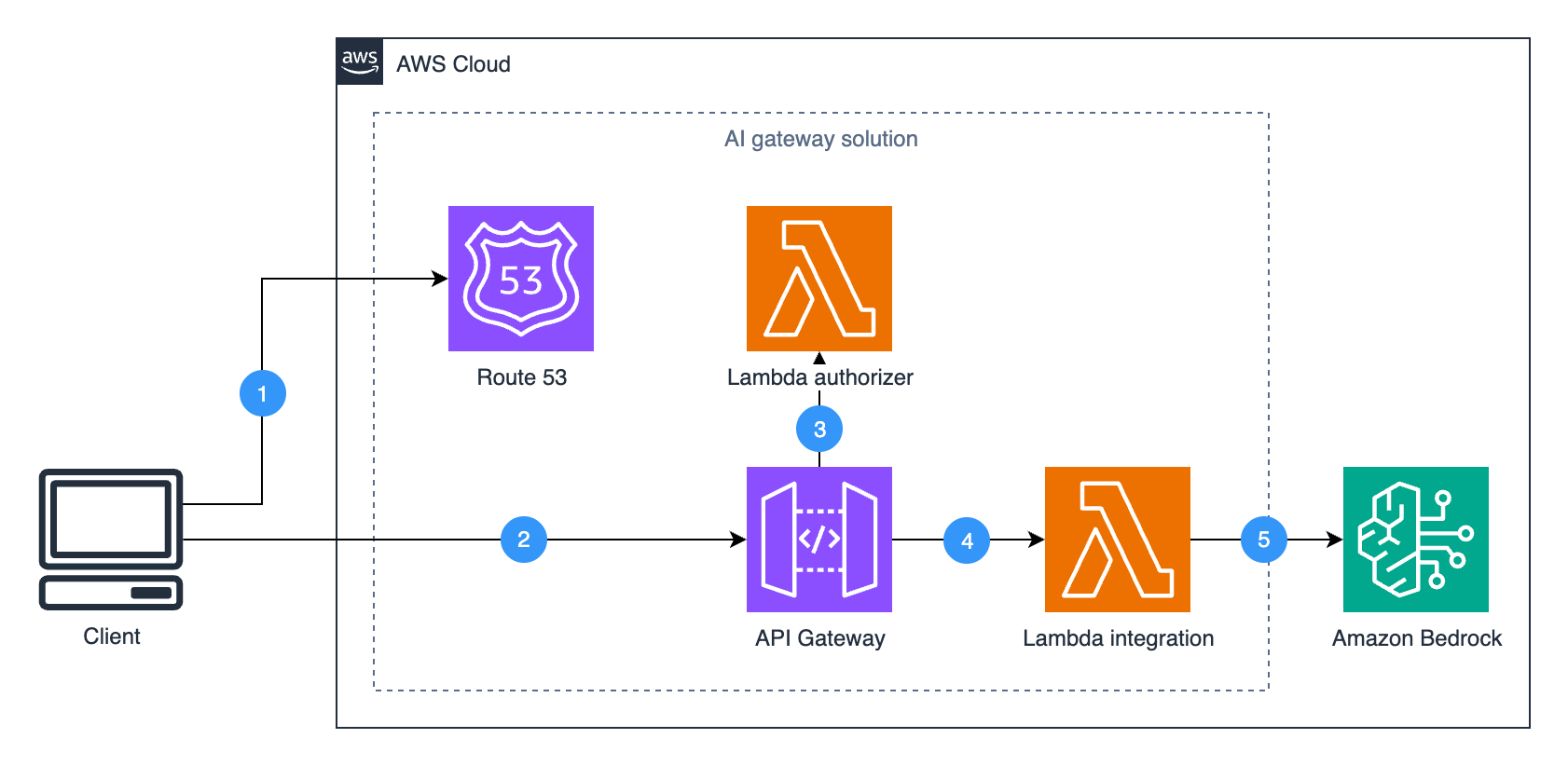
*Figure 1: AI Gateway Architecture*
### Core Components
1. **[Amazon Route 53](https://aws.amazon.com/route53/)** *(Optional)*:
Custom domain routing.
2. **Amazon API Gateway**:
Entry point providing **authorization**, **throttling**, and **version control**.
3. **[AWS Lambda Authorizer](https://docs.aws.amazon.com/apigateway/latest/developerguide/apigateway-use-lambda-authorizer.html)**:
Handles JWT validation or integrates with [Amazon Cognito](https://docs.aws.amazon.com/apigateway/latest/developerguide/apigateway-integrate-with-cognito.html).
4. **[Lambda Integration](https://docs.aws.amazon.com/apigateway/latest/developerguide/getting-started-with-lambda-integration.html)**:
Signs requests and routes to correct Amazon Bedrock endpoints.
5. **Amazon Bedrock**:
Delivers LLMs, [Knowledge Bases](https://aws.amazon.com/bedrock/knowledge-bases/), and other AI capabilities.
**Key Benefit**: Clients interact **exactly as if** calling Bedrock directly — but gain enterprise-grade governance and scalability.
---
## Step-by-Step Deployment with CloudFormation
We’ll deploy a **private AI gateway** with **authorization disabled** for initial testing.
### 1. Launch the CloudFormation Stack
1. Sign into the [AWS Console](https://console.aws.amazon.com/) and select your deployment region.
2. Click:
[](https://console.aws.amazon.com/cloudformation/home#/stacks/quickcreate?templateURL=https%3A%2F%2Fpomatas-public-blogs.s3.us-east-1.amazonaws.com%2Fdynatrace-api-gateway%2Fbedrock-llm-gateway.yaml&stackName=bedrock-llm-gateway¶m_EnableAuthorizer=false¶m_EndpointType=PRIVATE)
3. Configure parameters (see GitHub README for full details):
| Parameter | Description | Value | Reason |
|-------------------|-----------------------------------------------------|-----------|---------------------------------------------|
| EndpointType | API Gateway endpoint accessibility | PRIVATE | Restricts to internal network |
| EnableAuthorizer | Enable Lambda Authorizer | false | Disable for easier initial testing |
| CustomDomain | Domain for API Gateway | *(empty)* | Default domain is fine for testing |
| HostedZoneId | Route 53 Hosted Zone ID | *(empty)* | Not required unless using custom domain |
4. Check **I acknowledge that AWS CloudFormation might create IAM resources**.
5. Click **Create Stack** and wait until **CREATE_COMPLETE**.
6. In **Outputs**, note **GatewayUrl**, **VpcId**, and **ApiId**.
---
## Testing the Gateway in a Private VPC
### 1. Create CloudShell VPC Environment
1. Open [CloudShell](https://console.aws.amazon.com/cloudshell/home) and click **+ → Create VPC environment**.
2. Settings:
- **Name**: e.g. `AIGatewayTest`
- **VPC**: Use `VpcId` from CloudFormation
- **Subnet**: Any in that VPC
- **Security Group**: Default
3. Click **Create**.
### 2. Set Up `boto3` Client Factory
Save the factory script:
cat > boto3_client_factory.py << 'EOF'
import boto3
from botocore import UNSIGNED
from botocore.client import BaseClient
from botocore.config import Config
import os
SERVICE_NAME = "bedrock-runtime"
ENDPOINT_URL = os.environ.get("API_GATEWAY_ENDPOINT")
JWT_TOKEN = os.environ.get("JWT_TOKEN")
bedrock_client = Boto3ClientFactory.create(
service_name=SERVICE_NAME,
endpoint_url=ENDPOINT_URL,
jwt_token=JWT_TOKEN
)
EOF
**Purpose:**
Encapsulates API Gateway-specific routing and headers in a reusable pattern—keeping standard `boto3` usage while leveraging gateway features.

---

## Example: Test Model Inference with `ConverseStream`
export GATEWAY_URL="https://your-api-id.execute-api.region.amazonaws.com/v1"
cat > test_converse_stream.py << 'EOF'
import os
from boto3_client_factory import Boto3ClientFactory
bedrock_runtime_client = Boto3ClientFactory.create(
service_name="bedrock-runtime",
endpoint_url=os.environ['GATEWAY_URL']
)
response = bedrock_runtime_client.converse_stream(
modelId='global.anthropic.claude-haiku-4-5-20251001-v1:0',
messages=[{"role": "user", "content": [{"text": "Who invented the airplane?"}]}]
)
for event in response['stream']:
if 'contentBlockDelta' in event:
delta = event['contentBlockDelta']['delta']
if 'text' in delta:
print(delta['text'], end='', flush=True)
elif 'messageStop' in event:
print("\n")
break
EOF
python test_converse_stream.py
---

## Adding Authorization

Once verified, enable **Lambda Authorizer**:

1. Edit `bedrock-llm-gateway.yaml` to implement JWT validation.
2. Update stack:
   - **EnableAuthorizer** = `true`
3. Deploy changes to API Gateway (`Stage` = `v1`).

**Test with JWT Token:**
cat > test_with_auth.py << 'EOF'
import os
from boto3_client_factory import Boto3ClientFactory
jwt_token = "your-jwt-token"
client = Boto3ClientFactory.create(
service_name="bedrock-runtime",
endpoint_url=os.environ['GATEWAY_URL'],
jwt_token=jwt_token
)
response = client.converse_stream(
modelId='global.anthropic.claude-haiku-4-5-20251001-v1:0',
messages=[{"role": "user", "content": [{"text": "Who invented the airplane?"}]}]
)
for event in response['stream']:
if 'contentBlockDelta' in event:
delta = event['contentBlockDelta']['delta']
if 'text' in delta:
print(delta['text'], end='', flush=True)
elif 'messageStop' in event:
print("\n")
break
EOF
python test_with_auth.py
---

## Enhancement Ideas

- **Rate Limiting & Throttling** — [Usage Plans](https://docs.aws.amazon.com/apigateway/latest/developerguide/api-gateway-api-usage-plans.html)
- **Private or Edge-Optimized Endpoints** — Optimize latency/scoping
- **Canary Releases & Stages** — Controlled rollout
- **AWS WAF Integration**
- **Prompt/Response Caching**
- **Custom Content Filtering** — Combine with [Bedrock Guardrails](https://docs.aws.amazon.com/bedrock/latest/userguide/guardrails.html)

---

## Conclusion

The **AI Gateway pattern** enables **secure, scalable, and transparent** access control to Amazon Bedrock capabilities—proven in **enterprise-scale deployments**.

For organizations extending AI pipelines into **multi-platform publishing and monetization**, platforms such as [AiToEarn](https://aitoearn.ai/) offer **open-source, global content workflows** integrating:

- AI generation tools
- Publishing to Douyin, Kwai, WeChat, Bilibili, Xiaohongshu, Facebook, Instagram, LinkedIn, Threads, YouTube, Pinterest, X
- Analytics and [AI Model Ranking](https://rank.aitoearn.ai)

**Resources:**
- [Sample AI Gateway GitHub Repo](https://github.com/aws-samples/sample-ai-gateway-for-amazon-bedrock)
- [Amazon API Gateway Features](https://aws.amazon.com/api-gateway/features/)
- [Amazon Bedrock Documentation](https://docs.aws.amazon.com/bedrock/latest/userguide/index.html)
- [AiToEarn GitHub](https://github.com/yikart/AiToEarn)

---

