
[Frontend Efficiency Tool] No More APIfox Debugging! Zero-Intrusion Mocking Without Code Changes or Proxies
![[Frontend Efficiency Tool] No More APIfox Debugging! Zero-Intrusion Mocking Without Code Changes or Proxies](/content/images/size/w1200/2025/11/img_001-506.jpg)
How I Ended Up Building a Lightweight API Mocking Tool
Last Thursday afternoon, while tweaking some frontend styles, my computer’s fan suddenly roared like a jet.
Opening Task Manager revealed:
> Memory usage: 15.5G / 16G 😲
What Was Hogging My RAM?
At a glance:
- VSCode — 2.1 GB (project open: reasonable)
- Chrome (30 tabs) — 4.5 GB (docs, Stack Overflow, GitHub… expected)
- APIfox — 1.5 GB 🤨
- WeChat + WeCom — 1.1 GB (work necessity)
- Other miscellaneous processes...
APIfox alone was consuming 1.5 GB just so I could mock a few APIs. Using it required:
- Installing a 500 MB+ desktop client
- Running a proxy (and remembering to disable it later)
- Constantly switching between browser, APIfox, and VSCode
- Heavy memory usage
Tried Alternatives
- Hardcoded mock data in code — Risk of forgetting to remove before pushing to prod
- Mock.js — Requires code changes & tedious setup
---
The Ideal Solution I Wanted
- No client install
- No code changes
- No proxy setup
- Minimal memory footprint
- Toggle mocking in one click
So… I built a Chrome extension over a weekend.
> Now I can mock APIs directly in the browser — no APIfox running, minimal RAM usage, smooth system performance.
---
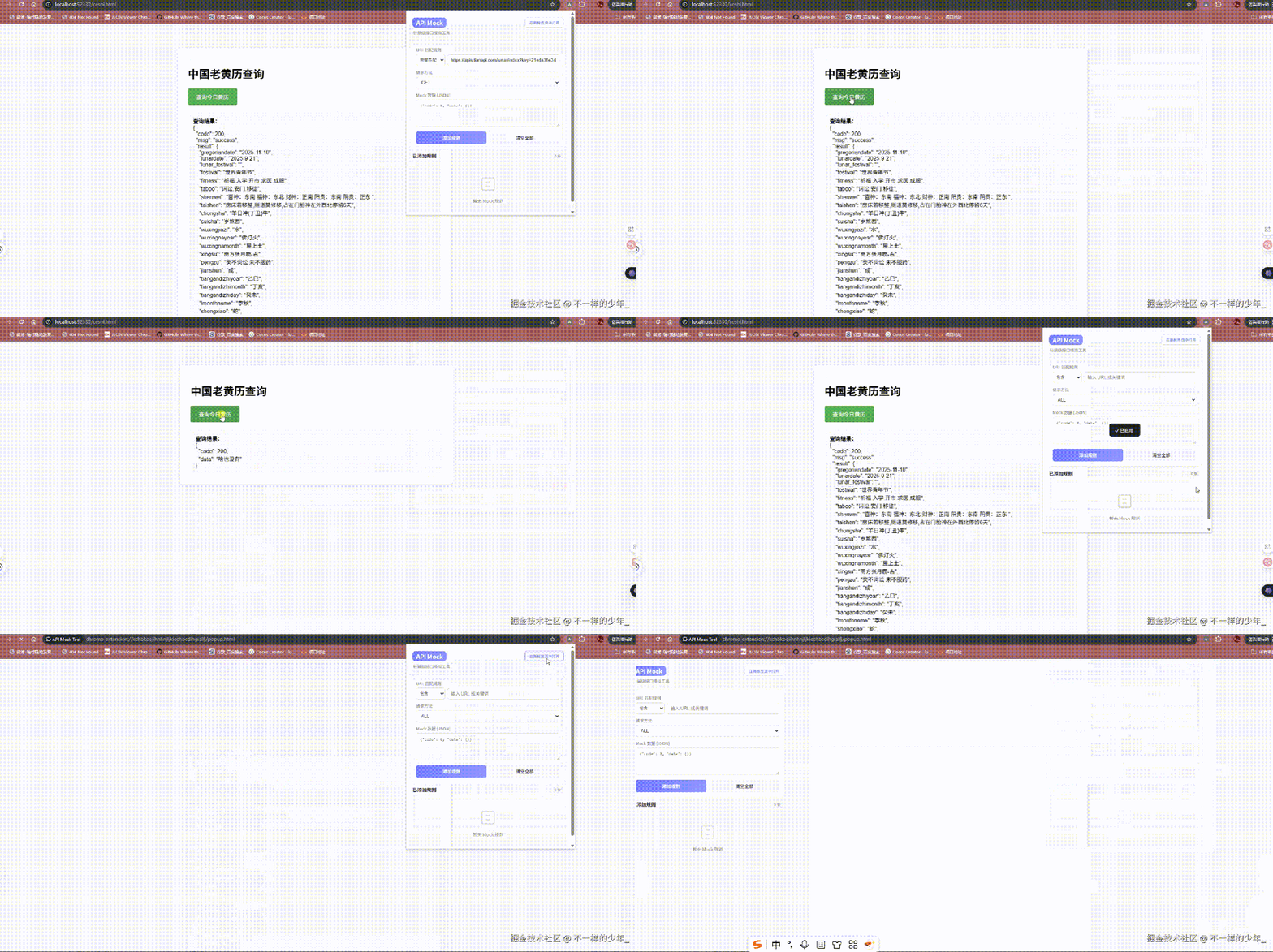
Demo: Intercepting `fetch` / `ajax` and Returning Mock Data
---
Features Overview
- Intercept page `fetch` and `XMLHttpRequest` calls
- Fuzzy and exact match rules supported
- Filter by HTTP method (GET/POST/PUT/DELETE)
- Return custom JSON data
- Ongoing optimization for performance, rule matching, and UX — feedback welcome!
---
Core Principle: Hook Browser Network Methods
Before the page loads, replace native `fetch` and `XMLHttpRequest` with custom logic:
- Intercept request
- Check rules
- Return mock data if matched
- Forward to original method if not
Normal flow:
Webpage → fetch('/api/user') → Browser → ServerWith extension:
Webpage → fake fetch → Rule check
    ├─ Hit → return mock ✅
    └─ Miss → call real fetch → Server
---
Simplified Implementation
// Save the original
const realFetch = window.fetch;

// Override fetch
window.fetch = function (url) {
  if (url.includes('/api/user')) {
    console.log('Intercepted! Mocking data');
    return Promise.resolve({ json: () => ({ name: 'Mock User' }) });
  }
  return realFetch(url);
};
---
Project Structure
quick-mock/
├── manifest.json       # Extension config
├── popup.html          # Popup UI
├── popup.css           # Popup styles
├── popup.js            # Popup logic
├── content.js          # Bridge script
└── injected.js         # Page-level hook script
---
🚀 Quick Start
Get the Code
- GitHub: Teernage/quick-mock ⭐
- Gitee: xuzhenxin110/quick-mock
Install in Chrome
- Visit `chrome://extensions/`
- Enable Developer mode
- Click Load unpacked
- Select the `quick-mock` folder
- Done — extension is ready
---
Deep Dive: Implementation Layers
UI Layer (Popup)
- popup.html — markup for rules input & control buttons (GitHub | Gitee)
- popup.css — styling (GitHub | Gitee)
- popup.js — logic: add/delete rules in `chrome.storage`, render list (GitHub | Gitee)
Core Layer
- content.js — bridge between extension & page (GitHub)
- Injects `injected.js`, reads storage, communicates via `postMessage`
- injected.js — actual interception (GitHub)
- Hooks `fetch`/`XMLHttpRequest`, queries `content.js` for mock rules
Config Layer
- manifest.json — extension manifest (GitHub)
---
Multi-Script Communication Workflow
Why split `content.js` and `injected.js`?
- Content script: can access Chrome APIs, cannot hook `window.fetch`
- Injected script: can hook `window.fetch`, cannot access Chrome APIs
Communication: via `window.postMessage`
Analogy:
- `content.js` = vault manager (has keys)
- `injected.js` = lobby manager (serves customers)
Both coordinate over a “walkie-talkie” to decide whether to serve mock or real data.
---
Key Technical Points
- Run early with `"run_at": "document_start"` to catch all requests.
- Expose `injected.js` via `"web_accessible_resources"` for script injection.
- Use `postMessage` — environments are isolated, globals won’t work.
- Preserve originals (`fetch`, `xhr`) to avoid breaking normal functionality.
---
When to Use This Pattern
- Backend API not ready
- Debugging bugs without server changes
- Live demos with mock responses
- Automated tests needing stable data
- API docs incomplete — build test data yourself
---
Wrap-Up
This two-script architecture keeps extension data access and page-level interception intact, while remaining lightweight and fast.
If you found this useful:
- 👍 Like / ⭐ Star the GitHub repo
- 💬 Share your usage in comments
Future plans:
- Richer configs
- Improved interaction
---
Tip: For devs sharing tutorials or demos widely, pairing such tools with AiToEarn官网 can automate content generation and publish tutorials simultaneously to platforms like Douyin, Kwai, WeChat, Bilibili, Rednote, Facebook, Instagram, LinkedIn, Threads, YouTube, Pinterest, and X — with analytics & monetization built in.
Learn more: AiToEarn博客 | GitHub开源地址
Monetize your mock workflows and share them globally, efficiently.


