
GitHub Copilot: Simplifying Complexity, Enhancing Intelligence

GitHub Copilot Chat: Smarter Tool Access in VS Code
In VS Code, GitHub Copilot Chat can access hundreds of tools via the Model Context Protocol (MCP) — from code analysis utilities to Azure-specific functions.
However, adding more tools doesn’t always make an agent smarter — in some cases, it can make it slower.
---
Recognizing the Problem
If you’ve seen this spinner in VS Code, you’ve likely hit the limits of a model trying to process too many tools at once:

---
Our New Approach
We developed two systems to address this:
- Embedding-Guided Tool Routing
- Adaptive Tool Clustering
Additionally, we’re introducing a reduced default toolset, cutting from 40 tools to 13 core ones.
Impact:
- 2–5% improvement in benchmark success rates (SWE-Lancer, SWEbench-Verified)
- 400 ms average latency reduction in online A/B testing
---
Why Too Many Tools Can Hurt Agent Performance
By default, VS Code offers ~40 built-in tools. Adding MCP servers can push this number into the hundreds, sometimes exceeding API token limits.
Our solution: filter and prioritize tools relevant to the user’s query — improving latency without reducing capability.
---
Adaptive Tool Clustering
Early Attempt: LLM-Based Grouping
We tried feeding all tools into an LLM to group and summarize them.
Problems:
- Uncontrollable number of generated groups
- Slow and high token cost
- Occasional omissions requiring reruns
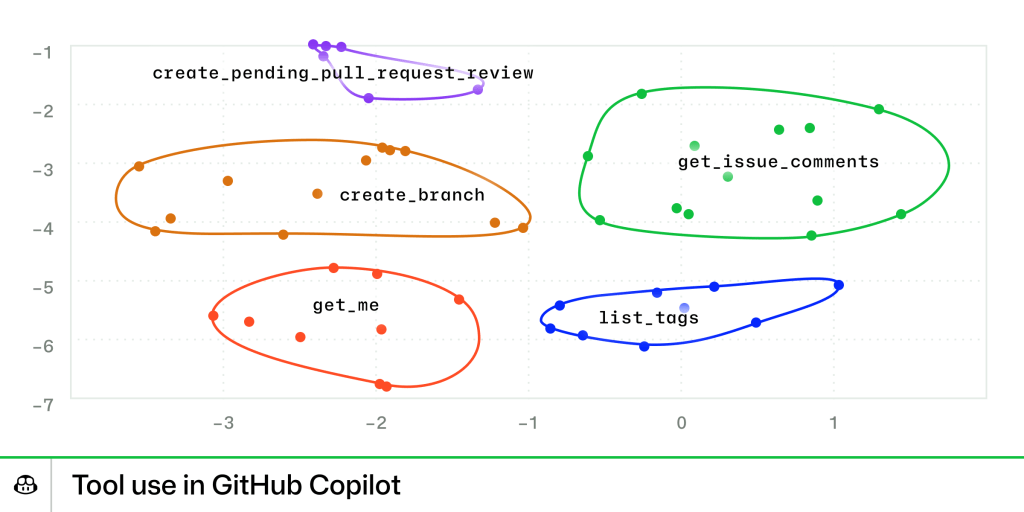
Improved Approach: Embedding + Cosine Similarity
- Use Copilot’s embedding model for semantic similarity
- Group tools by cosine similarity in embedding space
- Cache embeddings and group summaries locally
Benefit: Stable, reproducible clusters with faster summarization.
Example visualization of MCP tool grouping:
---
Context-Guided Tool Selection
The Challenge
Even with groups, the model often searches sequentially, adding latency:
Example
User: “Fix this bug and merge it into the dev branch”
Observed behavior:
- Opens search tools
- Opens documentation tools
- Opens local Git tools
- Finally finds merge tool in GitHub MCP group
---
Embedding-Guided Tool Routing
Solution:
Before expanding a group, compare the query embedding to:
- Each tool’s embedding
- Each cluster’s embedding
Result: Pre-selects most relevant tool candidates instantly — avoiding unnecessary exploration and cache misses.
Outcome:
- Faster reasoning
- Lower failure rate
- Reduced latency
---
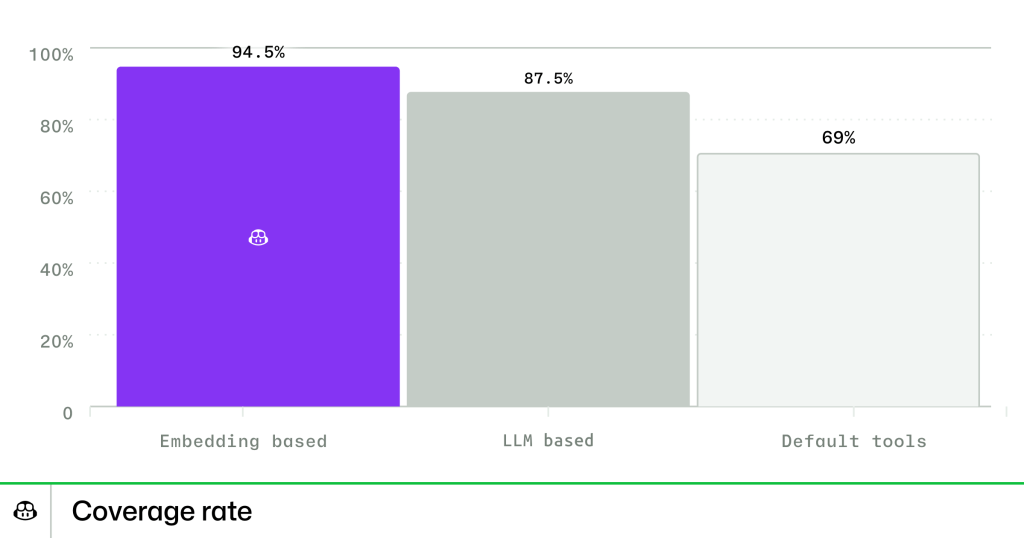
Embedding-Based Selection Results
Offline Testing:
- Tool Use Coverage: 94.5% (Embedding) vs
- 87.5% (LLM-based)
- 69.0% (Static list)
- Absolute coverage improvement: +27.5%
Online Testing:
- Stable builds: 19% pre-expanded tools
- Insider builds: 72% pre-expanded tools
- Matches offline improvements
---
“Less Is More”: Reducing the Default Toolset
Findings
Even before hitting limits, large toolsets degrade performance:
- 2–5% resolution rate drop in SWE-Lancer
- More ignored instructions and irrelevant tool calls
Action Taken
Core toolset reduced to 13 essentials:
- Repository parsing
- File reading/editing
- Context search
- Terminal usage
Remaining tools grouped as:
- Jupyter Notebook Tools
- Web Interaction Tools
- VS Code Workspace Tools
- Testing Tools
Results
- TTFT reduced by 190 ms (First Token)
- TTFT reduced by 400 ms (Final Token)
- Faster, clearer reasoning
---
Future Directions: Long-Context Reasoning
In the future, tool selection will evolve toward multi-step, long-context reasoning:
- Remember previous tool usage
- Infer intent from history
- Plan tasks over extended sessions
Embedding, memory, and reinforcement could enable agents to decide:
- When to act
- When to delegate
- When to stop
---
Acknowledgments
Thanks to our developer community for feedback, and to Zijian Jin for contributions.
We’re hiring applied researchers and software engineers — join us!
---
Key Takeaway:
Smarter tool selection in VS Code means faster, more reliable GitHub Copilot responses — proving that less can be more when combined with embedding-guided intelligence.


