
How to Add a Field to a Table with Tens of Millions of Rows — Easy to Mess Up

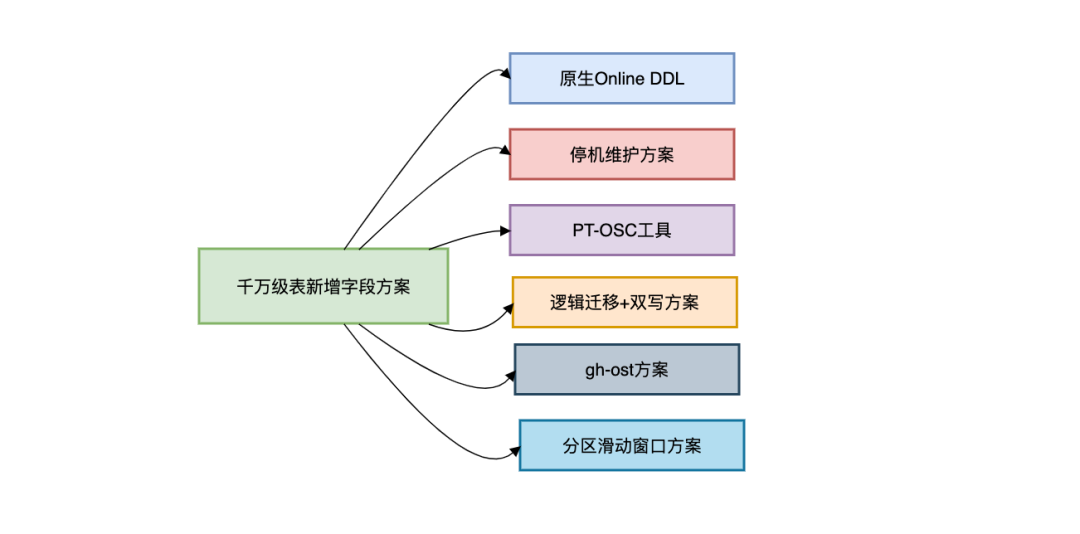
Adding a New Column to a Massive Online Table: 6 Proven Approaches

---
Introduction
Adding a new column to an online table with tens of millions of rows requires careful planning.
Running DDL operations directly on large tables can cause locking, slow queries, and even production outages.
This article reviews six safe approaches and includes:
- Their pros and cons
- Applicable scenarios
- Tips for minimizing downtime
---
I. Why Adding a Column to a Large Table Can Be Dangerous
The risk lies in MySQL DDL locking behavior.
Lock Behavior by Version
- Before MySQL 5.6 → Full table lock (blocks all reads/writes)
- MySQL 5.6+ → Supports Online DDL for certain operations
Example:
-- Session 1 runs DDL
ALTER TABLE user ADD COLUMN age INT;

-- Session 2 tries to query (will block)
SELECT * FROM user WHERE id=1;
Downtime Estimate Formula
Lock Time ≈ (Table Rows × Row Size) / Disk IO SpeedExample:
- 10M rows × 1 KB each
- Mechanical HDD @ 100MB/s
- ≈ 100 seconds downtime
In high QPS systems, this is unacceptable → we need safer methods.
---
II. Approach 1 — Native Online DDL
MySQL ≥ 5.6:
ALTER TABLE user
ADD COLUMN age INT,
ALGORITHM=INPLACE,
LOCK=NONE;
Pros:
- Simple syntax
- No full table lock for some changes
Cons:
- Certain ops (like FULLTEXT) still lock
- Needs 2× disk space temporarily
- May cause replication lag

---
III. Approach 2 — Downtime Maintenance
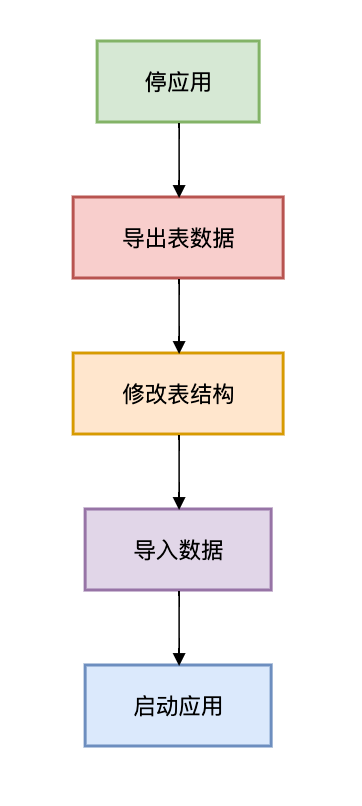
When to Use:
- Maintenance window available
- Low concurrency system
- Data < 100 GB
- Rollback plan ready
---
IV. Approach 3 — PT-OSC Tool
Percona's `pt-online-schema-change`:

Install and run:
sudo yum install percona-toolkit

pt-online-schema-change \
--alter "ADD COLUMN age INT" \
D=test,t=user \
--execute
Pros:
- Minimizes downtime
- Widely used, easy to script
Cons:
- Triggers can cause overhead
- Not ideal for foreign key-heavy tables
---
V. Approach 4 — Logical Migration + Dual Write
Best for:
- Schema change + business logic change
- Zero data loss (financial data)
- Very large tables (1B+ rows)
Steps
- New Table Structure
- Dual Write in Application
@Transactional
public void addUser(User user) {
    userOldDAO.insert(user);
    userNewDAO.insert(convertToNew(user));
}
CREATE TABLE user_new (
id BIGINT PRIMARY KEY,
name VARCHAR(50),
age INT DEFAULT 0,
KEY idx_name(name)
) ENGINE=InnoDB;- Batch Data Migration
- Gray Switch

SET @start_id = 0;
WHILE EXISTS(SELECT 1 FROM user WHERE id > @start_id) DO
    INSERT INTO user_new (id, name, age)
    SELECT id, name, COALESCE(age_cache, 0)
    FROM user
    WHERE id > @start_id
    ORDER BY id
    LIMIT 10000;

    SET @start_id = (SELECT MAX(id) FROM user_new);
    COMMIT;
    SELECT SLEEP(0.1);
END WHILE;
---
VI. Approach 5 — gh-ost
Open-source by GitHub. Trigger-less online schema change via binlog parsing.
Advantages over Trigger-Based PT-OSC:
- Lower primary DB load
- Can pause/resume
- Better high-concurrency performance
Sample Command:
gh-ost \
--alter="ADD COLUMN age INT NOT NULL DEFAULT 0" \
--host=Primary_DB_IP --port=3306 \
--user=gh_user --password=xxx \
--database=test --table=user \
--chunk-size=2000 \
--max-load=Threads_running=80 \
--critical-load=Threads_running=200 \
--execute \
--allow-on-master
Process:
- Full copy in small chunks
- Incremental sync via binlog
- Millisecond atomic cut-over via `RENAME TABLE`
---
VII. Approach 6 — Sliding Window for Partitioned Tables
For large time-based partitions (e.g., logs):
Idea: Only newest partition schema is updated → no giant-table changes.
Modify Partition + Add Column
ALTER TABLE logs ADD COLUMN log_level VARCHAR(10) DEFAULT 'INFO';Create New Partition
ALTER TABLE logs REORGANIZE PARTITION p202302 INTO (
    PARTITION p202302 VALUES LESS THAN (TO_DAYS('2023-03-01')),
    PARTITION p202303 VALUES LESS THAN (TO_DAYS('2023-04-01'))
);
---
VIII. Precautions for Very Large Tables
- Always have a primary key
- Monitor disk space (reserve ≥ 1.5× table size)
- Control replication delay
SHOW SLAVE STATUS;- Avoid `NOT NULL` when possible
- Test on replica first
- Deploy during low traffic
---
IX. Solution Comparison
| Solution | Lock Time | Impact | Consistency | Best Use Case | Complexity |
|--------------------------------|-------------------------|------------------------|------------------------|--------------------------------------------------------|----------------|
| Native Online DDL | Seconds–Minutes | Medium | Strong | < 100M rows | Low |
| Downtime Maintenance | Hours | High | Strong | Offline upgrades (<100GB) | Medium |
| PT-OSC | ms (cut-over) | Medium (trigger load) | Eventual | No heavy FKs/triggers | Medium |
| Logical Migration + Dual Write | 0 | Low | Strong | Financial-core tables (>1B rows) | High |
| gh-ost | ms (cut-over) | Low | Eventual | TB-scale high-concurrency | Med–High |
| Partition Sliding Window | N/A (partition only) | Very Low | Partition-level | Time-partitioned log tables | Medium |
---
X. Summary Recommendations
- < 100M rows → Native Online DDL or PT-OSC
- > 100M high concurrency → gh-ost
- Financial-grade → Dual Write migration
- Log tables → Sliding Window partition scheme
- Always backup before change
- For extreme scale → consider sharding over direct DDL
---
Final Thoughts
For mission-critical environments, plan, stage, and test your schema changes.
The right tool and method depend heavily on:
- Table size
- Business tolerance for downtime
- Data integrity requirements
---
Would you like me to create a decision flowchart illustrating when to choose each approach? That would make this guide even easier to use in real-world planning.


