
How to Build a Portfolio Website with Figma and AI Tools: A Developer’s Guide
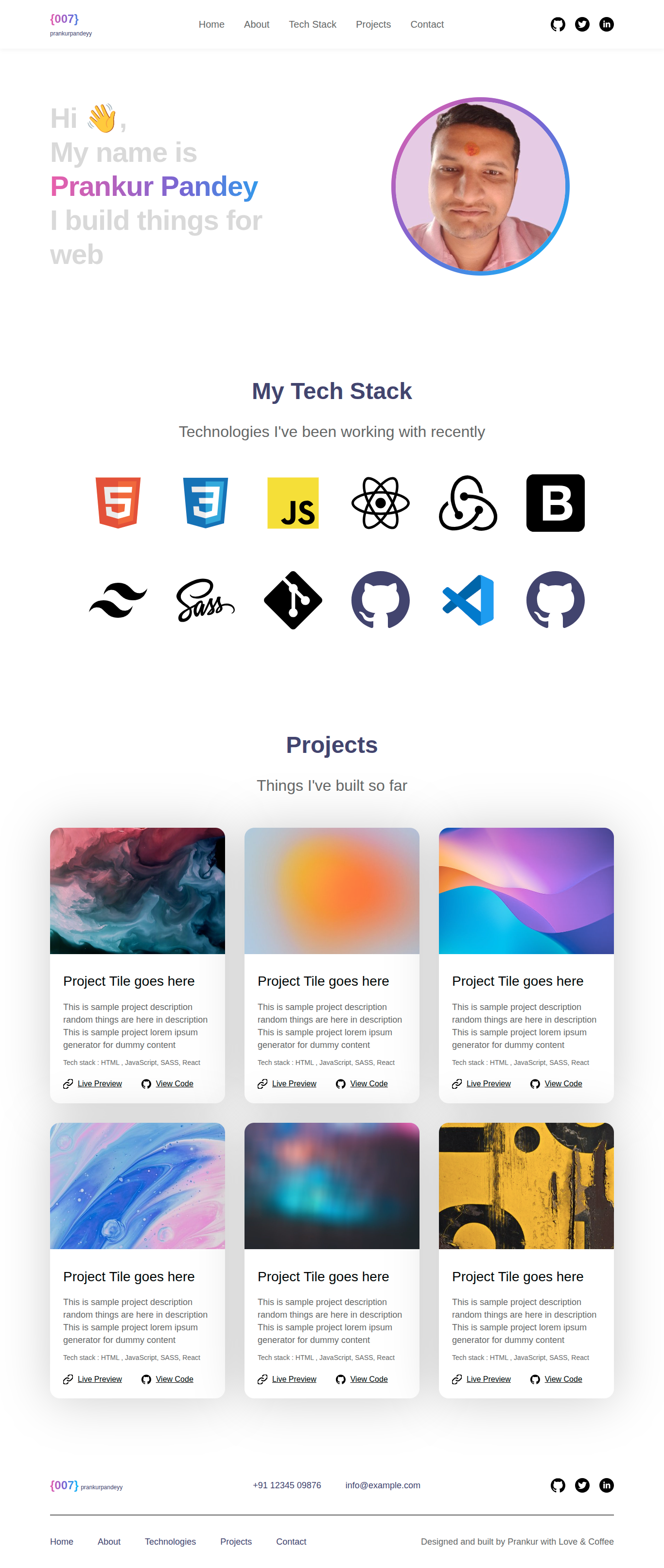
# How to Build a Stand‑Out Portfolio Website (2025 Guide)

Ever since my article on [How to Become a Full Stack Developer and Get a Job in 2025](https://www.freecodecamp.org/news/become-a-full-stack-developer-and-get-a-job/) went viral, I’ve been flooded with DMs, emails, and messages. The questions span **learning to code**, **system design**, **web design**, and **AI’s role** in modern development.

My last deep‑dive into *system design principles* got great feedback — motivation enough to keep delivering practical guides.

Lately, I’ve become especially interested in **UI/UX design**. Not only because I’m curious, but because readers have consistently asked for a **step‑by‑step guide** to:

- Learning web design
- Applying it to real projects
- Understanding the AI‑driven future of design & development

I began six years ago as a **software tester**, then moved into full‑stack development, DevOps, data analysis, and now balance full‑time freelancing with farming.
One thing became crystal clear: **a strong portfolio unlocks opportunities you didn’t think possible**.

This tutorial will show you exactly how I rebuilt my own portfolio — **from scratch** — with smart structure, clean design, and compelling copywriting.

---

## 📚 Table of Contents
- [What is a Portfolio Website and Why Do You Need One?](#what-is-a-portfolio-website-and-why-do-you-need-one)
- [Important Portfolio Website Components](#important-portfolio-website-components)
- [How to Make Your Portfolio Website Stand Out](#how-to-make-your-portfolio-website-stand-out)
- [How to Use Figma to Design Your Portfolio](#how-to-use-figma-to-design-your-own-portfolio)
- [Tools for Figma to Code Generation](#tools-for-figma-to-code-generation)
- [Copywriting for Your Portfolio](#copywriting-for-your-portfolio)
- [Testing Benchmarks](#testing-benchmarks-for-a-portfolio-website)
- [Hosting Your Portfolio](#hosting-your-portfolio)
- [Using Your Portfolio Effectively](#how-to-use-your-portfolio-effectively)
- [Q&A](#qa)
- [Final Notes](#final-notes)
- [Conclusion](#conclusion)

---

## What is a Portfolio Website and Why You Need One

A **portfolio website** is your personalized online space where you showcase projects, achievements, and creative work. Unlike a static résumé, it is interactive, visual, and tailored to your style.

**Benefits:**
- **Visual impact**: Show, don’t just tell.
- **Control over narrative**: You decide what story your work tells.
- **Professional branding**: Highlights your dedication and style.
- **Networking hub**: One link for recruiters, clients, collaborators.
- **SEO advantage**: Easier to find via search.

💡 *Pro Tip:* If you plan on actively publishing content related to your portfolio, consider **[AiToEarn](https://aitoearn.ai/)** — an open-source AI content monetization platform that lets you **create, publish, and earn** across multiple social channels simultaneously (Douyin, Kwai, WeChat, Bilibili, Facebook, Instagram, LinkedIn, YouTube, Pinterest, X/Twitter).

---

## Important Portfolio Website Components

### 1. **Home Page**
Your first impression. Clearly state:
- Who you are
- What you do
- Why you’re worth hiring/collaborating with

Example headline:
> “Hi, I’m Prankur – I build fast, user‑friendly web apps.”

---

### 2. **About Me**
- Share your journey
- Keep it conversational
- Include a clear, friendly photo

---

### 3. **Projects / Work**
For each project include:
- Short description
- Tools used
- Problem solved
- Screenshot or live demo link
- GitHub link (if applicable)

Focus on **quality over quantity** — 3–6 outstanding projects.

---

### 4. **Case Studies** *(Optional)*
Describe problem → solution → impact of key projects.

---

### 5. **Skills & Tools**
Group skills by category:
- **Frontend:** HTML, CSS, React
- **Backend:** Node.js, MongoDB
- **Design:** Figma, Adobe XD

---

### 6. **Testimonials** *(Optional)*
Short quotes from clients, mentors, or peers.

---

### 7. **Blog / Articles** *(Optional)*
Showcase thought leadership. Even 2–3 solid posts add value.

---

### 8. **Contact**
Make reaching out easy:
- Email address
- LinkedIn, GitHub links
- Contact form
- Short invitation:
> “Have a project? Let’s connect.”

---

### 9. **Résumé Download** *(Optional)*
A PDF for quick sharing with recruiters.

---

### 10. **Call to Action**
Guide visitors to act:
- “Hire me”
- “View my latest work”
- “Subscribe for updates”

---

## How to Make Your Portfolio Website Stand Out

1. **Highlight your best work**
2. **Use high‑quality visuals**
3. **Write clear, concise copy**
4. **Tell your story**
5. **Keep navigation simple**
6. **Update regularly**
7. **Optimize for SEO** (keywords, meta descriptions, accessible text)

---

## How to Use Figma to Design Your Portfolio

**Figma Steps:**

1. **Wireframe first**: Layout sections → hero, skills, projects, blog, contact
2. **Add colors and typography**
3. **Create reusable components** (cards, buttons, navigations)
4. **Replace placeholders with real content**
5. **Prototype interactions**
6. **Export assets & hand over to development**

💡 Using **Auto Layout** in Figma keeps spacing and alignment consistent when content changes.

---

## Tools for Figma → Code Generation

**Manual Method**:
- Export assets from Figma
- Write HTML/CSS/JS or React from scratch

**AI Method**:
- AI tools like V0, Builder.io, Kombai convert Figma designs into code
- Always **review and refine** AI‑generated code for responsiveness and accessibility

---

### Example HTML Structure (Manual Approach)
Modern UI for Everyone
Beautiful designs built for speed and accessibility.
Get Started

---

## Copywriting for Your Portfolio

**Good copywriting helps visitors take action.**

Tips:
1. **Strong headline**: Immediate clarity.
2. **Tell your story**: Make it personal.
3. **Write benefit‑focused descriptions**
4. **Include CTAs**
5. **Maintain tone consistency**

Example headline:
> “I build modern, responsive web apps that turn ideas into reality.”

---

## Testing Benchmarks for a Portfolio Site

Before going live:
- **Speed** (Load in <3 seconds)
- **Core Web Vitals** (LCP, INP, CLS)
- **Mobile responsiveness**
- **Accessibility** (WCAG compliance)
- **SEO best practices**
- **Cross‑browser compatibility**
- **Security checks** (HTTPS)
- **Optimized assets** (Images, CSS, JS)
- **Real user monitoring** (RUM)

---

## Hosting Your Portfolio

Top free hosting choices:
- **Vercel**: Great for React/Next.js
- **GitHub Pages**: Perfect for static sites
- **Netlify**: Quick deployments with CI/CD

---

## How to Use Your Portfolio Effectively

- Share your link in **résumés, LinkedIn messages, proposals**
- Add to **email signature**
- Embed in **GitHub profile**
- Post portfolio updates on **social media**
- Tailor it for **different applications/clients**

---

## Q&A

**Q1:** Is a portfolio really essential?
Yes. One link showcasing all your work is more professional than multiple scattered links.

**Q2:** Is a custom domain worth it?
Absolutely — signals seriousness.

**Q3:** AI or manual build?
Manual first for fundamentals, AI second for speed.

**Q4:** Best hosting?
Free plans from Vercel, Netlify, or GitHub Pages are great starting points.

---

## Final Notes

A portfolio is **your digital identity**. Keep improving it as your skills grow. Combine creativity, clarity, and usability — tools can help, but authenticity makes it memorable.

---

## Conclusion

Your portfolio isn’t just a site — it’s **your professional story**.
Use it to showcase not only *what* you’ve built, but *how* you solve problems and add value.

Consider integrating tools like **[AiToEarn](https://aitoearn.ai/)** to help you turn your portfolio and creative assets into multi‑platform content, auto‑published and tracked for performance — freeing you up to focus on creating, while still enjoying global reach.

**Design + Creativity + Development + Execution = The Ultimate Developer Stack 🔥**

---

**Connect with me:**
- 💻 Portfolio: [prankurpandeyy.is-a.dev](https://prankurpandeyy.is-a.dev/)
- 🐦 X/Twitter: [prankurpandeyy](https://x.com/prankurpandeyy)
- 💼 LinkedIn: [linkedin.com/in/prankurpandeyy](https://linkedin.com/in/prankurpandeyy)
- 📂 GitHub: [prankurpandeyy](https://github.com/prankurpandeyy)

