# **How to Create System Architecture Documentation Everyone Can Understand**
Imagine being asked to give UX feedback on a system workflow document — and realizing you can’t understand a single word of it.
That’s exactly what happened to me.
As an IT support officer, I’m used to putting myself in a user’s shoes to spot friction points. But this document?
No visuals. No plain-language explanations. Just dense backend jargon: *service mesh, container orchestration, async queues, REST APIs...* you name it.
If someone like me struggles to grasp it, PMs, frontend developers, new hires, and even other IT staff will likely hit the same wall.
This guide will help you create **system architecture documentation** that **anyone** on your team can read and actually use.
---
## **Table of Contents**
- [Step 1: Show the System from Different Angles](#step-1-show-the-system-from-different-angles)
- [Step 2: Make Diagrams the Star](#step-2-make-diagrams-the-star)
- [Step 3: Translate Tech Into User-Relevant Outcomes](#step-3-translate-tech-into-user-relevant-outcomes)
- [Step 4: Make Communication Clear](#step-4-make-communication-clear)
- [Step 5: Keep it Simple and Consistent](#step-5-keep-it-simple-and-consistent)
- [System Architecture Documentation Tools](#system-architecture-documentation-tools)
- [Conclusion](#conclusion)
---
## **Step 1: Show the System from Different Angles**
A strong architecture document is more than just a glossary of tech terms. Present multiple perspectives tailored to different audiences.
### **A. Conceptual View** *(PM / UX / business roles)*
- Focus: **What the system achieves for the user**
- Example: *“User Authentication System”*, *“Checkout Service”*
- Highlight **user value** and **business objectives**
### **B. Component View** *(Frontend Developers / IT Staff)*
- Focus: **How parts interact and data flows**
- Example: *“Web App → API Gateway → Microservice → Database”*
- Emphasize **system boundaries** and **data flow**
### **C. Physical / Operational View** *(DevOps / Infrastructure Engineers)*
- Focus: **Where the system runs and how**
- Example: *servers, databases, cloud setup, scaling*
- Cover **infrastructure** and **deployment** details
---
## **Step 2: Make Diagrams the Star**
Text-heavy documentation is hard to digest. Use visuals to explain complex systems.
### **Recommended Diagram Types**
- **System Context Diagram** — Shows system and external dependencies
- **Container Diagram** — Highlights main boundaries (*"Web App"*, *"Auth API"*, *"Database"*)
- **Component Diagram (UML)** — Details internal structure and interactions
- **Data Flow Diagram** — Tracks data from source to destination
> **Tip:** Even a quick sketch in PowerPoint, Figma, or on paper beats walls of text. Clarity trumps artistic polish.
---
### **Example 1: System Context Diagram**
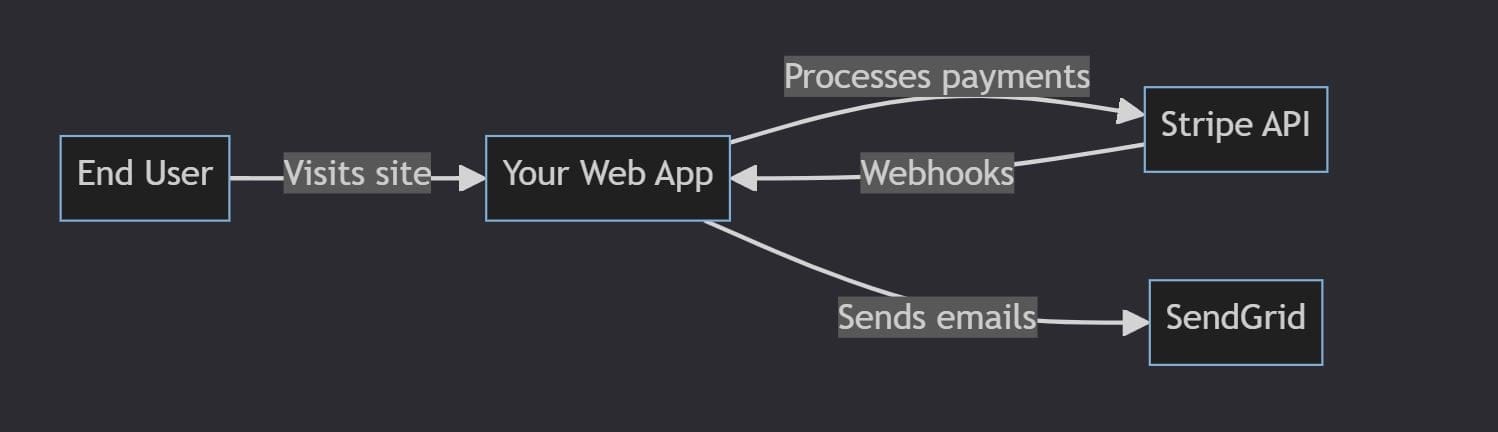
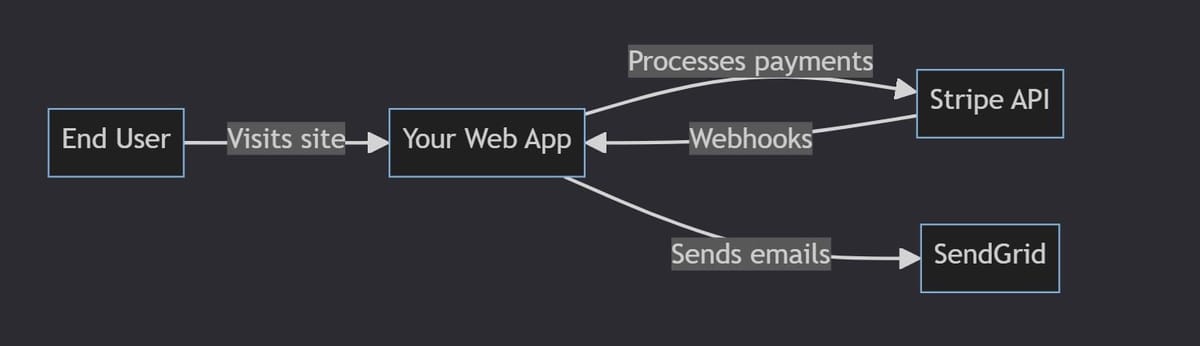
This diagram shows:
- Who uses the system (*web user*)
- External services it depends on (*Stripe* for payments, *SendGrid* for emails)
- **No internal logic** — just external interactions
---
### **Example 2: Container Diagram**
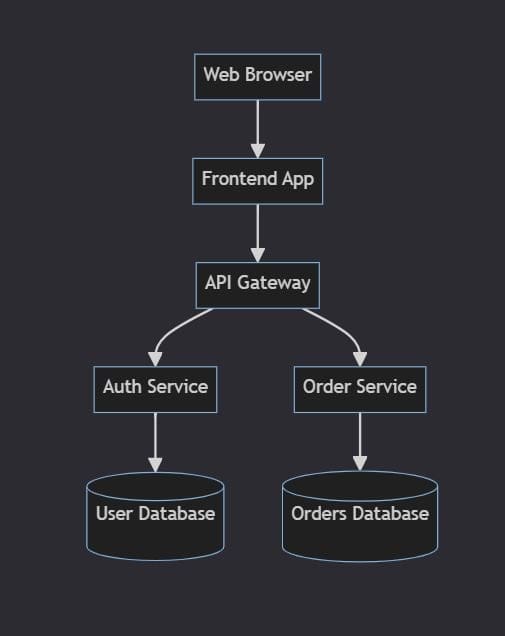
Shows:
- **Web App** — user-facing interface
- **Auth API** — handles login & security
- **User Database** — stores profiles
- Arrows indicate **component interactions**
---
## **Step 3: Translate Tech Into User-Relevant Outcomes**
When jargon is necessary, link it to its value.
| Requirement | ❌ Technical Jargon | ✅ User Outcome |
|--------------|-------------------------------------------------|---------------------------------------------------|
| Scalability | Kubernetes for container orchestration | Handles **10× more users** without slowing down |
| Performance | CDN + caching | Pages load in **<500ms**, no “loading” screens |
| Security | TLS 1.3 for data transfer | Data safe; only authorized systems access **PII** |
---
## **Step 4: Make Communication Clear**
- **Define acronyms** at first use unless truly standard.
- **Break processes** into simple steps.
- Use **active voice and examples**.
**Communication Channels in Docs:**
- **Frontend ↔ Backend:**
Example: *“The website sends login requests to the Auth API.”*
- **Backend ↔ Backend:**
Explain **synchronous** (instant API calls) vs **asynchronous** (background jobs/events) so even non-backend staff understand the speed differences users may notice.
---
## **Step 5: Keep it Simple and Consistent**
- **Use consistent terms:** *“Order Service”* should not randomly become *“Order Processor”*
- **Update docs regularly** to match system changes
- **Explain decisions:**
Example: *“NoSQL DB chosen for User Profiles because it supports fast read/write for non-relational data.”*
---
## **System Architecture Documentation Tools**
### **Writing Platforms**
- **Google Docs** — simple, collaborative, great starting point
- **Confluence** — enterprise use, integrates with Jira
- **Notion** — flexible workspace, docs + tasks in one
- **GitHub/GitLab Wikis** — developer-friendly, version-controlled
---
### **Diagramming Tools**
- **Draw.io / diagrams.net** — free, browser-based, exports PNG/SVG
- **Figma** — live collaboration, also handles diagrams well
- **Mermaid** — diagrams as code, integrates with GitHub/GitLab
[Mermaid Live Editor](https://mermaid.live/)
---
> **Pro Tip:** Avoid tools that produce only static images for critical diagrams — they’re harder to keep consistent when names/services change.
---
## **Conclusion**
Clear architecture docs bridge **technical depth** and **team-wide understanding**.
Multiple views, well-crafted diagrams, and jargon translated into **user outcomes** make docs more accessible.
For teams working on multi-platform or AI-driven workflows, tools like [AiToEarn官网](https://aitoearn.ai/) can integrate **documentation creation, AI generation, cross-platform publishing, and analytics** into a single open-source ecosystem, helping keep diagrams, text, and explanations **consistent** across Douyin, WeChat, LinkedIn, YouTube, and more.
**Clear docs + efficient publishing = faster alignment and smoother projects.**