
Introducing Advanced Tooling Capabilities on the Claude Developer Platform

Introducing Advanced Tool Use on the Claude Developer Platform
---
Overview
The next generation of AI Agents will need to integrate with hundreds or thousands of tools — from developer IDE assistants with Git, package managers, testing frameworks, and deployment pipelines, to operations coordinators managing Slack, GitHub, Google Drive, Jira, databases, and dozens of MCP servers.
To build effective agents, tools must be:
- Discoverable on demand without loading all definitions into the agent’s initial context.
- Callable via code, enabling orchestration logic like loops, conditionals, and transformations.
- Learned from real examples, not just schema definitions, to avoid misuse of parameters.
We have released three new tool-use capabilities:
- Tool Search Tool – Discover tools in large libraries without inflating context.
- Programmatic Tool Calling – Call tools from code to reduce token use and improve efficiency.
- Tool Use Examples – Provide sample invocations to improve accuracy and adherence to conventions.
---
The Context Challenge
MCP (Model Context Protocol) tool definitions can consume massive token budgets before any request is processed.
Example with 5 connected servers:
- GitHub: 35 tools (~26K tokens)
- Slack: 11 tools (~21K tokens)
- Sentry: 5 tools (~3K tokens)
- Grafana: 5 tools (~3K tokens)
- Splunk: 2 tools (~2K tokens)
Total: ~55K tokens. Add Jira (~17K tokens) and you can easily exceed 100K tokens, with some cases at 134K+ tokens.
Problems:
- Wrong tool selection (similar names).
- Incorrect parameter usage.
---
Solution 1 – Tool Search Tool
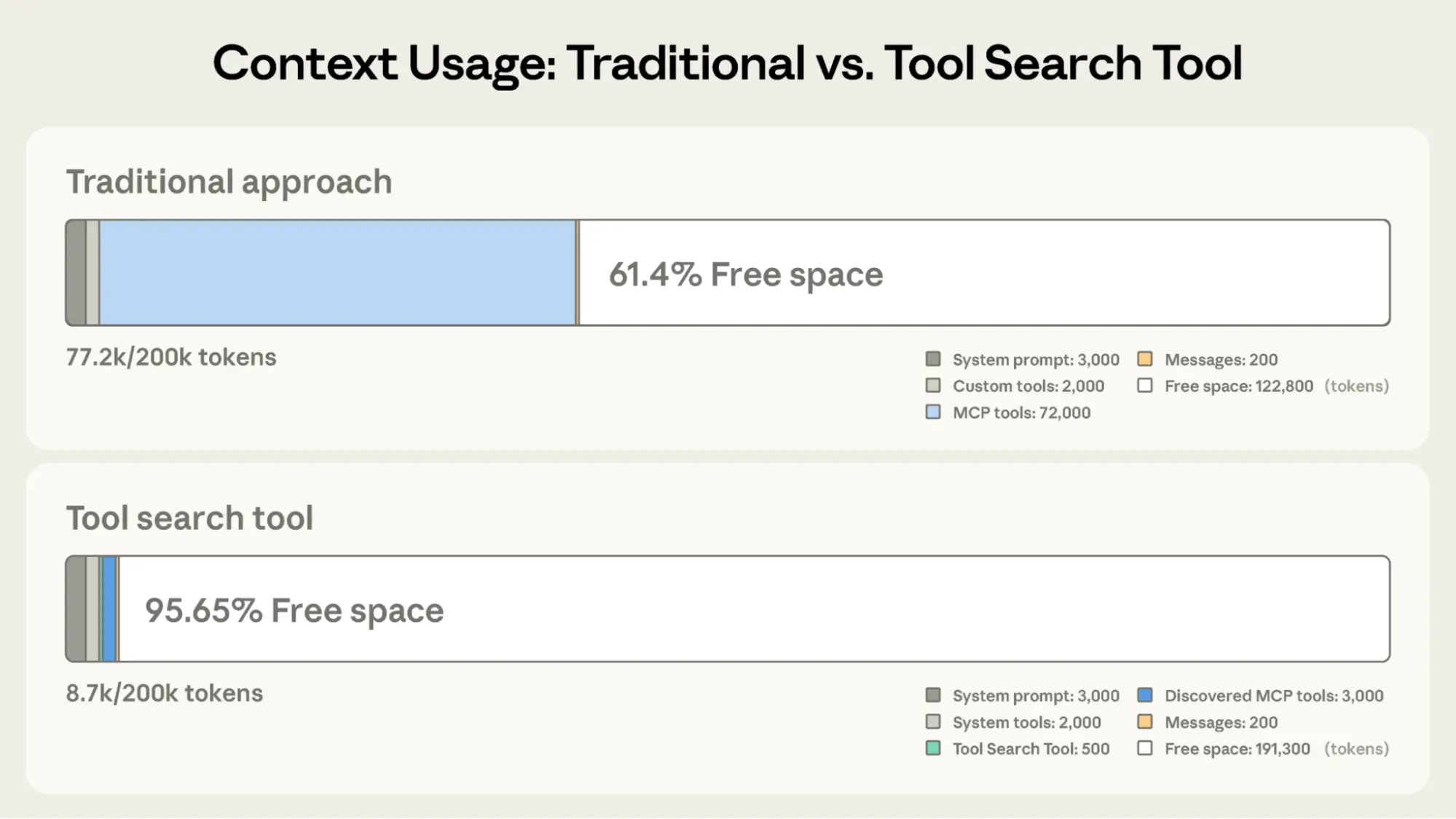
Key idea: Do not pre-load all tool definitions. Only load Tool Search Tool and most-used tools; discover others on demand.
Benefits:
- Up to 95% context window savings (e.g., from ~77K tokens down to ~8.7K).
- Improved accuracy with large tool libraries (Opus 4: 49% → 74%; Opus 4.5: 79.5% → 88.1%).
Example Configuration
{
  "tools": [
    {"type": "tool_search_tool_regex_20251119", "name": "tool_search_tool_regex"}
  ]
}
Delay-load tools with `defer_loading: true`:
{
  "name": "github.createPullRequest",
  "description": "Create a pull request",
  "input_schema": {...},
  "defer_loading": true
}
Delay-load an entire MCP server but keep high-frequency tools active:
{
  "type": "mcp_toolset",
  "mcp_server_name": "google-drive",
  "default_config": {"defer_loading": true},
  "configs": {
    "search_files": {
      "defer_loading": false
    }
  }
}
---
Best use cases:
- Tool definitions exceed 10K tokens.
- Multiple MCP servers connected.
- Frequent tool selection errors.
Avoid if:
- Small toolset (<10 tools).
- All tools used every session.
- Extremely compact definitions.
---
Solution 2 – Programmatic Tool Calling
The Challenge
Traditional tool calls cause:
- Context pollution – large intermediate results fill the window.
- Multiple inference passes – one per tool call, slowing workflows.
The Solution
Programmatic Tool Calling (PTC) – Claude writes orchestration code to call tools inside code execution.
Advantages:
- Token savings – 37% reduction in complex research workflows.
- Latency reduction – fewer inference passes.
- Accuracy improvement – explicit orchestration logic.
---
Example – Q3 Travel Budget Check
Three tools:
- `get_team_members(department)` – team IDs and levels.
- `get_expenses(user_id, quarter)` – detailed expense items.
- `get_budget_by_level(level)` – budget limit per level.
Traditional flow:
20× `get_expenses` calls returning 50–100 items → 2000+ records in context.
PTC flow:
All records processed in code; only final results enter context.
Example Python orchestration:
team = await get_team_members("engineering")

levels = list(set(m["level"] for m in team))
budget_results = await asyncio.gather(*[
    get_budget_by_level(level) for level in levels
])
budgets = dict(zip(levels, budget_results))

expenses = await asyncio.gather(*[
    get_expenses(m["id"], "Q3") for m in team
])

exceeded = []
for member, exp in zip(team, expenses):
    budget = budgets[member["level"]]
    total = sum(e["amount"] for e in exp)
    if total > budget["travel_limit"]:
        exceeded.append({
            "name": member["name"],
            "spent": total,
            "limit": budget["travel_limit"]
        })

print(json.dumps(exceeded))
---
When to use PTC:
- Processing large datasets.
- Multi-step workflows (>3 calls).
- Filtering data before Claude sees it.
- Running parallel operations.
Avoid if:
- Single, simple calls.
- Claude must see all intermediate data.
---
Solution 3 – Tool Use Examples
The Challenge
JSON Schema defines structure but lacks usage patterns — leading to:
- Format ambiguity (e.g., date formats).
- Inconsistent IDs.
- Unclear nested object population.
- Parameter irrelevance or misuse.
The Solution
Provide tool usage examples inside definitions.
Example:
{
  "tool": "search_customer_orders",
  "examples": [
    {"date_range": ["2025-01-01", "2025-01-31"], "status": "pending"},
    {"total_min": 50.00, "total_max": 200.00},
    {
      "date_range": ["2025-02-01", "2025-02-15"],
      "status": "shipped",
      "total_min": 100.00
    }
  ]
}
Benefits:
- Clarifies formatting conventions.
- Shows parameter relationships.
- Improves accuracy (internal tests: 72% → 90%).
---
Best use cases:
- Complex structures & optional parameters.
- APIs with domain-specific conventions.
- Similar tools needing distinction.
Avoid if:
- Simple tool with obvious usage.
- Standard formats already understood.
---
Best Practices for Combining Features
Match feature to bottleneck:
- Context inflation → Tool Search Tool
- Intermediate results → Programmatic Tool Calls
- Parameter errors → Tool Use Examples
Layer strategically:
- Start with main bottleneck.
- Add other features as needed.
Tip: Clear tool names & descriptions improve Tool Search accuracy.
---
Claude System Prompt & Tool Guidelines
1. Good vs Bad Definitions
Good:
{
    "name": "search_customer_orders",
    "description": "Search for customer orders by date range, status, or total amount."
}
Bad:
{"name": "query_db_orders", "description": "Execute order query"}2. System Prompt
- List major tools (Slack, Drive, Jira, GitHub).
- Always preload top 3–5 tools.
- Use tool search for others.
3. Programming-Friendly Format
Return formats explicit for parsing.
4. Opt-in Tool Types
- Parallel executable.
- Retry-safe.
5. Parameter Accuracy
Provide concise, realistic examples.
6. Beta Feature Activation
client.beta.messages.create(
    betas=["advanced-tool-use-2025-11-20"],
    model="claude-sonnet-4-5-20250929",
    max_tokens=4096,
    tools=[
        {"type": "tool_search_tool_regex_20251119", "name": "tool_search_tool_regex"},
        {"type": "code_execution_20250825", "name": "code_execution"}
    ]
)
---
Resources
---
Acknowledgments
Research by Chris Gorgolewski, Daniel Jiang, Jeremy Fox, Mike Lambert. Inspired by LLMVM, Cloudflare Code Mode, and Code Execution as MCP.
---
In Practice:
For multi-platform publishing and monetization, consider AiToEarn官网 — open-source toolkit for AI content generation, publishing, analytics, and model ranking, supporting Douyin, Kwai, WeChat, Bilibili, Xiaohongshu, Facebook, Instagram, LinkedIn, Threads, YouTube, Pinterest, and X/Twitter.
---
Source: https://www.anthropic.com/engineering/advanced-tool-use


