
Jensen Huang’s $30K Personal Supercomputer for Elon Musk Needs a Mac Studio to Run Smoothly? First Real-World Reviews Are In
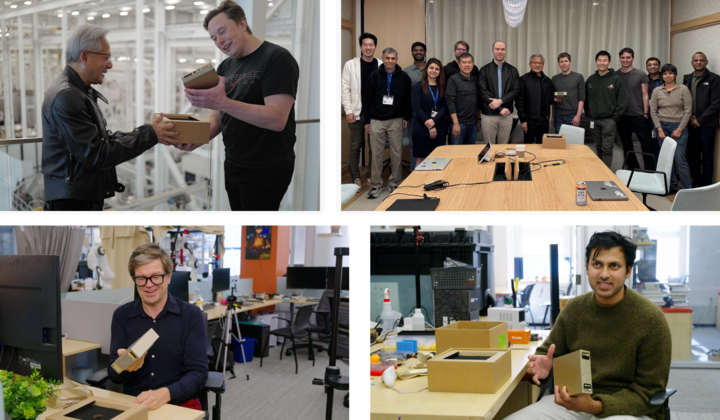
200B Parameters, 30,000 RMB, 128GB Memory — Can the “World’s Smallest Supercomputer” Really Let You Run Large Models on a Desktop?
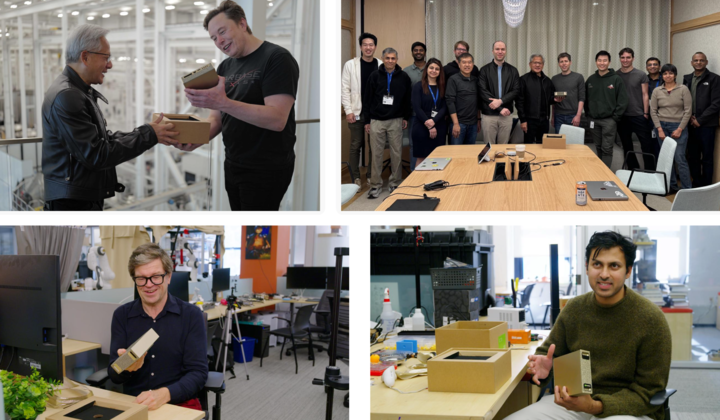
▲ Image from x@nvidia
A few days ago, Jensen Huang personally delivered this supercomputer to Elon Musk, and later took one to OpenAI headquarters to present to Sam Altman. From its CES debut to real-world rollout, this personal AI powerhouse is finally reaching users.
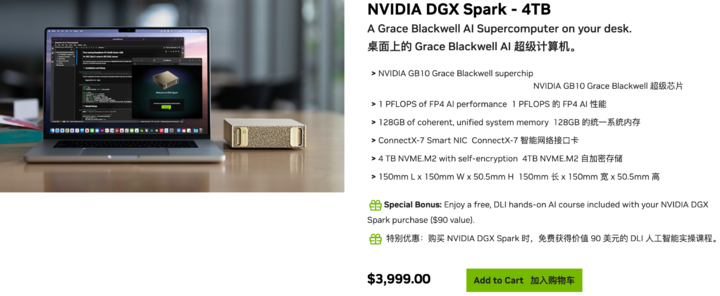
▲ Official sales page — USD 3,999; available from ASUS, Lenovo, Dell, and others.
NVIDIA DGX Spark is a personal AI supercomputer aimed at researchers, data scientists, and students, providing high-performance desktop AI computing power to fuel model development and innovation.
---
Everyday Use Cases for Regular Users
While marketed for professional workloads, DGX Spark opens up highly compelling local AI scenarios:
- Run Large Models Locally
- Keep chat data fully on your own machine for absolute privacy.
- Local Creative Work
- Generate high-quality images and videos without restrictions, memberships, or quotas.
- Private AI Assistant
- Train a personal “Jarvis” using your own data — tuned exclusively to you.
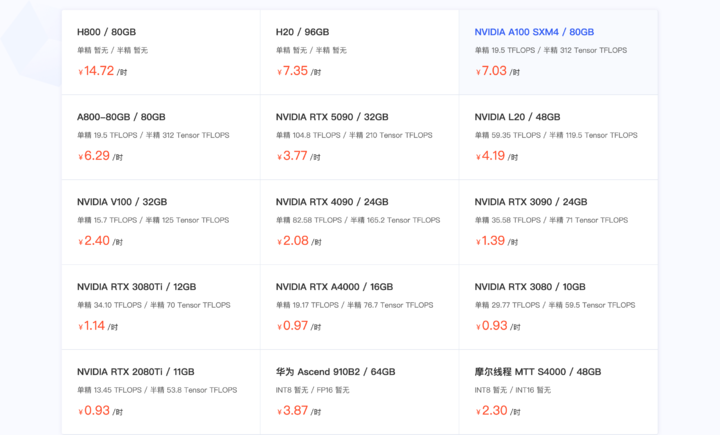
▲ A100 GPU rental prices: 7 RMB/hour
---
The Big Question
What can the DGX Spark GB10 Grace Blackwell superchip really do?
At 30,000 RMB — about the same as renting an A100 for 4,000 hours — could one truly use it for local large model inference?
We collected detailed DGX Spark reviews from multiple sources to examine the value before hands-on testing.
---
TL;DR Performance Snapshot
- Strengths: Runs lightweight models lightning-fast, handles large models up to 120B parameters. Performance sits between future RTX 5070 and RTX 5070 Ti.
- Biggest Bottleneck: 273 GB/s memory bandwidth limits throughput. Compute power is strong, but data transfer stalls output.
- Optimization Hack: Pair with a Mac Studio M3 Ultra — DGX handles computation, Mac smooths output, reducing “stutter.”
- Plug-and-Play Ecosystem: 20+ ready-to-use scenarios (image/video generation, multi-agent assistants, etc.).
---
Benchmark Insights — “Better than Mac Mini, but...”
Let’s dig into the numbers.
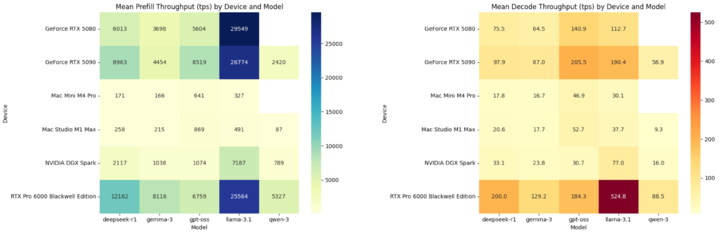
▲ Tokens per second in Prefill and Decode stages — DGX Spark trails RTX 5080
Prefill vs. Decode: Quick Terms
When you query an AI model:
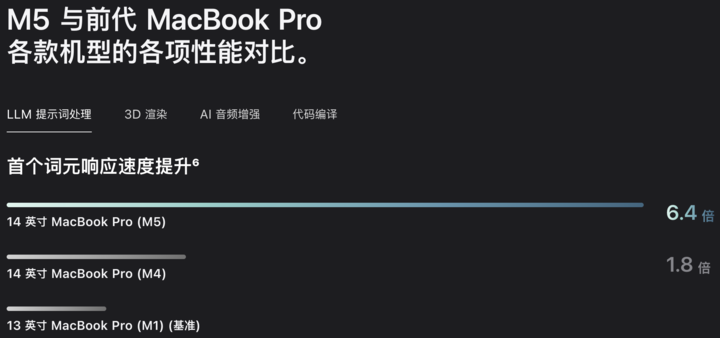
- Prefill (Reading comprehension)
- Model processes your input prompt quickly — determines Time to First Token (TTFT).
- Decode (Answer generation)
- AI outputs the answer word-by-word — measured in Tokens Per Second (TPS).
💡 TPS = Token Per Second
- Prefill TPS → Speed of understanding your question.
- Decode TPS → Speed of typing out the answer.
---
DGX Spark’s TTFT is short — first token appears quickly, but TPS in decode is modest.
For reference, Mac Mini M4 Pro with 24GB unified memory costs ~10,999 RMB.
---
Why the Decode Lag?
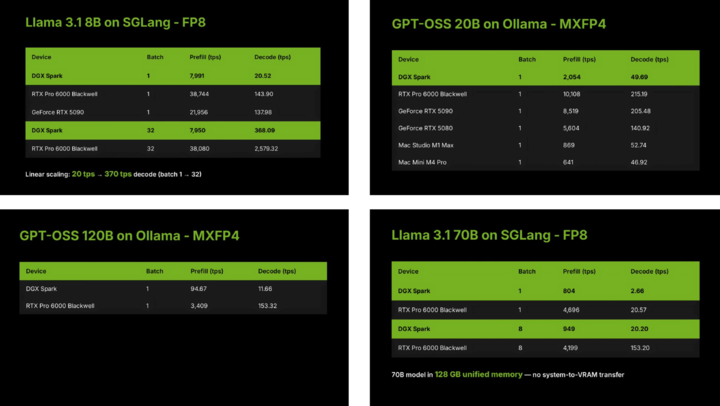
Tests by LMSYS (developers of "Large Model Arena") using SGLang and Ollama showed:
- Batch size 1 → Decode speed: 20 TPS
- Batch size 32 → Decode speed: 370 TPS
Large batch = more data per iteration = greater GPU demand.
DGX Spark’s GB10 chip delivers 1 PFLOP sparse FP4 tensor performance — sits between RTX 5070 & 5070 Ti.
Strengths:
- Compute muscle for big batch processing.
- Generous 128GB memory — fits hundreds-of-billions-parameter models.
Weakness:
- Narrow LPDDR5X bandwidth at 273 GB/s vs. RTX 5090’s 1800 GB/s GDDR7.
Bottom line: Prefill benefits from compute power, Decode depends on bandwidth.
---
Real-World Bandwidth Hacks
Some teams split workload stages across devices for speed boosts.
Example: Exo Lab paired DGX Spark with Mac Studio M3 Ultra (819 GB/s bandwidth):
- DGX Spark → Prefill stage (compute-heavy)
- Mac Studio → Decode stage (bandwidth-heavy)
Challenge: Huge KV-cache transfer between devices.
Solution: Pipeline-layered computation — stream KV-cache as each prefill layer completes.
Result: 2.8× speed increase — but hardware cost jumps to ~RMB 100,000.
---
Beyond Benchmarks — What Else Can It Do?
Local AI Video Generation
Using ComfyUI + Alibaba’s Wan 2.2 14B text-to-video:
- Creator @BijianBowen followed official Playbooks.
- GPU reached 60–70°C with zero fan noise.
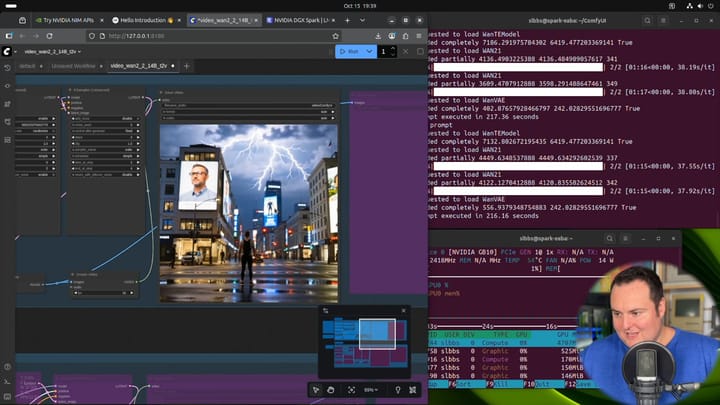
Other reviewers praised quiet operation and clean internal design.
---
Multi-Agent Chatbot Development
Level1Techs ran multiple LLMs/VLMs concurrently on DGX Spark for agent-to-agent interaction:
- Models: 120B GPT-OSS, 6.7B DeepSeek-Coder, Qwen3-Embedding-4B, Qwen2.5-VL:7B-Instruct
- Official NVIDIA site lists 20+ guided scenarios — each with time estimates and step-by-step instructions.
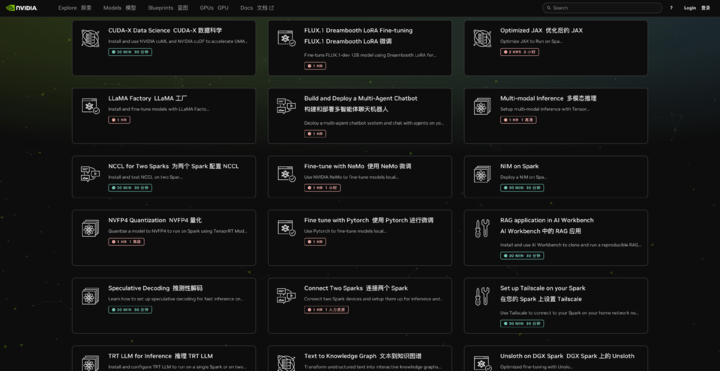
Example: Convert unstructured text to a structured knowledge graph, or perform video search & summarization.
---
Summary
DGX Spark is a desktop AI machine with data center-grade compute power, constrained by memory bandwidth.
Perfect for:
- Running huge models locally where privacy matters.
- Exploring multimedia AI tasks without reliance on cloud credits.
- Leveraging 128GB unified memory for complex AI pipelines.
Limitations:
- Decode stage bottleneck unless optimized with PD separation or similar bandwidth hacks.
- High cost for multi-device configurations.
---
Creator’s Perspective — Pairing with AiToEarn
Platforms like AiToEarn官网 bridge local AI power with global content monetization:
- AI Generation Tools
- Cross-Platform Publishing (Douyin, Kwai, WeChat, Bilibili, Xiaohongshu, FB, Instagram, LinkedIn, Threads, YouTube, Pinterest, X)
- Analytics & Model Ranking
- Open Source (GitHub)
With DGX Spark, creators could:
- Build locally with full control over data & models.
- Publish directly to multiple platforms via AiToEarn.
- Monetize at scale — without depending on cloud infrastructure limits.
---
Final Thought: DGX Spark may be less of a fixed “product” and more of an AI experiment — testing the idea of personal supercomputers. The real question isn’t whether it can run large models, but what happens when everyone has their own AI powerhouse at home?
---
If you’d like, I can create a concise comparison table summarizing DGX Spark’s performance vs. competing devices to make this even easier to scan. Would you like me to add that?


