
MCP Gateway in Action: Zero-Code Tool Extension with Higress + Nacos
AliMei Editorial Introduction
This article presents a privatized MCP intelligent agent gateway architecture using open‑source Higress and Nacos. It enables:
- Dynamic tool registration
- Real-time Prompt updates
- Multi-tenant security isolation
- One-click production deployment without public internet or Helm
---
Background
With the rapid emergence of AI assistants leveraging RAG and intelligent Q&A, traditional Q&A alone falls short for enterprise use. We require assistants that directly invoke APIs and system interfaces, functioning as intelligent agents.
We chose MCP as the communication protocol between models and interfaces due to its growing adoption. When designing an MCP Server for enterprise services, key challenges include:
- Session maintenance via SSE in high-availability multi-instance deployments
- Dynamic Prompt updates for faster iteration
- Authorization isolation for multi-tenant cloud environments
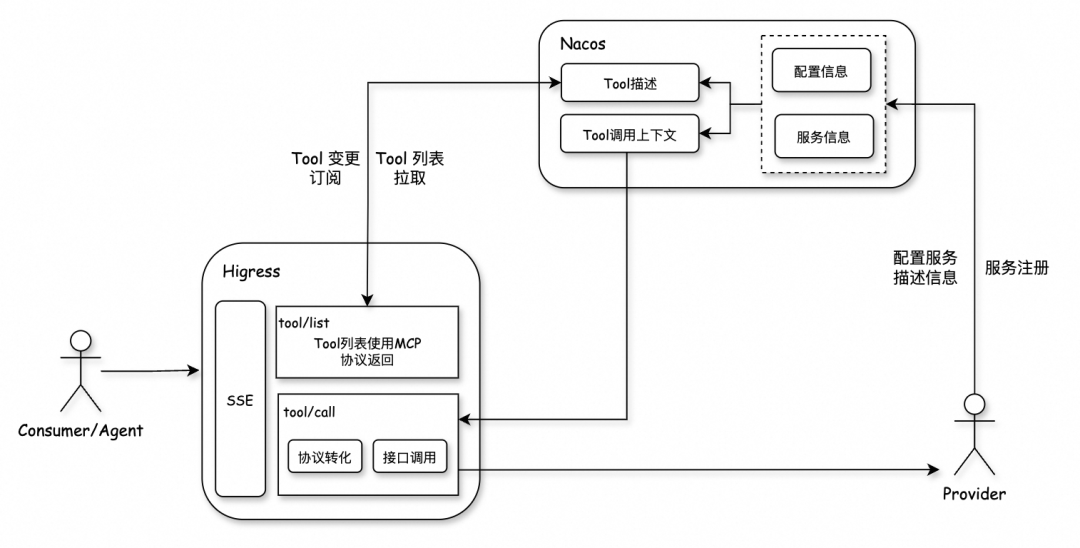
Higress solves challenge 1, offering rich monitoring and a visual console.
Nacos addresses challenge 2 by serving as an MCP registry to store service and tool metadata.
Deployment flow:
- Higress = MCP Proxy
- Nacos = MCP Registry
---
Architecture Overview
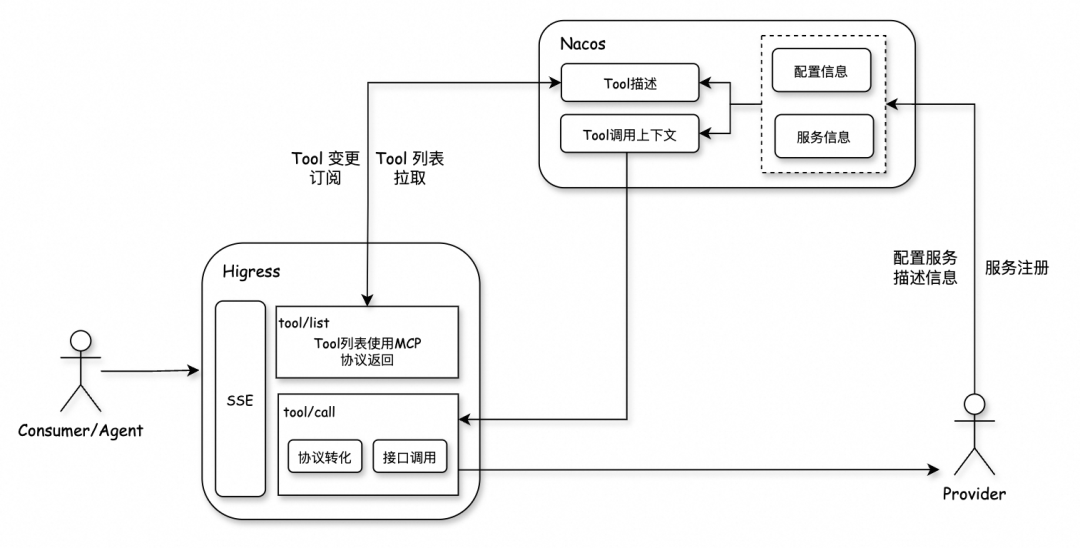
Both components are cloud-native and run in Kubernetes. In isolated production environments (no internet), we use community versions of Higress and Nacos and deploy directly via Docker images without Helm.
Advantages:
- Zero-code tool extension
- Fast Prompt update & verification through visual console
- Tenant isolation via Nacos namespaces
---
Private Deployment of Higress
Deployment Methods
Higress supports:
- Helm
- docker-compose
- All-in-one Docker image
In restricted environments, we use all-in-one Docker (`Dockerfile`) to deploy all processes inside a single pod, scaling via multiple replicas.
FROM higress-registry.cn-hangzhou.cr.aliyuncs.com/higress/all-in-one:latest---
WASM Plugin Download Issue
Direct image deployment may fail due to WASM plugin download via OCI.
MCP in Higress depends on WASM plugins, so we must address this.
---
WASM Plugin Independent Deployment
The plugin-server project enables HTTP-based private plugin distribution. Benefits:
- Avoids network dependency on public OCI registries
- Improves plugin load time
Step 1 – Deploy `plugin-server`
FROM higress-registry.cn-hangzhou.cr.aliyuncs.com/higress/plugin-server:1.0.0Step 2 – Create K8s Service (ClusterIP)
apiVersion: v1
kind: Service
metadata:
  name: higress-plugin-server
  namespace: higress-system
spec:
  type: ClusterIP
  ports:
    - port: 80
      targetPort: 8080
  selector:
    app: higress-plugin-server
> Tip: In Kubernetes, service DNS follows
> `..svc.cluster.local`
Step 3 – Update Plugin Download URL in Higress
ENV HIGRESS_ADMIN_WASM_PLUGIN_CUSTOM_IMAGE_URL_PATTERN=http://[K8s service address]/plugins/${name}/${version}/plugin.wasm
ENV MCP_SERVER_WASM_IMAGE_URL=http://[K8s service address]/plugins/mcp-server/1.0.0/plugin.wasm
---
Once configured, redeploy. Verify ports 8080 and 8443 are active.
---
Configuration Sync Limitation
With all-in-one deployment inside pods:
- Each pod runs independently
- Built-in console config changes affect only one instance
- Config files must be stored in project code and redeployed when updated
---
Sticky Sessions in MCP
For SSE communication, Higress + Redis handles sticky sessions.
Example config:
mcpServer:
  enable: true
  sse_path_suffix: /sse
  redis:
    address: xxx.redis.zhangbei.rds.aliyuncs.com:6379
    username: ""
    password: "xxx"
    db: 0
Redis monitoring:
PSUBSCRIBE mcp-server-sse:*---
Custom Image Build
Official Higress images are minimal. To add enterprise tools like Alibaba Cloud SLS:
- Copy all-in-one Dockerfile contents
- Add extra build steps and dependencies
- Update plugin paths if needed
- Ensure glibc ≥ 2.18 for `envoy`
---
External Access Modes
- Internal Console Access (8001): View configs, no editing
- External MCP Gateway Access (8080): Public client connections
---
Full Dockerfile Example
FROM [Enterprise Base Image]
# Higress all-in-one build steps...
---
Nacos Deployment
Deploy via:
- `nacos-operator` (K8s)
- Direct Docker image
FROM nacos-registry.cn-hangzhou.cr.aliyuncs.com/nacos/nacos-server:latest---
Cluster Deployment
Nacos uses Raft; requires ≥3 instances.
Static config example:
ENV MODE=cluster
ENV NACOS_SERVERS="10.0.0.1:8848 10.0.0.2:8848 10.0.0.3:8848"
> Note: Static IPs are unsuitable in cloud-native environments; use dynamic discovery.
---
Dynamic Discovery via Headless Service
Create headless K8s service:
clusterIP: None
ports:
  - port: 8848
selector:
  app: mcp-nacos
Implement script to dynamically update `cluster.conf` via `nslookup` service FQDN.
---
External MySQL Config
Cluster mode requires MySQL:
ENV SPRING_DATASOURCE_PLATFORM=mysql
ENV MYSQL_SERVICE_HOST=xxx.mysql.zhangbei.rds.aliyuncs.com
ENV MYSQL_SERVICE_DB_NAME=nacos
ENV MYSQL_SERVICE_USER=xxx
ENV MYSQL_SERVICE_PASSWORD=xxx
---
Higress–Nacos Connection Service
Expose ports 8848 and 9848 in K8s Service for gRPC config pulls.
---
Authentication Approach
We reuse existing service-level authentication rather than implementing all in Higress, to:
- Lower maintenance overhead
- Avoid storing sensitive keys in gateway layer
---
MCP End-to-End Verification
Step 1 – Register Service & Tool in Nacos
curl -X POST 'http://127.0.0.1:8848/nacos/v1/ns/instance?...'Step 2 – Configure MCP Source in Higress
Disable auth for quick test.
Step 3 – Connect from Cursor or Cherry Studio
Use Higress MCP gateway URL and test tool invocation.
---
Diagrams
Disaster Recovery Architecture
Tools routed via URIs for isolation.
Logical Module Diagram
Multiple authentication logics coexist without conflict.
---
References
- Builtin Plugin URL Update
- plugin-server Overview
- Nacos Cluster Deployment Docs
- Higress All-in-one Dockerfile
- peer-finder Source
---
Nacos 2.4.0 Release Notes
Highlights
- Config Center: Faster large-scale pushes, lower resource consumption
- Service Discovery: Improved heartbeat, gateway-friendly APIs
- Security: TLS mutual auth, failover enhancements, ACL refinements
- Bug Fixes: High-concurrency refresh fixes, ephemeral deregistration fixed
Upgrade Steps:
- Backup configs and storage
- Update `nacos.properties`
- Validate heartbeat/push settings
- Test dependent services
---
Resources
---
In Summary:
This guide covers private deployment of Higress & Nacos for MCP, solving plugin isolation, sticky sessions, dynamic service discovery, and multi-tenant auth. By combining these with cloud-native patterns, enterprises can deliver secure AI-driven gateways completely offline.


