
Spring Data AOT in IntelliJ IDEA Practice

# Spring Data AOT Repositories in IntelliJ IDEA 2025.3

Spring’s AOT (Ahead-of-Time) engine has been [around](https://spring.io/blog/2021/12/09/new-aot-engine-brings-spring-native-to-the-next-level) since the Spring Native era, but **Spring Data** had not significantly benefited from it — until now.
Historically, repository infrastructure relied heavily on **proxies**, **reflection**, and **runtime-generated queries**, which made applications flexible but slower to start.

With the latest Spring Data release, repositories now [get full AOT support](https://spring.io/blog/2025/11/25/spring-data-ahead-of-time-repositories-part-2).
Method queries can be **pre-generated at build time**, removing runtime overhead.

**IntelliJ IDEA 2025.3** enables developers to inspect, navigate, and debug these **AOT-generated repository classes directly in the IDE**, making development faster, easier, and less error-prone.

---

## Overview: AOT in Spring Data

Enabling AOT is straightforward; see official docs for:

- [Gradle](https://docs.spring.io/spring-boot/gradle-plugin/aot.html)
- [Maven](https://docs.spring.io/spring-boot/maven-plugin/aot.html)

By default, AOT-generated sources are stored in:

- **Gradle:** `build/generated/aotSources`
- **Maven:** `target/spring-aot/main/classes/`

Two artifacts are essential for IntelliJ IDEA:

1. **Generated source code**
2. **JSON metadata** describing repository methods and queries

---

## Example Scenario

We need a repository method to retrieve quotes by author:
List findAllByAuthor(String author);
**Spring Data JPA** and **Spring Data JDBC** produce different AOT outputs for this method.
---
### Spring Data JPA Output
IntelliJ IDEA shows the generated **JPQL** query above the method signature.

Clicking the  icon opens the generated implementation:
public List findAllByAuthor(String author) {
String queryString = "SELECT q FROM Quote q WHERE q.author = :author";
Query query = this.entityManager.createQuery(queryString);
query.setParameter("author", author);
return (List) query.getResultList();
}
---
### Spring Data JDBC Output
Here, IntelliJ IDEA displays **pure SQL** and mapping details.
Repository declaration with SQL:

Generated code:
public List findAllByAuthor(String author) {
Criteria criteria = Criteria.where("author").is(author);
StatementFactory.SelectionBuilder builder =
getStatementFactory().select(Quote.class).filter(criteria);
}
RowMapper execution:
RowMapper rowMapper = getRowMapperFactory().create(Quote.class);
List result = (List) builder.executeWith((sql, paramSource) ->
getJdbcOperations().query(sql, paramSource, new RowMapperResultSetExtractor<>(rowMapper)));
return (List) convertMany(result, Quote.class);
---

## IntelliJ IDEA Query Display

IntelliJ treats AOT output as part of the project’s source set, enabling:

- **Direct navigation** into generated methods
- **Code inspection** and highlighting
- Linking compiled classes to generated sources

---

### JSON Metadata Examples

Spring Data AOT generates JSON metadata for each repository method.

#### JPA Example
{
"name": "findAllByAuthor",
"signature": "public abstract java.util.List org.test.demo2gradleaot.hello.QuoteRepository.findAllByAuthor(java.lang.String)",
"query": {
"query": "SELECT q FROM Quote q WHERE q.author = :author"
}
}
#### JDBC Example
{
"name": "findAllByAuthor",
"signature": "public abstract java.util.List com.jetbrains.test.boot4.server.quote.QuoteRepository.findAllByAuthor(java.lang.String)",
"query": {
"query": "SELECT \"quote\".\"id\" AS \"id\", \"quote\".\"text\" AS \"text\", \"quote\".\"author\" AS \"author\", \"quote\".\"source\" AS \"source\" FROM \"quote\" WHERE \"quote\".\"author\" = :author"
}
}
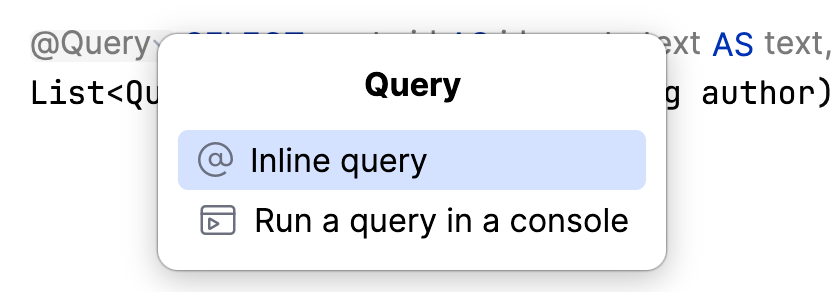
You can refine queries via the **Inline Query** action, injecting them into a `@Query` annotation.
---
## Debugging AOT-Generated Code
AOT-generated repository code is **fully debuggable**.
Set breakpoints directly inside generated methods to see **exact queries** without digging through proxies.
---
## Running Applications in AOT Mode
By default, Spring Boot **does not** load AOT classes when using:
- `./gradlew bootRun`
- `./mvnw spring-boot:run`
- IntelliJ's run icon
Enable AOT by passing:
-Dspring.aot.enabled=true
---

## Configuring Build Tools

### Gradle

Add to `build.gradle.kts`:
tasks.named("bootRun") {
if (project.hasProperty("aot")) {
jvmArgs("-Dspring.aot.enabled=true")
systemProperty("spring.profiles.active", "aot")
}
}
Run:
./gradlew bootRun -Paot
---

### Maven

Create an **AOT profile**:
aot
aot,localdb
-Dspring.aot.enabled=true
org.springframework.boot
spring-boot-maven-plugin
process-aot
process-aot
Run:
./mvnw -Paot package spring-boot:run
💡 **Note:** Spring Boot Docker Compose integration is incompatible with AOT.
Start required services manually and set relevant profiles.
---
## IntelliJ IDEA Run Configurations
You can debug AOT applications via Gradle or Maven run configs.
**Gradle:**

**Maven:**
Similar configuration with:
- **Before launch** task
- JVM Args: `-Dspring.aot.enabled=true`
---
## Limitations
### JDBC Dialect Requirement
For Spring Data JDBC, define a dialect bean:
@Configuration
class AotConfiguration {
@Bean
JdbcDialect dialect() {
return JdbcPostgresDialect.INSTANCE;
}
}
Expected removal in future Spring Boot releases ([issue #47781](https://github.com/spring-projects/spring-boot/issues/47781)).

---

### DevTools Incompatibility

DevTools can cause startup errors in AOT mode. Disable DevTools when debugging AOT:
java.lang.IllegalAccessError: failed to access class org.springframework.boot.autoconfigure.AutoConfigurationPackages$BasePackages
...
---
## Conclusion
Spring Data AOT repositories provide:
- [Faster startup](https://spring.io/blog/2025/05/22/spring-data-ahead-of-time-repositories#how-does-it-work-and-what-can-you-expect)
- Lower memory usage
- Better native image performance
- **Direct visibility** into generated queries
With IntelliJ IDEA 2025.3, you can **inspect, navigate, and debug** AOT repositories like handwritten code—removing guesswork from query execution.
[*Prev post* Open-source IntelliJ IDEA: A Simpler Way to Build and Contribute to the Community](https://blog.jetbrains.com/idea/2025/11/intellij-idea-open-source/)
[](https://jb.gg/blog-idea-download)

