
The Birth of a Sales Data Analysis Bot: How Dify Achieves Automated Closed-Loop with DMS
Background & Challenges
Dify is a low-code AI application development platform that leverages intuitive visual workflow orchestration to lower barriers to large model application development.
However, during enterprise-level deployments, two major limitations emerge:
Key Bottlenecks
- Limited Code Execution
- The built-in Sandbox in Dify supports basic Python execution but cannot install custom packages.
- This prevents implementing complex logic, data processing, or integrating enterprise SDKs.
- No Automated Scheduling
- Lacks support for scheduled triggers, periodic runs, or orchestrated dependencies for Agents/Workflows.
- Limits integration into enterprise automation systems.
These restrictions hinder Dify’s deployment in production, especially for intelligent Agents requiring a fully closed-loop Perception → Decision → Execution → Feedback workflow.
---
Proposed Enhanced Architecture: Dify + DMS Notebook + DMS Airflow
Components
- ✅ DMS Notebook – Full Python environment, custom pip installs, environment variables, async services, secure VPC communication.
- ✅ DMS Airflow – Robust scheduler to trigger workflows/notebook scripts with dependency management.
- ✅ DMS Integration – End-to-end development, debugging, deployment, scheduling, and monitoring.
We’ll demonstrate this by building a Sales Data Analysis Bot that is schedulable, extensible, and maintainable.
---
Extending Dify with DMS Notebook
Why Use Notebook?
Sandbox is insufficient for:
- Pandas data cleaning
- Prophet forecasting
- Enterprise SDK integration
DMS Notebook offers:
- Custom pip install support
- Environment variables (API keys, etc.)
- Async services via FastAPI
- Secure VPC communications
---
Step-by-Step Guide
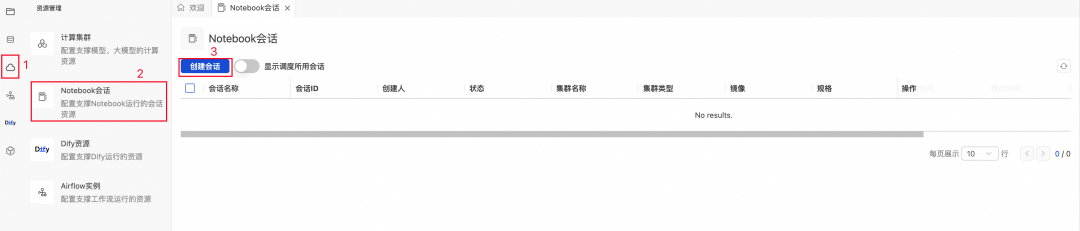
1. Create a Notebook Session
- Navigate to: `DMS Console → Notebook Session → Create Session`
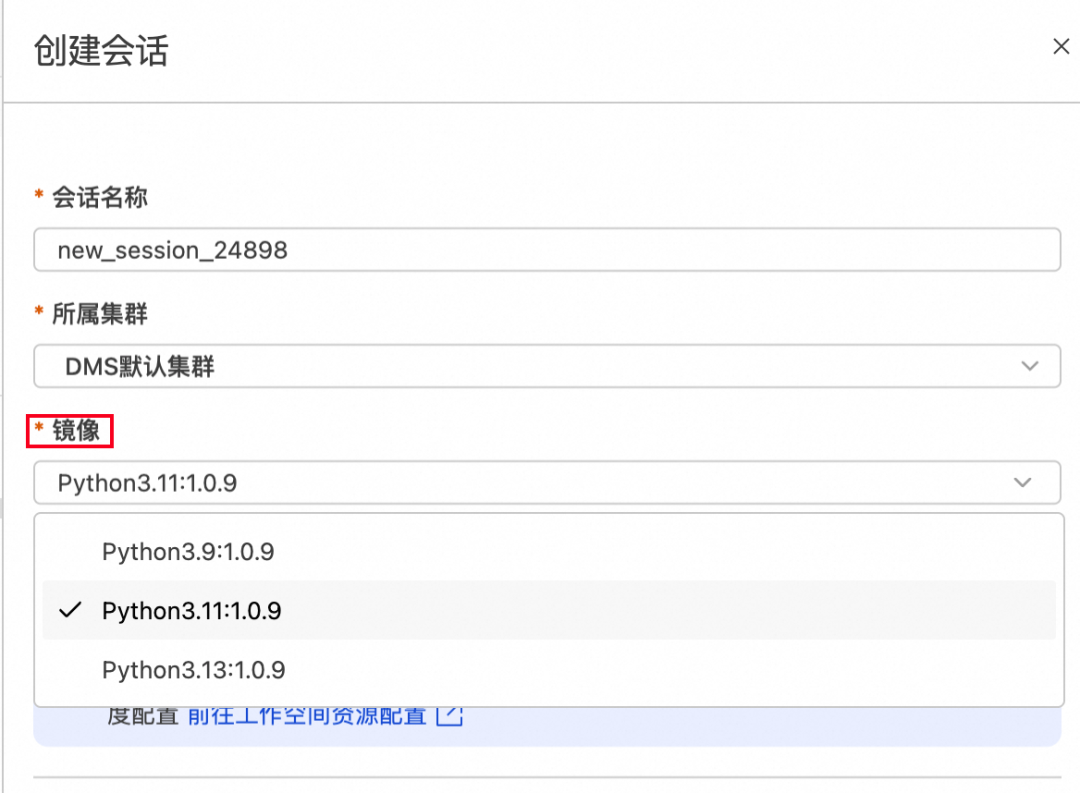
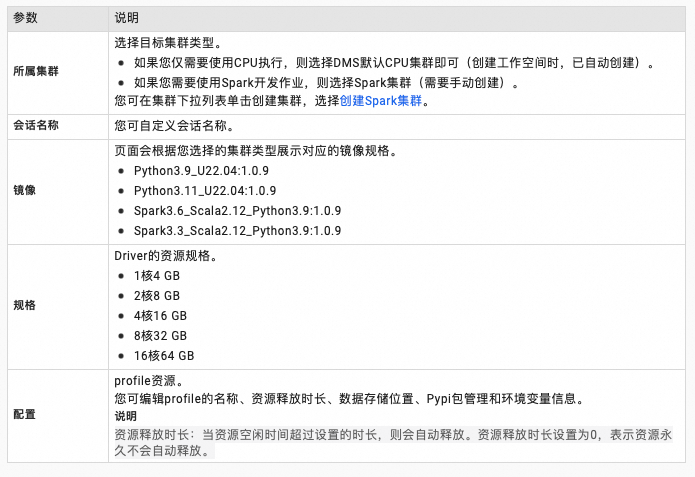
- Define Parameters:
- Select Python version:
- Edit Settings:
- Dependencies:
- Add to `requirements.txt`:
   pandas
   fastapi
   uvicorn
   nest-asyncio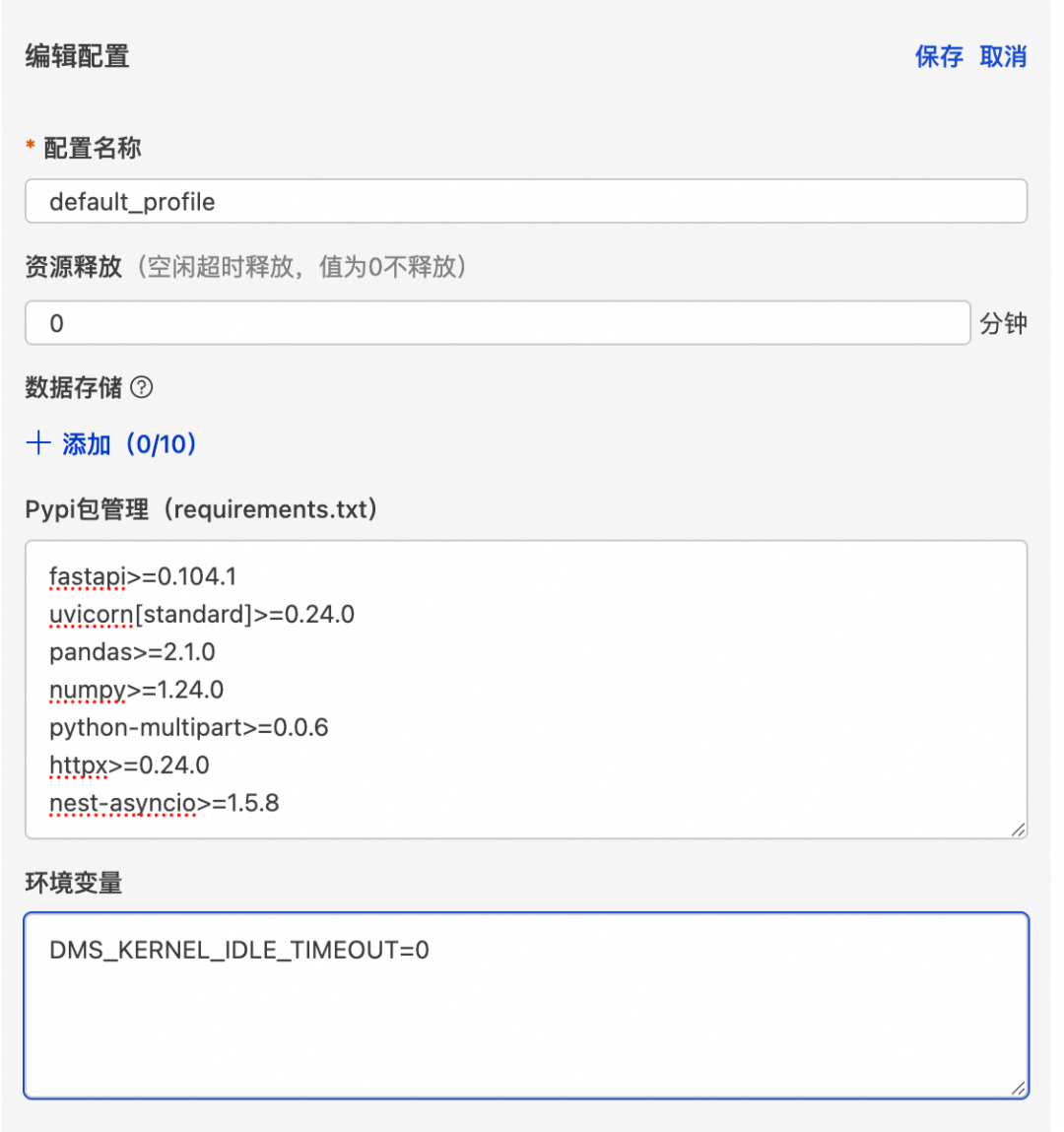
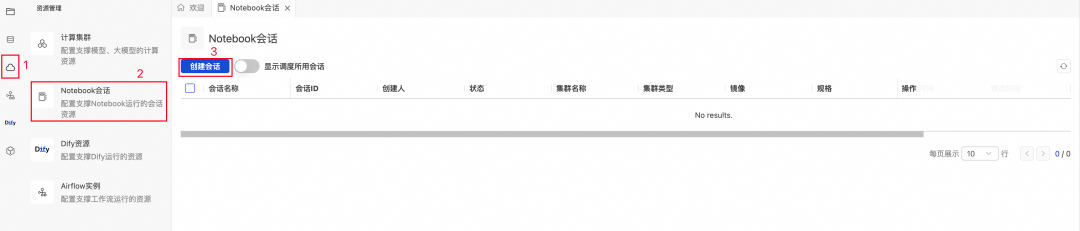
Environment Variables:
- `ALIBABA_CLOUD_ACCESS_KEY_ID`
- `ALIBABA_CLOUD_ACCESS_KEY_SECRET`
- Large model `API_KEY`
Configuration Tips:
- Install `fastapi`, `uvicorn`, `nest-asyncio`
- Resource release time = `0`
- Set `DMS_KERNEL_IDLE_TIMEOUT=0` → prevents kernel being killed
💡 Tip: Without setting `DMS_KERNEL_IDLE_TIMEOUT=0`, long-running APIs may fail due to idle kernel termination.
---
2. Write & Start FastAPI Service
- Create new notebook under default library
- Reference official FastAPI docs: fastapi.tiangolo.com
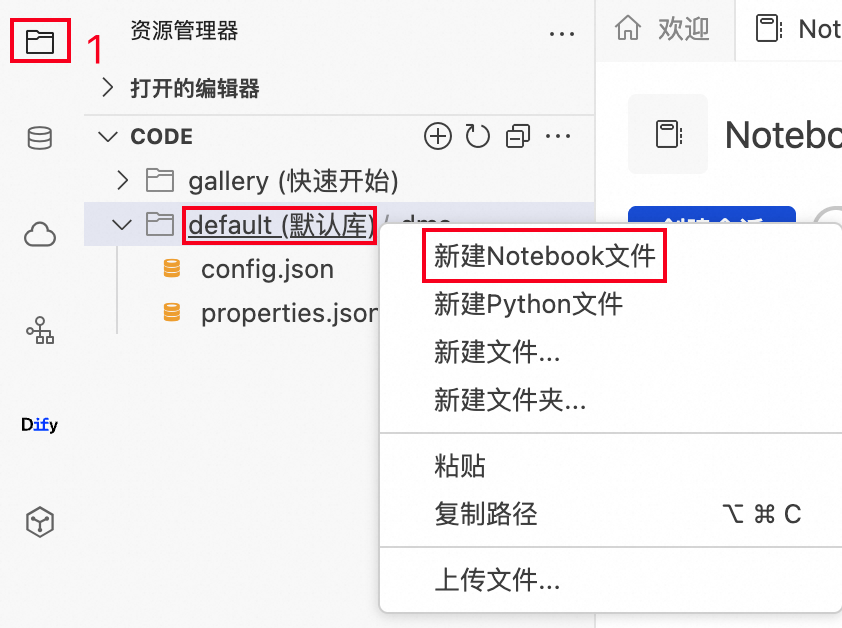
Example FastAPI template:
import os
from fastapi import FastAPI, HTTPException, Request
from fastapi.staticfiles import StaticFiles
import nest_asyncio

nest_asyncio.apply()
app = FastAPI(title="Service Name")

# Static files
static_dir = "static"
os.makedirs(static_dir, exist_ok=True)
app.mount("/static", StaticFiles(directory=static_dir), name="static")

@app.get("/")
async def root():
    return {"message": "Service is running"}
Refer to subsequent provided code for handling path/query/header/form/file uploads.
---
3. Service Deployment
- Run the notebook cell to start Uvicorn within the Jupyter async loop.
- Verify service start:
- !image
- !image
- Fetch Notebook session’s VPC IP:
- Example: `172.16.0.252`
!ifconfig---
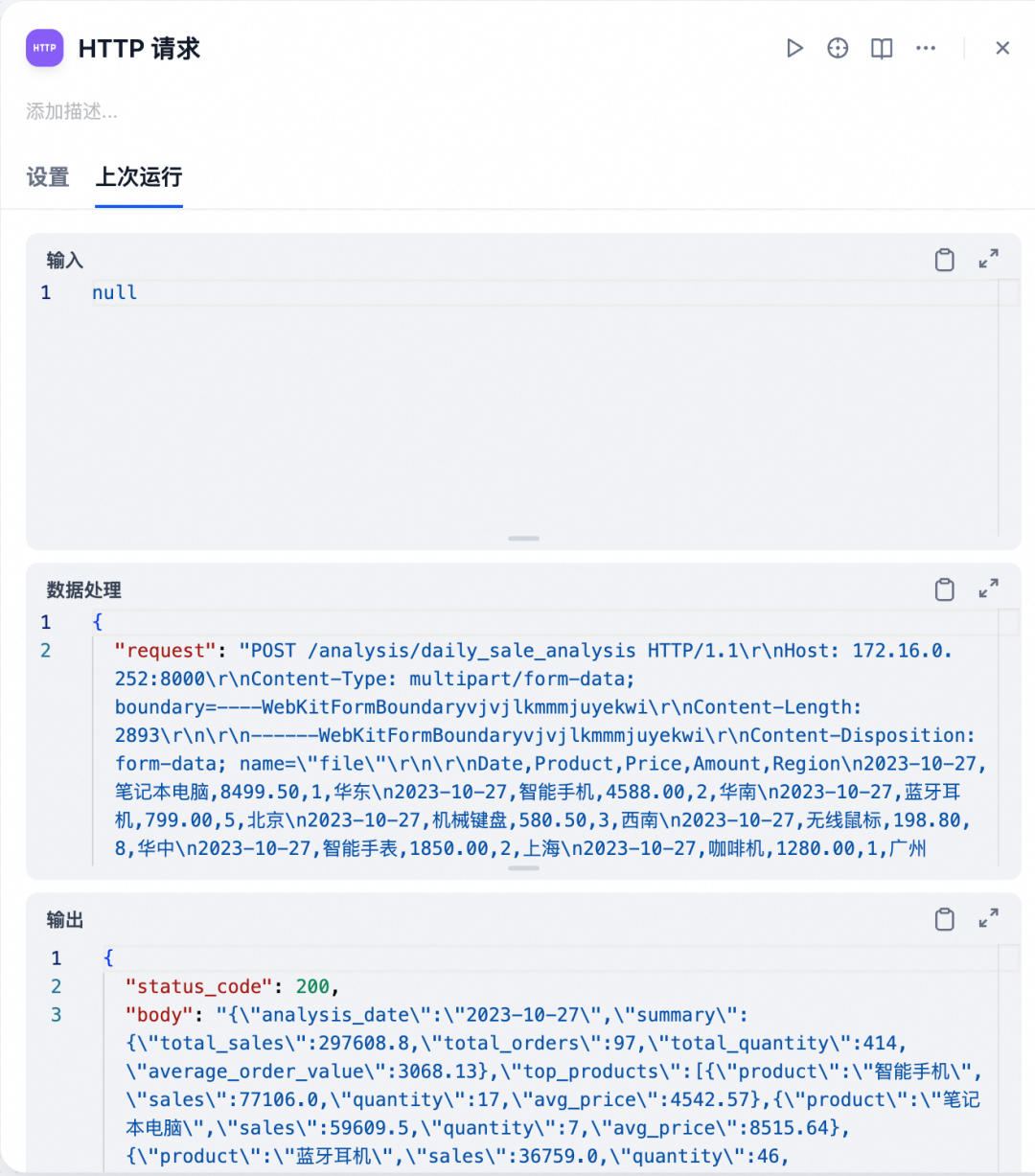
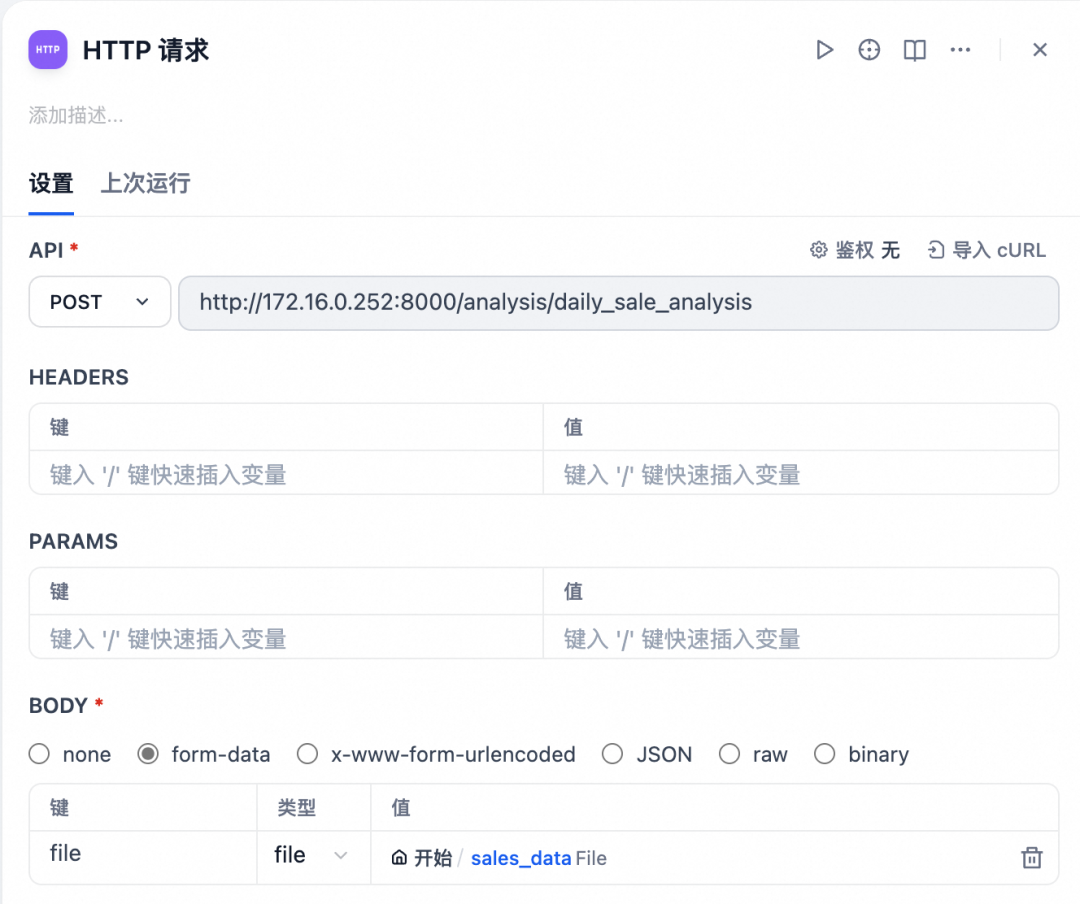
4. Integrate with Dify Workflow
- Add HTTP Request node with API URL `http://:/endpoint`
- Pass parameters in request body.
- Test:

---
Example: Daily Sales Analysis API
Provided code:
- File Processing: CSV validation, parsing with Pandas
- Metrics: Total Sales, Orders, Quantity, Average Order Value
- Analysis: Top products, regions, price ranges
- Insights: Sales performance commentary
Key endpoints:
- `/analysis/daily_sale_analysis` – Upload CSV → JSON analysis output
- `/upload-file` – Multi-part form file uploads
- `/status` – API health check
---
Using DMS Airflow for Scheduling
Steps:
- Create Airflow Instance
- Docs:
- Purchase Airflow Resources
- Create & Manage Instance
- Airflow Official Docs
- Write Airflow DAG – Example provided in code:
- Reads CSV file
- Uploads via `/files/upload`
- Triggers Dify workflow `/workflows/run`
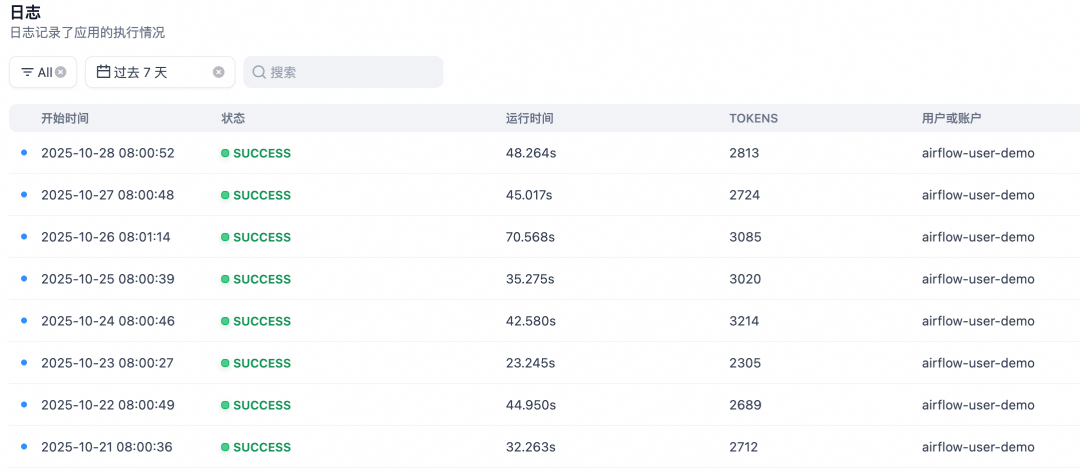
- Scheduled daily at 08:00
- View Scheduled Tasks:
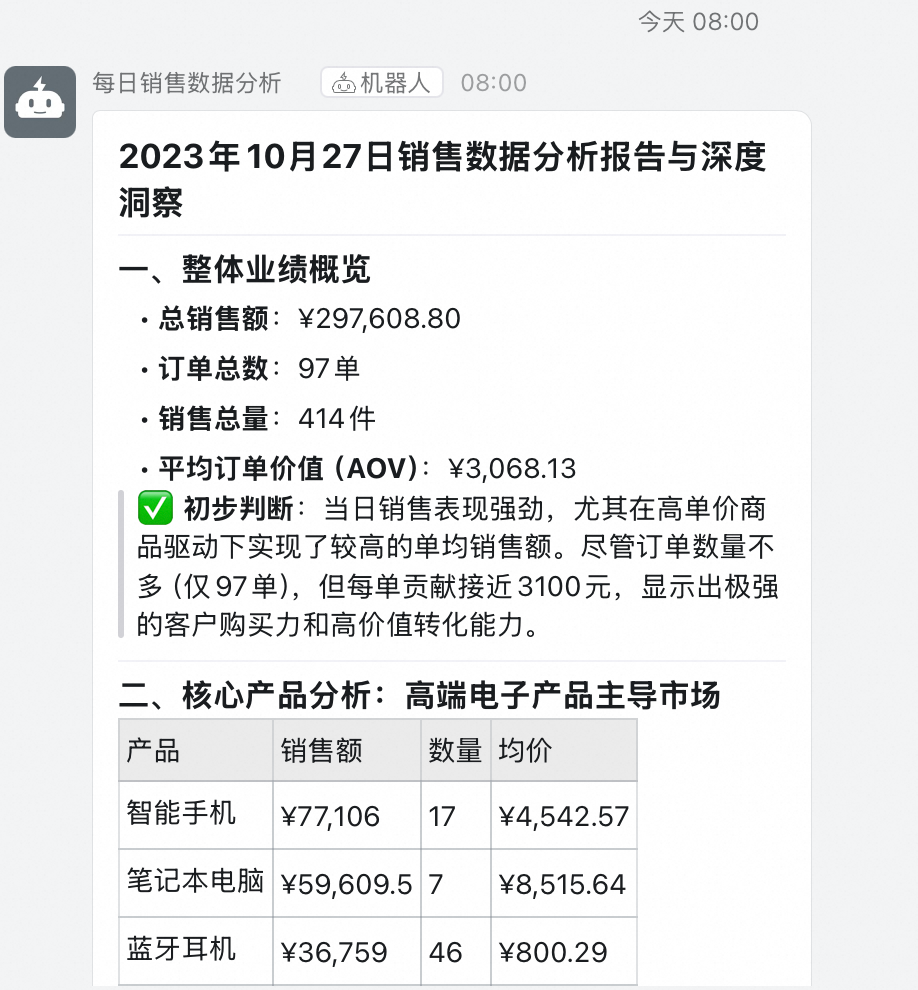
- Result:
- DingTalk bot pushes daily report

---
Summary & Best Practices
Architecture:
`Dify + DMS Notebook + DMS Airflow` enables:
- Agile low-code orchestration
- Flexible code execution
- Reliable scheduled automation
Core Concept:
An enterprise AI Agent should be extensible, schedulable, and maintainable — blending low-code development with robust engineering practices.
---
Join Community:
- DingTalk code: `96015019923` → Dify on DMS User Group
- Dify app link: Apply here
---
Tip for Content Creators:
For AI-driven analysis that needs cross-platform publishing, consider AiToEarn官网.
An open-source AI content monetization platform enabling creators to:
- Generate AI content
- Publish simultaneously to Douyin, Kwai, WeChat, Bilibili, Facebook, Instagram, LinkedIn, YouTube, Pinterest, X, etc.
- Analyze engagement and model rankings
Integrating this with Dify + DMS automation empowers both internal intelligence workflows and external content monetization.




