
When Uploading Is More Than Just /upload: How We Designed Large File Uploads

[](https://mp.weixin.qq.com/s?__biz=MzU2NjU3Nzg2Mg==&mid=2247546851&idx=1&sn=d872a35b3a3dfb9cddaadd80880157f1&scene=21#wechat_redirect)
## Business Background
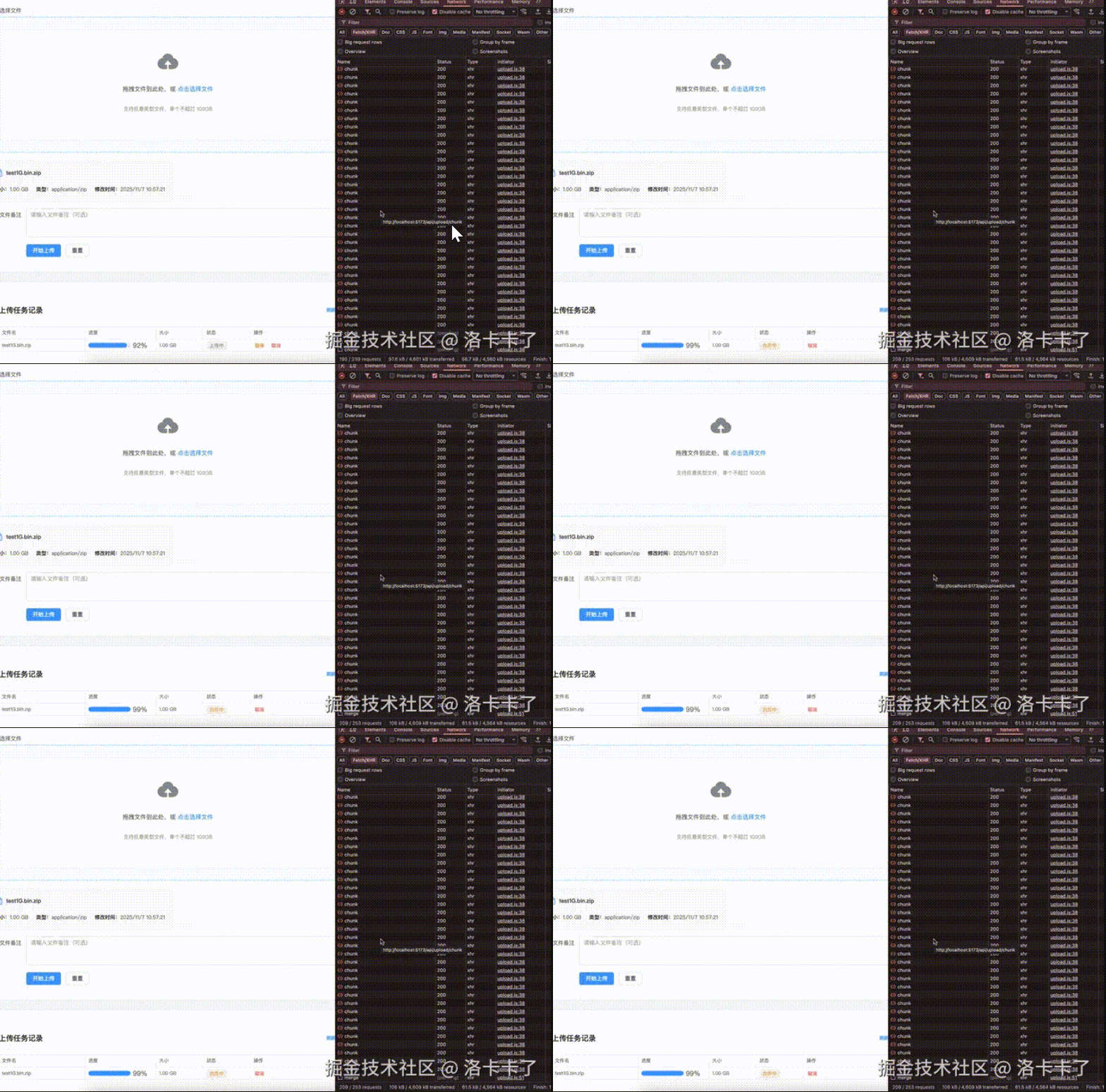
Before diving in, let’s first look at a demo we made for **large file uploads**.
The video demonstrates uploading a **1GB** compressed package with:
- **Chunked uploads**
- **Breakpoint resume**
- **Pause/Resume support**
The speed shown is intentionally **unoptimized** for clarity.
On the frontend, the **MD5 calculation** and **final file merge time** are preserved so you can clearly observe each stage of the process.
---
### **Typical SaaS Upload Flow**
In most SaaS systems:
1. **Frontend** — Performs chunked upload.
2. **Backend** — Merges chunks, stores in OSS/cloud path, returns URL.
✅ Works fine for small files and public internet deployments.
---
### **Private Deployment Scenario**
Our recent government/enterprise project requires uploading internal documents for AI processing:
**Key Differences:**
- **File Count**: Hundreds/thousands (Word, PDF, PPT, Markdown).
- **Size**: ZIP archives of **GBs**, sometimes **10–20GB**.
- **Environments**: LAN, intranet, offline.
- **Security**: Cannot use cloud OSS — sensitive data.
- **Audit**: Must log uploader, time, and storage path.
- **Post-processing**: Automatic unzip, parsing, vectorization, storage in Milvus/pgvector.
---
**Problems with Simple SaaS Method**:
- Upload interrupted → restart from zero.
- Clusters → chunks land on different machines → merge fails.
- Multiple users → overwriting/path conflicts.
- No records/audit.
- Compliance/security unmet.
**Therefore** — need a **redesigned upload logic**:
- Large file support
- Breakpoint resume
- Cluster-safe
- Intranet-friendly
- Controlled, auditable
- Integrated with AI workflows
---
## Why Many Projects Use a Single `/upload` Endpoint
In common SaaS/admin panels:
- **Backend**: Single `/upload` endpoint saves file, returns URL.
- **Frontend**: Often uploads directly to cloud (OSS/COS/Qiniu SDK).
- **Advantages**: Simple, stable cloud SDK, public internet, low security needs.
---
**However** — AI platforms need integrated parsing, indexing, embeddings.
Security, audit, and backend-controlled processing become critical.
---
## Common Frontend Large File Upload Patterns
Modern standard frontend strategy:
1. **Instant Upload Check** (MD5 match → skip upload)
2. **Chunked Upload** (split file into 5-10MB chunks)
3. **Resumable Upload** (track uploaded chunks)
4. **Concurrency Control** (upload multiple chunks simultaneously)
5. **Progress Display** (real-time percentage)
---
## Backend API Design Overview
We split upload into clear stages:
- `/upload/check` — Instant upload check
- `/upload/init` — Initialize task
- `/upload/chunk` — Upload chunk
- `/upload/merge` — Merge chunks
- `/upload/pause` — Pause task
- `/upload/cancel` — Cancel task
- `/upload/list` — Task list
Each API does **one job**, aiding clarity and scalability.
---
## API Details
### **1. `/upload/check` — Instant Upload Check**
POST /api/upload/check
{
"fileHash": "md5_abc123def456",
"fileName": "training-docs.zip",
"fileSize": 5342245120
}
Response:
{
"success": true,
"data": {
"exists": false
}
}
---

### **2. `/upload/init` — Initialize Task**
POST /api/upload/init
{
"fileHash": "md5_abc123def456",
"fileName": "training-docs.zip",
"totalChunks": 320,
"chunkSize": 5242880
}
Response:
{
"success": true,
"data": {
"uploadId": "uuid-here",
"uploadedChunks": []
}
}
---

### **3. `/upload/chunk` — Upload a Chunk**

Form-data example:

- `uploadId` — Task ID
- `chunkIndex` — 0
- `chunkSize` — 5242880
- `chunkHash` — md5
- `file` — binary chunk

Response:
{
"success": true,
"data": {
"uploadId": "uuid",
"chunkIndex": 0,
"chunkSize": 5242880
}
}
---

### **4. `/upload/merge` — Merge Chunks**
POST /api/upload/merge
{
"uploadId": "uuid",
"fileHash": "md5_abc123def456"
}
Response:
{
"success": true,
"message": "File merged successfully",
"data": {
"storagePath": "/data/uploads/training-docs.zip"
}
}
---

### **5. `/upload/pause` — Pause Task**
POST /api/upload/pause
{
"uploadId": "uuid"
}
Response:
{
"success": true,
"message": "Upload paused"
}
---

### **6. `/upload/cancel` — Cancel Task**
POST /api/upload/cancel
{
"uploadId": "uuid"
}
Response:
{
"success": true,
"message": "Upload cancelled"
}
---

### **7. `/upload/list` — List Tasks**

`GET /api/upload/list`

Response:
{
"success": true,
"data": [
{
"uploadId": "uuid",
"fileName": "training-docs.zip",
"status": "COMPLETED",
"uploadedChunks": 320,
"totalChunks": 320,
"uploader": "admin",
"createdAt": "2025-10-20 14:30:12"
}
]
}
---
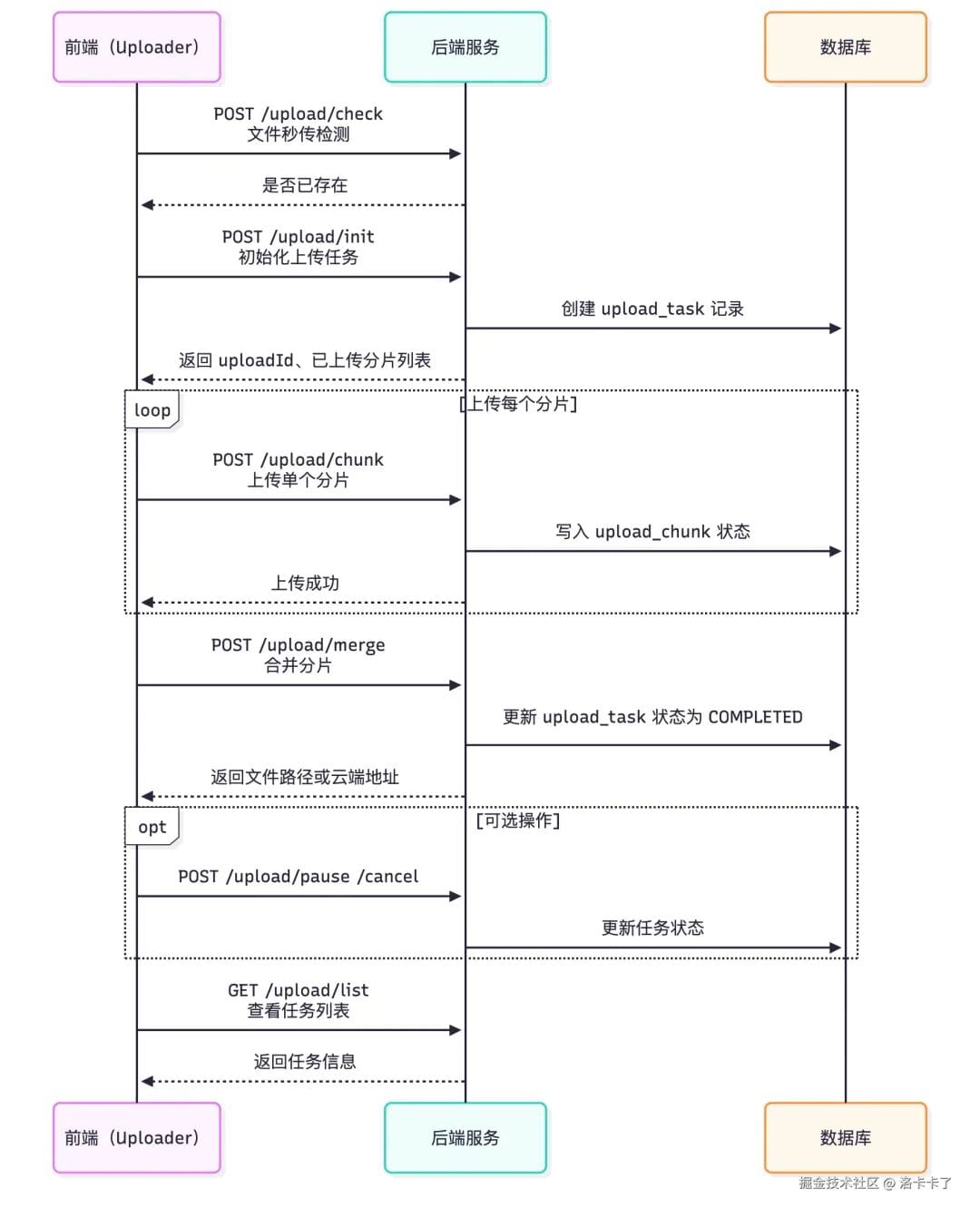
## Upload Sequence Summary
1. `/upload/check` — Instant check
2. `/upload/init` — Init task
3. `/upload/chunk` — Upload chunks
4. `/upload/merge` — Merge after completion
5. Optional: `/upload/pause`, `/upload/cancel`
6. Optional: `/upload/list`
---
## Database Design for Resumable, Cluster-safe Uploads
Three core tables:
- **`upload_task`** — Task metadata
- **`upload_chunk`** — Chunk metadata
- **`file_info`** — Completed file index
---
### **Table: `upload_task`**
Tracks overall progress, status, and storage type.
CREATE TABLE `upload_task` (
`id` bigint NOT NULL AUTO_INCREMENT,
`upload_id` varchar(64) NOT NULL,
...
PRIMARY KEY (`id`),
UNIQUE KEY `upload_id` (`upload_id`)
);
---

### **Table: `upload_chunk`**

Tracks per-chunk status for resuming and verification.
CREATE TABLE `upload_chunk` (
`id` bigint NOT NULL AUTO_INCREMENT,
`upload_id` varchar(64) NOT NULL,
...
PRIMARY KEY (`id`),
UNIQUE KEY `uniq_task_chunk` (`upload_id`,`chunk_index`)
);
---

### **Table: `file_info`**

Final merged file record.
CREATE TABLE `file_info` (
`id` bigint NOT NULL AUTO_INCREMENT,
`file_hash` varchar(64) NOT NULL,
...
UNIQUE KEY `file_hash` (`file_hash`)
);
---
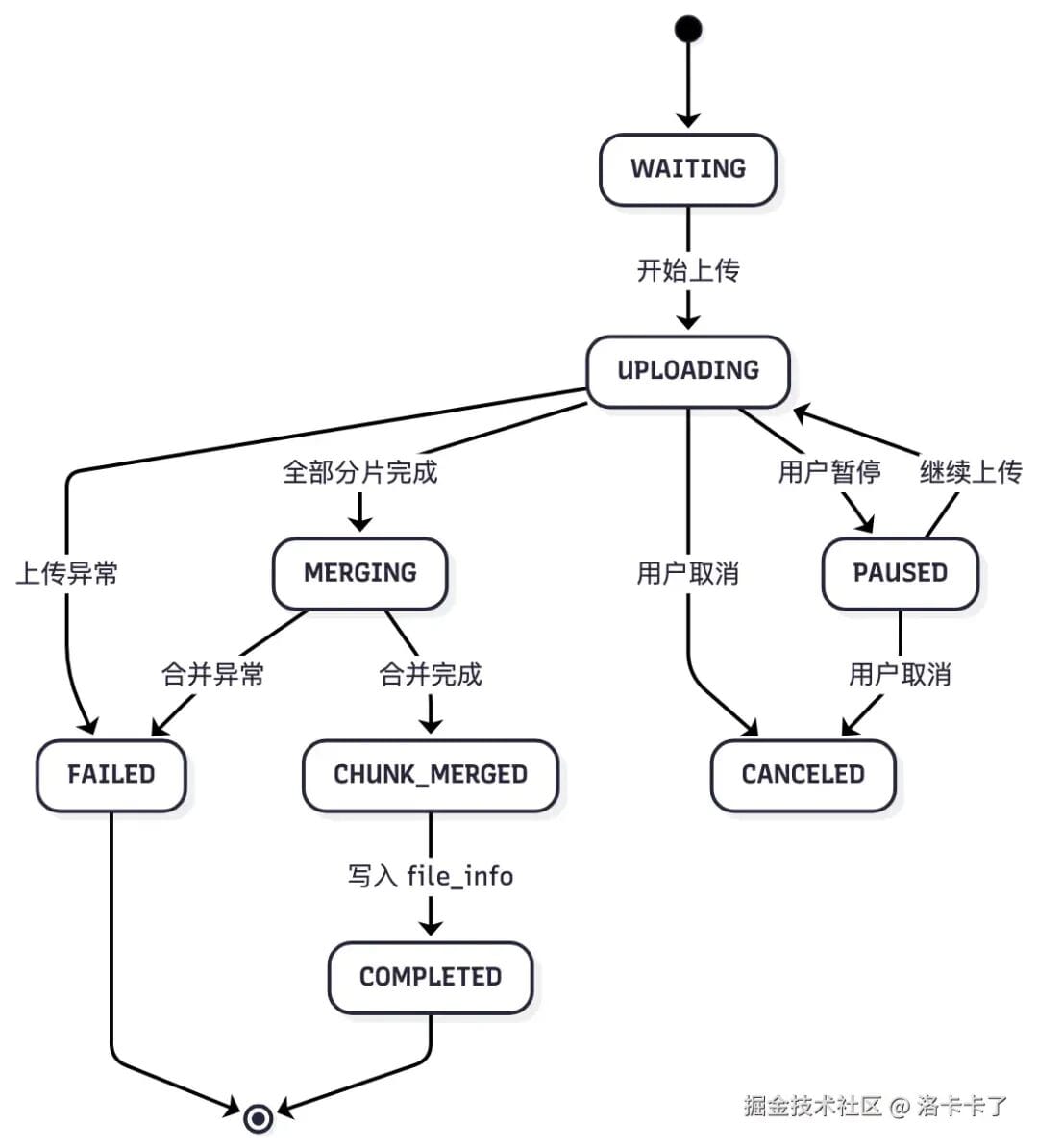
## Task Lifecycle States
- **WAITING** — Task created
- **UPLOADING** — Active
- **PAUSED** — User paused
- **CANCELED** — Abandoned
- **MERGING** — Combining chunks
- **CHUNK_MERGED** — Optional intermediate
- **COMPLETED** — Finished
- **FAILED** — Error
---
## Resume and Recovery Mechanism
When user returns:
1. MD5 check → see if in `file_info`
2. If not, check `upload_task`
3. Identify missing chunks from `upload_chunk`
4. Frontend uploads remaining chunks only
Cluster-safe because progress is **DB-based**, not machine-local.
---
## File Merge & Integrity Verification
**Local merge** — stream chunks in index order, recompute MD5, compare with original.
**Cloud merge** — use OSS/COS MinIO multipart merge APIs.
**Cluster** — share storage (NFS/NAS) or designate merge node.
---
## Asynchronous Processing
Merge + verify + move to OSS + parsing should run in background:
- Prevent frontend timeouts
- Reduce peak load
- Retry failed merges
- Trigger downstream AI workflows
---
## Final Thoughts
For private deployments:
- **Chunked + resumable + audited uploads** are essential.
- API separation aids clarity.
- DB stores all progress — cluster-safe.
- Integrates with AI/knowledge base workflows.

[Read the original article](https://juejin.cn/post/7571355989133099023)
[Open in WeChat](https://wechat2rss.bestblogs.dev/link-proxy/?k=59afdd82&r=1&u=https%3A%2F%2Fmp.weixin.qq.com%2Fs%3F__biz%3DMzU2NjU3Nzg2Mg%3D%3D%26mid%3D2247547153%26idx%3D1%26sn%3D71db09d5456a56578e4ad152587961ae)
---

